Mobile Work Order Software That Closes the Loop, From Floor to ERP
A fault spotted on the floor should not wait for a desktop to become a closed work order. Innovapptive mobile work order software turns a photo, voice note or prompt into a structured work order and follows it all the way to closure. Technicians raise, execute and close the job offline, supervisors run the shift from a live board, and every confirmation posts back to ERP. Closed-loop execution, from signal to action.
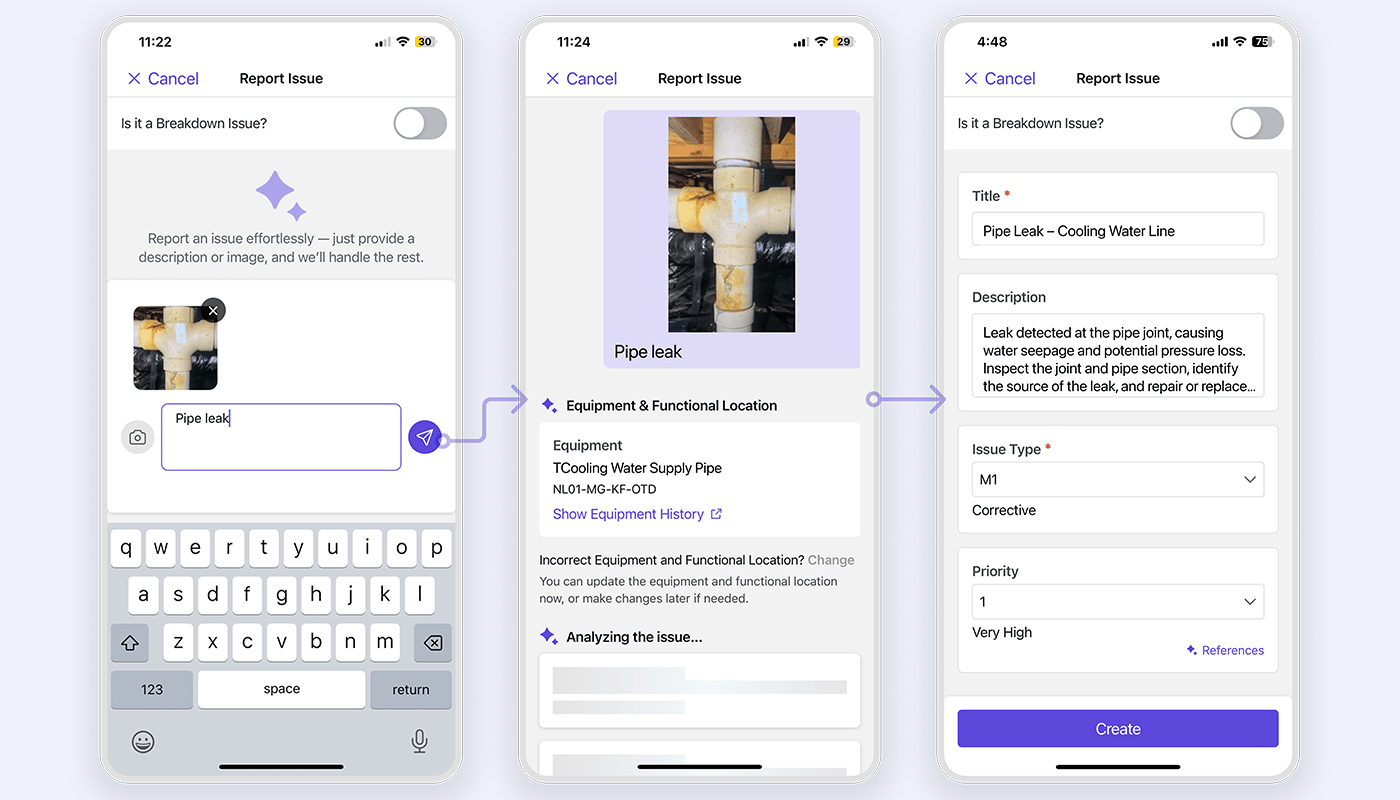
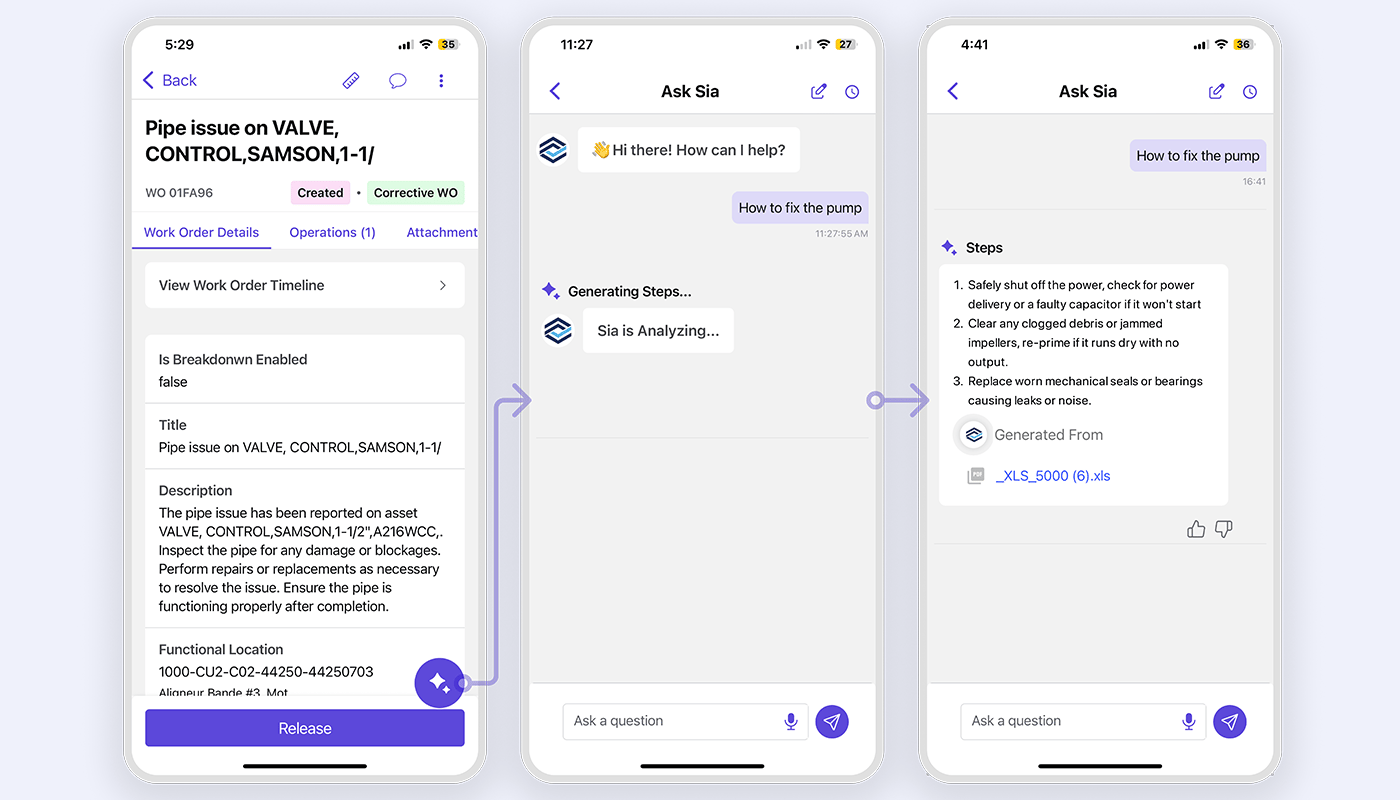
WorkSmartAI™ turns a photo, voice note or prompt into a structured work order in seconds
Full offline raise, execute and close, with bidirectional ERP sync in under five minutes
Every closure posts labor, parts and technical completion back to your ERP, lifting workforce productivity 15 to 20%
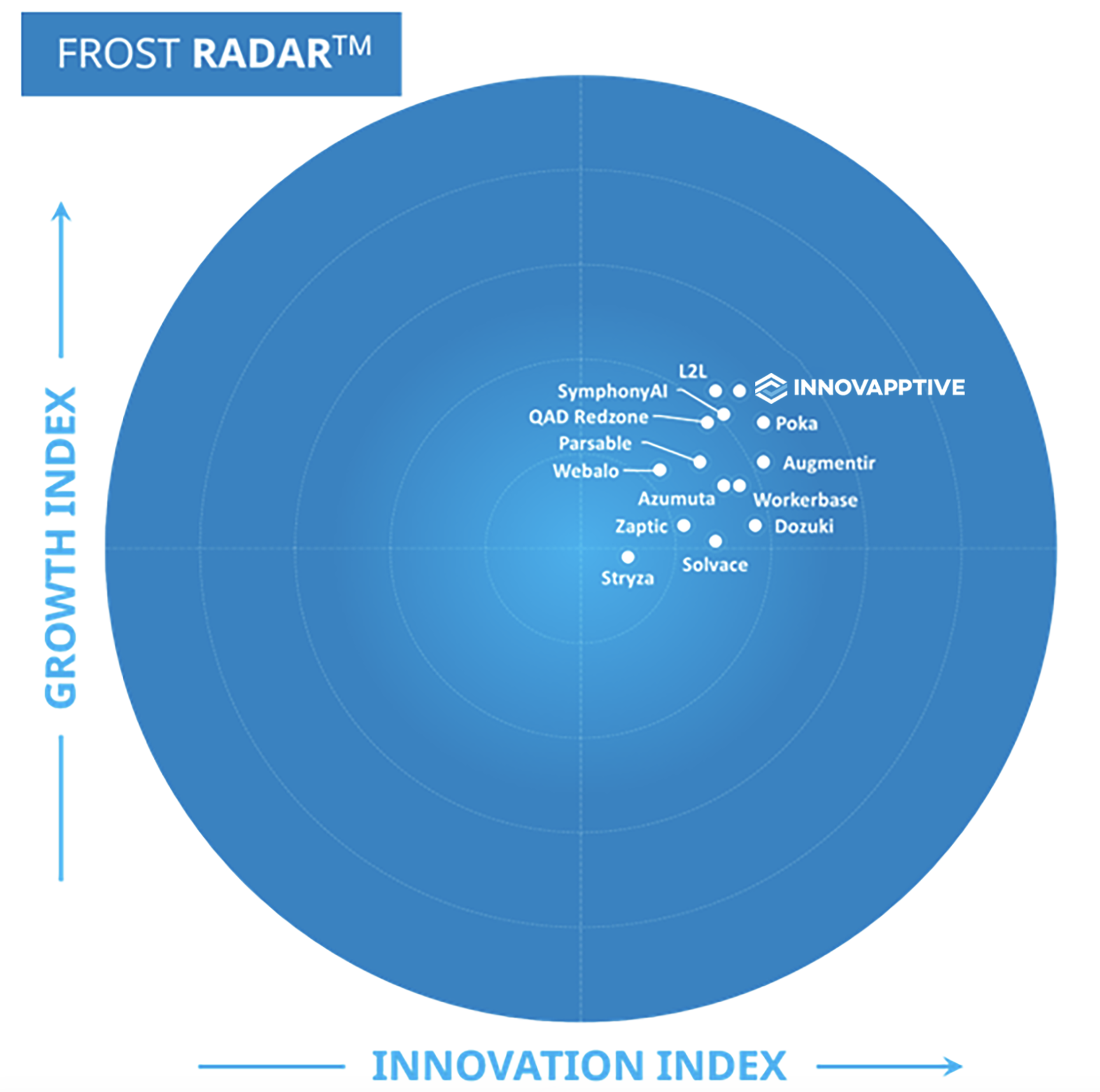
Frost & Sullivan 2026 Company of the Year • Frost Radar Leader, Connected Worker Platform • 50+ ERP & EHS connectors
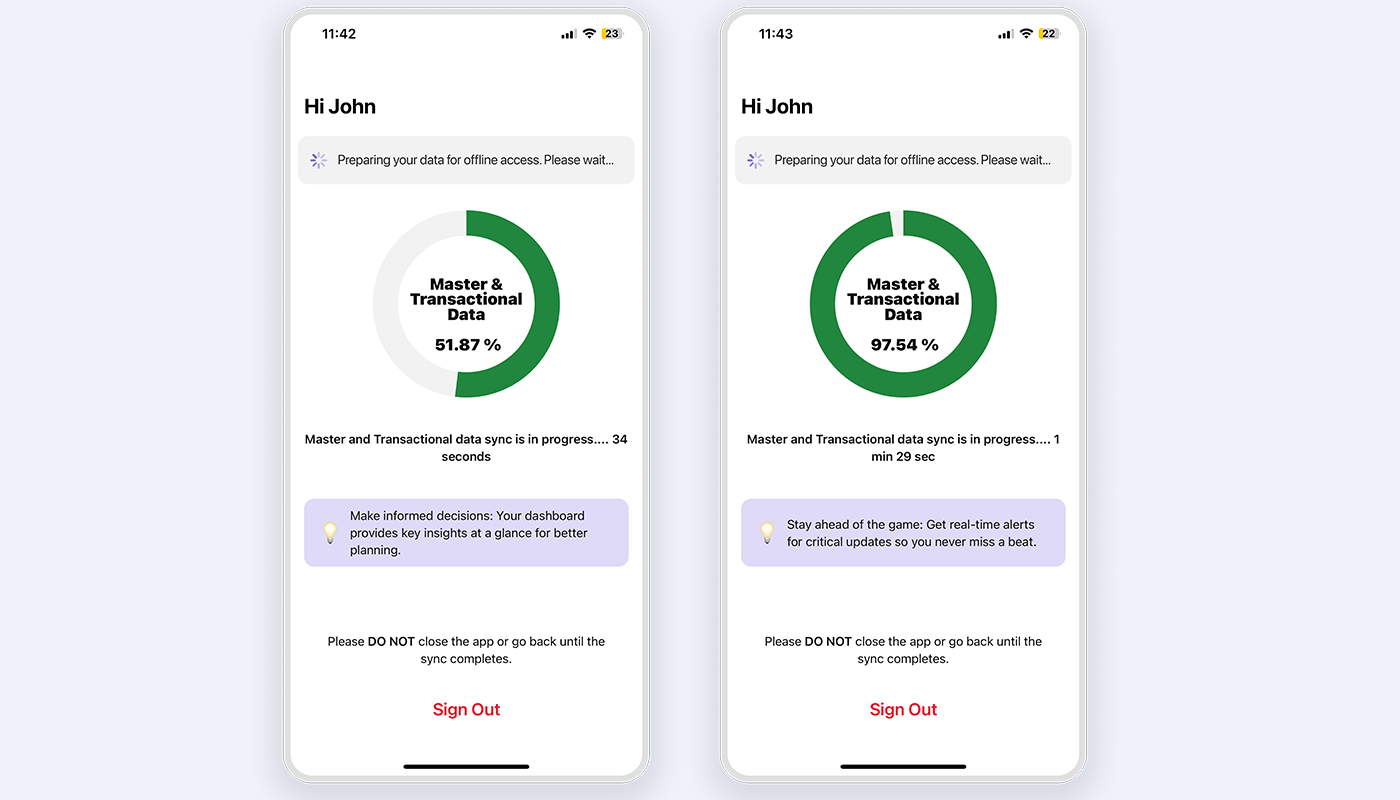
RapidSync™ · Offline
Full execution with zero connectivity
AI Work Identification
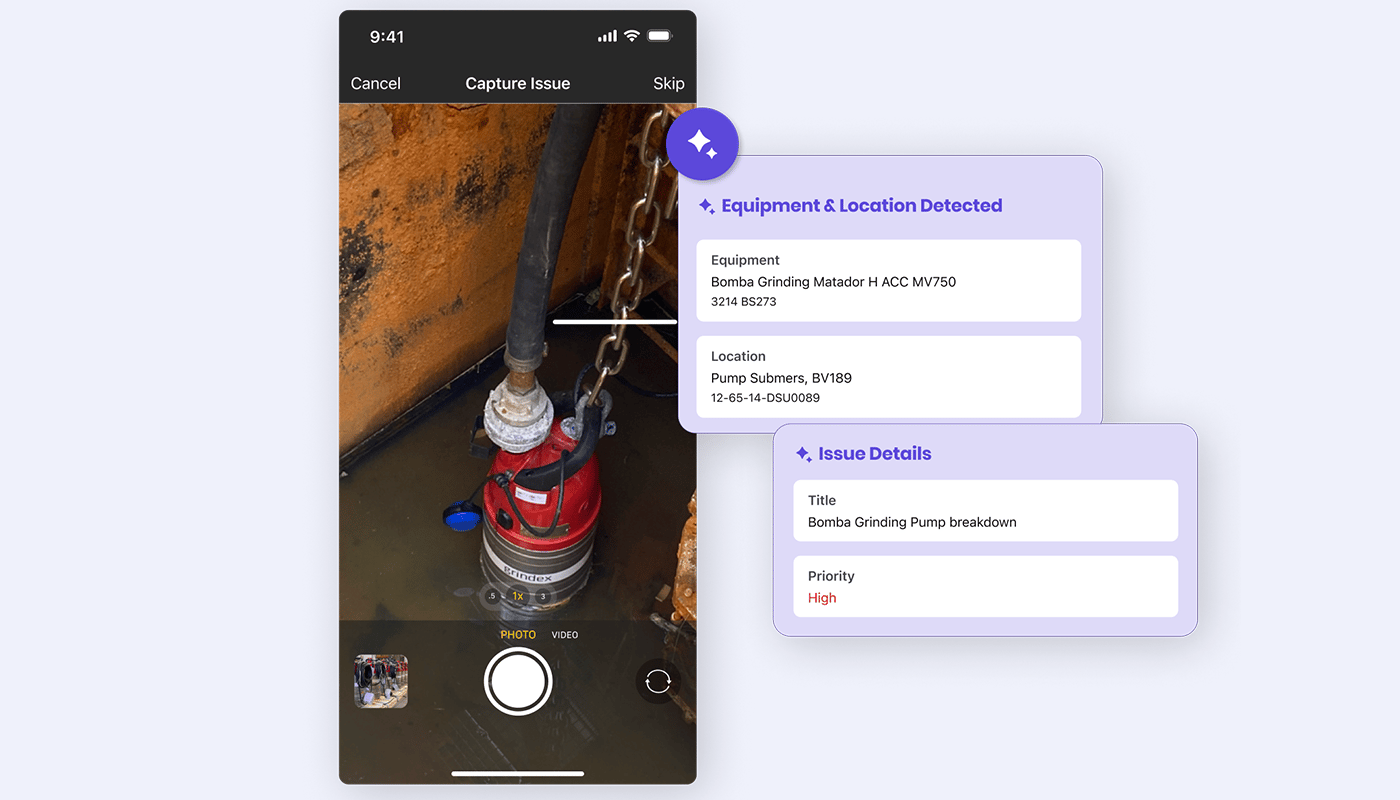
AI Fault Capture & Automatic Asset Identification
Trusted by industry leaders across 50+ countries
Product Capabilities
Work Order Management Software That Cuts Travel Time, Rework and Backlog Age
Innovapptive work order management software is built around the three people a work order passes through: the technician at the asset, the supervisor running the shift, and the planner scheduling the week. Purpose-built AI agents identify the work, package it with the parts and permits it needs, and guide execution at the tool, while every closure writes back to ERP and 50+ enterprise systems.
WorkSmartAI™ Work Order Creation
Capture the fault in seconds, with AI structuring the work order.
WorkSmartAI™ turns a photo, voice note or prompt into a structured notification or work order, detects the equipment and functional location, and asks the technician to confirm only when the match is ambiguous. The alternative is a fault that never gets logged, because reporting it by hand takes longer than the job itself. The system of record stays clean without the technician navigating the ERP.
Photo, voice and prompt capture
Equipment and functional location detection
Ambiguity confirmation before posting
Structured notification or work order in the system of record
The full work order travels with the technician, signal or not.
Technicians keep working even when the signal drops. RapidSync™ holds the full work order on the device, so a technician can open it, follow the instructions, capture readings and photos, log time, consume parts and close out with no connectivity. Repeated offline edits are held and reconciled, and an offline queue shows what is still pending to sync. In intrinsically safe zones and at remote sites, that is a requirement, not a feature.
See and manage every open work order from one live board.
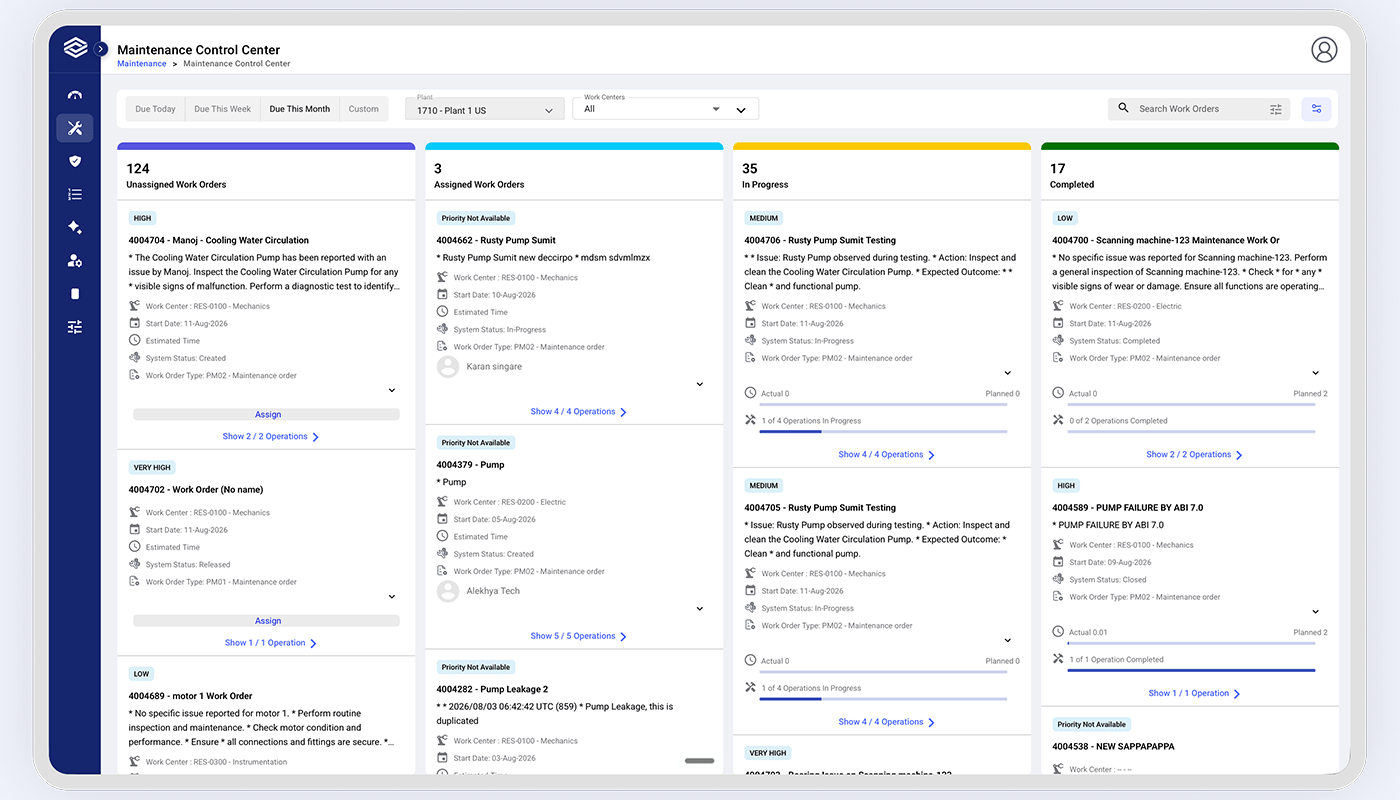
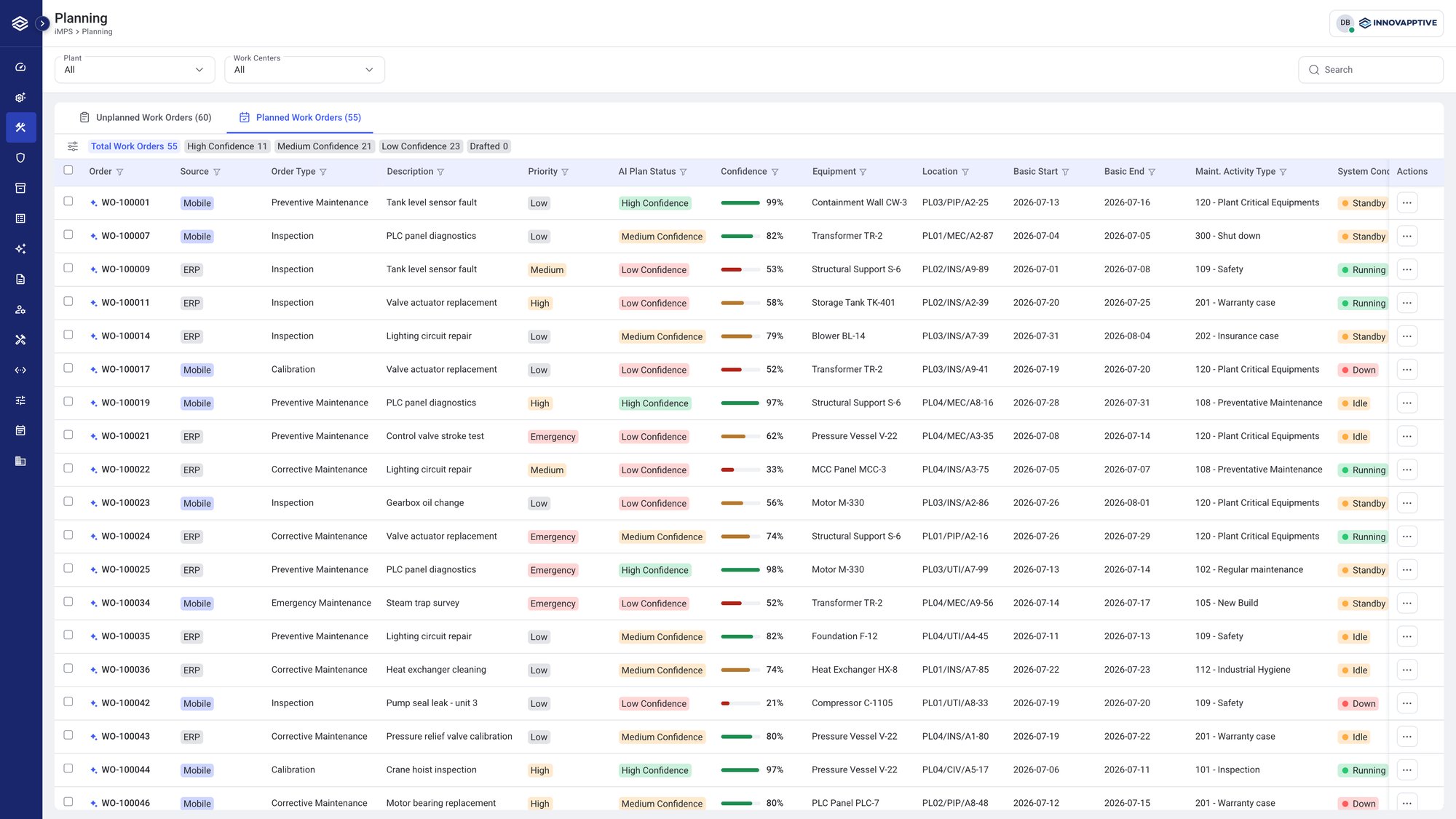
The Maintenance Control Center shows live work order status on a Kanban board. Supervisors assign and reassign from the floor, and see crew activity, technician efficiency and work order ageing in one view. A blocked job shows up the moment it blocks, not at the end of the shift.
Live Kanban work order board
Crew and technician activity in real time
Assign and reassign from the floor
Role-based mobile dashboards
90%schedule compliance on routine and safety checks
Scan the tag and see the failure history before the toolbox opens.
A QR scan opens Asset 360, the equipment-level view of runtime, downtime, maintenance frequency and failure trend, with the last readings and prior work orders against the same asset. When a job proves harder than the order described, the SIA assistant runs as a per-work-order chat with history. The result is faster diagnosis, not just faster access to information.
The permit, the isolation and the parts arrive with the work order.
Dependencies travel with the order instead of sitting in separate queues. A permit is raised from the order, risk-matrix scoring sets priority with auto-priority when the breakdown toggle is on, parts are reserved and consumed against the order, and work instructions sit at the step. The crew mobilizes to a job that is confirmed ready.
Permit raised from the work order
Isolation and PPE linked to execution
Parts reservation and consumption
Work instructions at the step
Jobs released only when permit, parts and isolation are confirmed
How Mobile Work Order Software Works, From First Signal to Closed Work Order
Six connected steps turn a field signal into a completed, structured work order, and turn every closure back into a cleaner system of record. AI identifies and prioritizes the work, the platform packages it before dispatch and supports the technician through execution offline, and every confirmation posts back to the ERP. The whole sequence runs offline and reconciles the moment the signal returns.
STEP 1
Report
AI-assisted
Capture the issue by photo, voice or prompt at the asset, or let it arrive from an operator round, an inspection, a checklist exception or a plant alarm. AI identifies the equipment and functional location and structures the problem automatically.
STEP 2
Notification to Work Order
Risk-Scored
The request or notification is scored on the risk matrix, where consequence and likelihood set priority. Auto-priority applies when the breakdown toggle is on, so critical work rises to the front of the queue.
STEP 3
Plan and Package
readiness gated
Parts are reserved, work instructions are attached at the step, and the permit requirement is identified. The order is held until material and permit readiness are confirmed, not assumed.
STEP 4
Assign and Dispatch
From the Floor
Work is assigned from the Kanban board, with the crew and lead technician set. Additional technicians join the operation on their own devices.
Step 5
Execute Offline
Mobile + Offline
Checklists, embedded instructions, readings, photos, timers and per-work-order chat all run with no connectivity. The record builds as the work happens, rather than being reconstructed afterwards.
Step 6
Confirm, Close and Write Back
written back to ERP
Labor is confirmed per technician, parts are consumed, findings recorded and technical completion posted. The full evidence set syncs back to ERP as a timestamped record.
One connected flow from issue identification to ERP closureAI supports the work before, during and after execution
Built to plug into the systems you already run.
Bi-directional, pre-built integrations across historians, APM, MES/SCADA, EHS, and ERP/CMMS — so your investments in OT and IT keep compounding.
How Innovapptive Work Order Software Compares With Manual, ERP and Generic Work Order Apps
Most plants still run work orders one of three ways: on paper and whiteboards, by keying into ERP screens at a desk, or through a generic work order app bolted on the side. The table below shows how each of those holds up against running execution on Innovapptive, from the moment a fault is reported to the moment closure posts back to the system of record.
Capability
Innovapptive Mobile Work Order Management
Manual (Paper and Spreadsheets)
ERP
Generic Work Order Apps and CMMS Tools
Work order creation
Photo, voice or prompt to a structured order in seconds, equipment detected
Handwritten, keyed in later by someone who was not there
Multiple transactions and master-data navigation before the order exists
Fast form entry, but the record is created outside the system of record
Breakdown work order
Executed and submitted in one screen
Radio call, then paperwork
A chain of separate transactions to execute and submit
Usually a generic high-priority flag
Offline execution
Bidirectional, under five minutes; closure posts confirmations and technical completion
Manual re-keying, hours to days later
Native, but only when the technician returns to a desk
Connector-dependent, often one-way
Work instructions
Embedded at the step, versioned, authored without code
Binder or laminated sheet
Attached document the technician must find
PDF attachment at best
Parts and reservations
Reserved, issued and consumed against the order
Separate transaction set
Inventory module exists but rarely reaches the ERP stock record
Permit and isolation
Permit raised from the order, isolation confirmed before release
Parallel permit register and radio confirmation
Separate system entirely
Rarely addressed
Supervisor visibility
Live Kanban with crew activity and ageing
Whiteboard and the morning meeting
Report available only after the shift
Dashboard exists, but rarely reflects field reality in real time
Audit evidence
Captured as work proceeds, timestamped and identity-bound
Reconstructed from files
Depends on what got keyed in
Digital records exist, evidence depth varies
Customer Story
How Indorama Ventures Turned Connected Execution Into $50M in Annual Maintenance Savings
Indorama Ventures connected frontline execution across rounds, maintenance and plant operations to improve how teams detect, act on and close operational issues.
58%Reduction in Maintenance backlog
38%Contractor Reduction
45% to 80%Improvement in Planned-to-corrective maintenance ratio
A Work Order Management System Built for Technicians, Supervisors, Planners and Plant Leadership
15-20%Improvement in productivity
The job arrives complete, and it closes on the device.
The order, instructions, parts, permit and asset history sit in one place, and the job is closed at the asset, offline, rather than reconstructed at a desk after the shift. Adoption stays high across the crew, including long-tenured technicians, because the app shows the job, not the system behind it.
Run the shift from the shop floor, not from a status report.
Assign and reassign from the Kanban board, watch crew activity and technician efficiency, and see work order ageing in one view. A blocked job surfaces the moment it blocks, so it is escalated before the shift ends, not after.
Plan against what the last job took, not what the last plan assumed.
Durations and labor come from real execution history, and findings captured at the job feed the next plan. Readiness is visible before scheduling, so work order software for maintenance stops committing crews to jobs that are not ready.
A complete work order record is the only reliable input to a reliability program.
Labor, overtime and contractor spend are visible against real work, downtime is attributable to specific work orders, and cost per asset is built from confirmations rather than allocations. Indorama Ventures unlocked $50M in annual maintenance savings on the platform.
Add plants and work order types without a code release.
No-code configuration controls field visibility, mandatory and read-only rules, auto-population and conditional logic, with no per-customer code branch to regression test. Identity runs on SAML 2.0, and master data ownership does not move. Extend your system of record, with no rip and replace.
See Innovapptive Mobile Work Order Software in Action
AI-Powered Mobile Work Order Management, Connected to Your ERP
A personalized walkthrough scoped to your work order types, your plants and your SAP, IBM Maximo or Oracle landscape, plus a value brief. Thirty minutes with a value engineer.
Recognized as a Leader in Connected Worker Platforms
Frost & Sullivan named Innovapptive 2026 Company of the Year and a Leader in its Frost Radar™ for Augmented Connected Worker, End-to-End Platforms, based on platform breadth, AI execution capability, and measurable customer impact.
Frost & Sullivan Best Practices
2026 Company of the Year, Global Connected Worker Platforms
Frost & Sullivan recognized Innovapptive for closing the frontline execution gap with its end-to-end connected worker platform.
“Innovapptive has taken an innovative approach to AI, developing one of the most extensive AI agent portfolios available. These agents assist manufacturers with their maintenance, operations, reliability, safety, and analytics needs.”
Juan Francisco Dell'Era · Senior Research Analyst, Industrial Automation & Software, Frost & Sullivan
Resources
Must-Have Resources for Maintenance and Reliability Leaders
Featured Whitepaper
Industrial AI in Action: The Rise of the Frontline Execution Platform
How asset-heavy operators close the gap between AI insight and frontline action, turning signals from rounds, inspections and alarms into executed, ERP-closed work.
Frequently Asked Questions About Work Order Software
What is work order software, and what should it do inside a plant?
Work order software plans, dispatches, executes and closes maintenance work against a specific asset, and turns each completed job into a permanent record in the system of record. In an asset-heavy plant it has to clear a higher bar than a general maintenance app: the closure must post back to SAP, IBM Maximo or Oracle; the full job must run when the network drops; and labor must be captured accurately, per technician. Meet those three and the work order becomes reliable cost and reliability data, not just a status.
What is the difference between a work order and a work request or notification?
A work request is the raw report that something needs attention. A notification is the system-of-record object, in SAP Plant Maintenance for example, that captures that report against a piece of equipment. A work order is the approved, resourced and scheduled job that follows. Innovapptive lets the frontline raise the request or notification from a photo, voice note or prompt, then carries the resulting work order, with its parts, permit and instructions, through to a confirmed closure.
Does mobile work order software replace our CMMS or EAM?
No. Innovapptive is an execution layer that runs on top of your system of record and writes back to it. Your CMMS or EAM remains the authority for asset, material and maintenance-plan data; the mobile layer is what the crew uses at the asset to execute and close the work. It is deployed alongside SAP, IBM Maximo or Oracle EAM, not in place of them, and ownership of master data does not move. Extend the system of record, with no rip and replace.
How much plant data can a technician carry offline, and what happens to a work order edited with no signal?
The technicians carry the plant data each job needs on the device and can raise, execute and close a full work order with no connectivity. Edits made offline, including repeated edits to the same order, are held and reconciled rather than lost, and an offline queue shows what is still pending to sync. Everything reconciles automatically on reconnection. That durability is why offline execution is a hard requirement at remote sites and in intrinsically safe zones, not an optional extra.
Does the work order carry the parts, the permit and the instructions, or just the task?
It carries all of them. Parts are reserved and consumed against the order, a permit is raised from the order and the isolation state is confirmed before the work is released, and work instructions sit at the step rather than in a separate attachment. Treating dependencies as part of the order, not as parallel queues, is what lets a crew mobilize to a job that is confirmed ready, instead of discovering a missing permit or part at the asset.
How does the system handle a breakdown or emergency work order?
With the breakdown toggle on, the risk matrix applies auto-priority, so the emergency moves to the front of the queue without a manual re-rank. The order can be created on the spot, which starts the timer and allows parts to be consumed immediately, and it is executed and submitted from a single screen rather than through a chain of separate ERP transactions. The record is captured as the work happens, so the emergency is not reconstructed from memory once the plant is back up.
What is job order management software, and is it the same thing?
Job order management software is an industry synonym for work order software, common in manufacturing and shop-floor settings where the unit of work is called a job order. The object and the lifecycle are identical: raise, approve, resource, execute and close, with the completed record posted back to the system of record. The terminology varies by plant and by ERP; the process it governs does not.
How long does a mobile work order rollout take across multiple plants, and does plant two cost the same as plant one?
Rollout runs on no-code configuration, so adding a work order type or a new plant does not require a code branch to build and regression test. Plant two inherits the configuration proven at plant one rather than starting from zero, which is what keeps a multi-plant program from becoming a series of one-off projects. This matters most to the IT stakeholder who has seen a mobility rollout stall at pilot, because it removes the custom-code drag that usually causes it.
How does work order software improve wrench time and schedule compliance?
Wrench time rises because the order, the part, the permit and the asset history travel with the technician, removing the trips that consume a shift, and because time is captured automatically against the order rather than estimated at the end of shift. Schedule compliance rises because planners commit crews to work that is confirmed ready, not assumed ready. Customers typically report a 15 to 20 percent improvement in workforce productivity as these two move together.
Is there a free work order software option, and what does it not do at plant scale?
Free work order tools cover the basics: logging a request, assigning it and marking it done, usually for a small single-site team. At multi-plant, asset-heavy scale they fall short on the four things that decide the outcome: executing a full job offline, writing closure back to SAP, IBM Maximo or Oracle, capturing labor per technician across a crew, and carrying the permit and isolation as part of the order. That is the line between a free tool and plant-grade execution.
Get Started
Close Every Work Order in Your System of Record
A short walkthrough of AI work order creation, offline execution and ERP write-back on your SAP, IBM Maximo or Oracle environment, plus a mobile work order solution brief for your plants.