AI-Powered Work Instructions Software: Embedded in the Job, Not Filed Away From It
Record the job once, and AI turns it into a structured procedure, then embeds it in the work order, operation, or round on its own. No searching, no manual linking, no separate library to keep in sync.
Embedded, Not Attached: Zero Lookup, Zero Manual Linking, on Work Orders, Operations, Round Plans and Round Tasks
Fix One Step, Not the Whole Procedure: Up to 90% Less Rework Per Correction
From Video or Document to Published Procedure: Creation Time Down 90%+
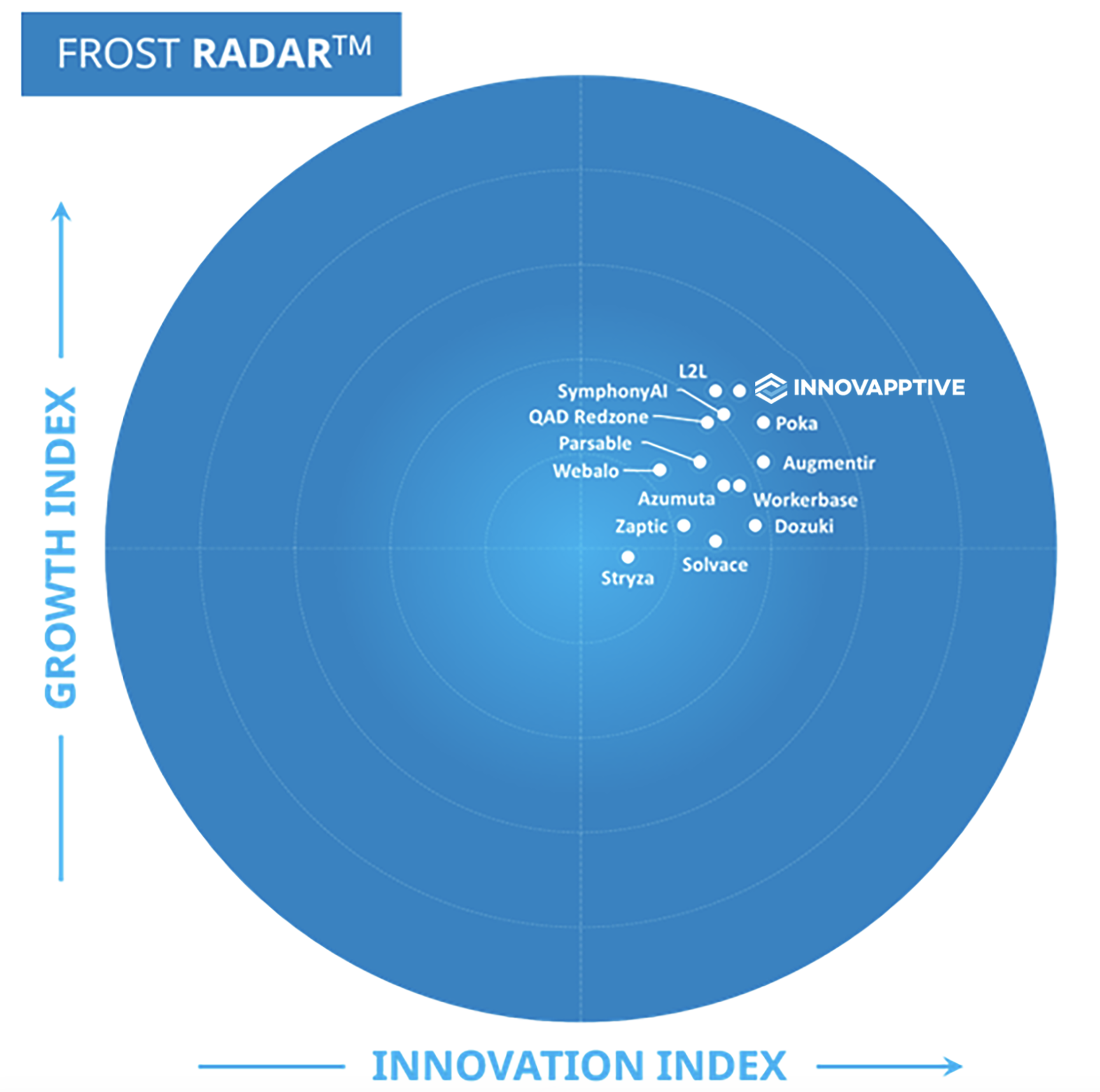
Frost & Sullivan 2026 Company of the Year • Frost Radar Leader, Connected Worker Platform • 50+ ERP & EHS connectors
RapidSync™ · Offline
Full execution with zero connectivity
AI Authoring
. Contextual AI Editing Prompts
Trusted by global process manufacturers
Core Capabilities
Digital Work Instructions Software That Covers Procedures From First Draft to Last Correction
Innovapptive Digital Work Instructions is built around four people: the subject matter expert who knows the job, the reviewer who approves it, the supervisor who plans it and the technician who performs it. AI drafts the procedure, your asset hierarchy delivers it, and field feedback keeps it accurate.
AI Authoring From Video
Record the job. Publish the procedure in minutes, not days.
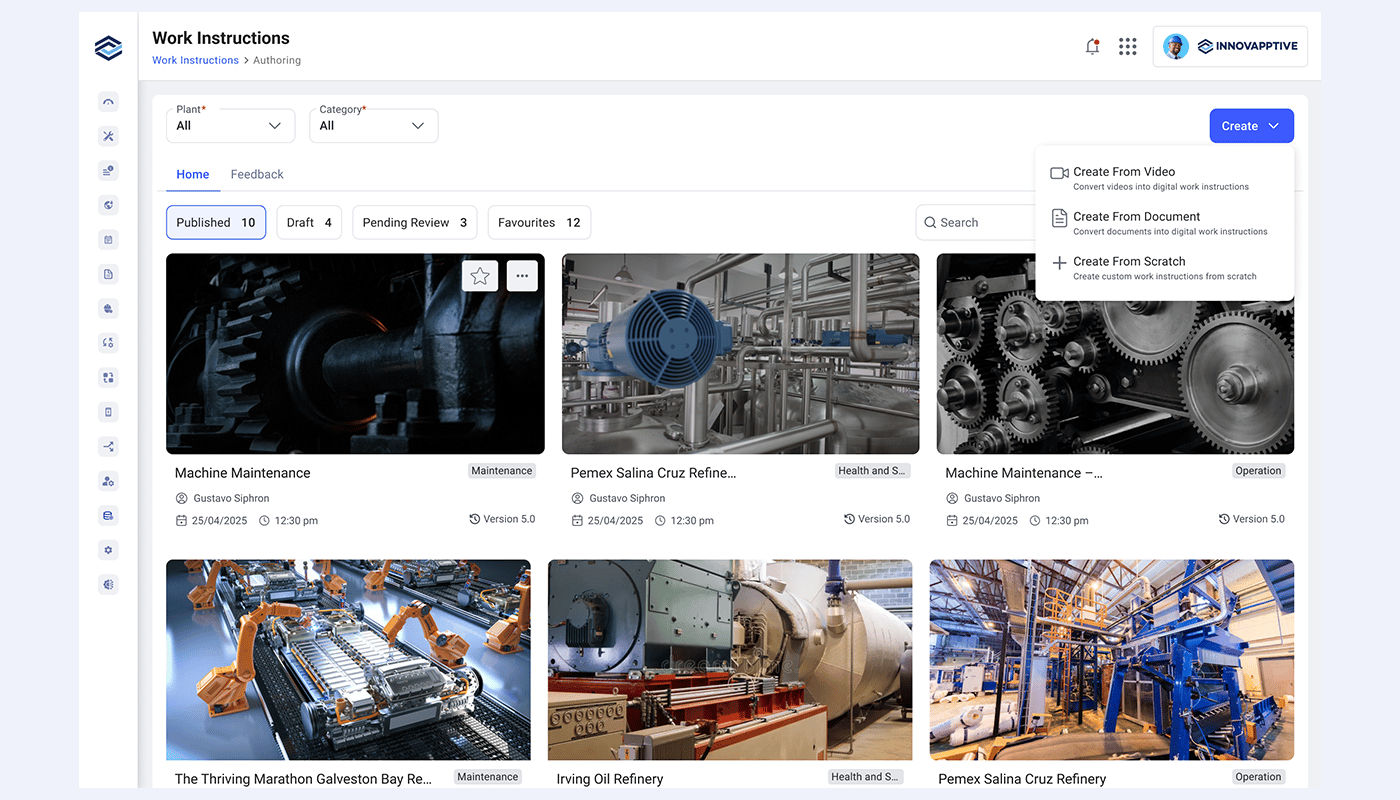
A subject matter expert records the job on video. AI reads the transcript, splits it into steps, and drafts a title, a description and an image for each one. The draft publishes straight into the work order, operation, or round it belongs to, not into a separate library someone still has to link up later.
Already have an SOP? AI turns it into a guided procedure instantly.
Upload an existing SOP, manual or PDF, and AI converts it into the same structured step format, no rebuilding from scratch. Steps, images and required tools carry over automatically, ready to review and publish.
Skip the search. The procedure finds the job on its own.
Procedures are authored as structured digital steps and embedded directly into the work order, operation, round plan and task, not attached as a PDF and not just synced from a separate library. The same instruction embeds against equipment and functional locations, so guidance travels with the asset as well as with the job. Every qualifying job picks up the matching procedure on its own.
Embedded in the Work Order, Operation or Round
Bound to Equipment & Functional Locations
Structured Steps, Not PDF Attachments
No Manual Lookup or Linking
Zero manual linking on qualifying work orders, operations or rounds
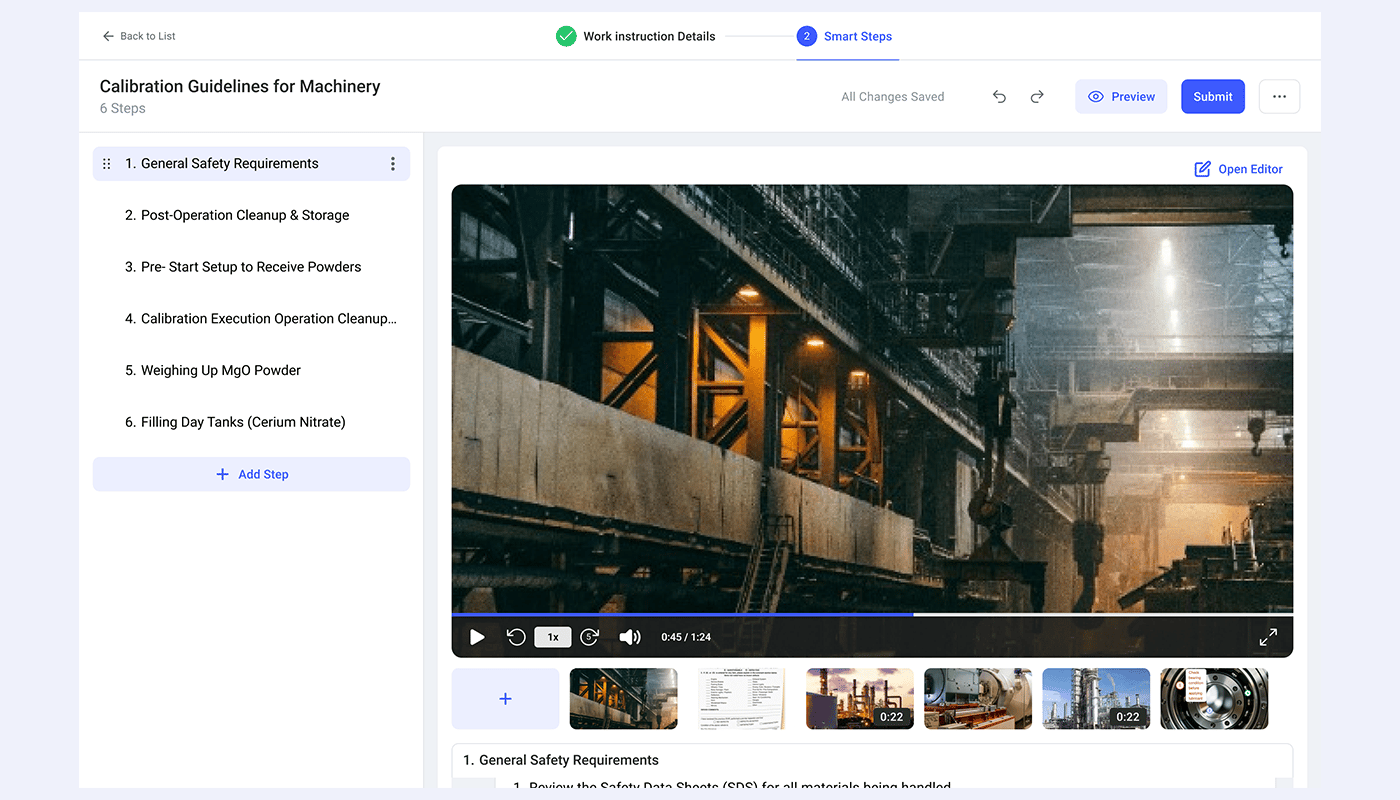
Images and video are cropped, rotated, trimmed and annotated inside the platform. Arrows and callouts point at the valve, the bolt or the gauge the step actually refers to. Nothing is exported to a separate editor, and no procedure waits on someone else to produce the visual it needs.
Image Cropping & Rotation
Image Cropping & Rotation
Arrows, Callouts & Annotations
No External Editing Tools
2 to 3 hourssaved per procedure with 40% higher task accuracy
Version history carries timestamps, author attribution and change descriptions. Versions are compared to see exactly what moved between revisions, and rolled back in one click when an edit turns out to be wrong. Archive and restore keeps retired procedures available for audit without cluttering the library.
Full History With Author Attribution
Version Comparison
One-Click Rollback
Archive & Restore
100% of published versions traceable to author, date and change
How Digital Work Instructions Software Cuts Procedure Creation Time by 90%
The guide lists all three authoring modes, how assignment is configured against work order types, assets and functional locations, the step-level feedback and review workflow.
How Digital Work Instructions Software Works: Six Steps From Recording to Repeatable Standard
Digital work instructions software closes a loop paper cannot: capture the method once, deliver it to the job automatically, and correct it from the field. A recorded job becomes a published, version-controlled procedure that arrives already attached to the next qualifying work order.
STEP 1
Capture
Video or Document
A subject matter expert records the job, or uploads the SOP, manual or PDF that already exists. AI extracts the tasks and steps and drafts titles, descriptions and images.
STEP 2
Author
Edit & Sequence
The author edits the draft, inserts safety warnings, required tools and checklists, sequences steps by drag and drop, and finishes the visuals in the media editor.
STEP 3
Review
Approve & Publish
A reviewer or quality manager approves the procedure. Publication records the version, the author, the timestamp and the change description.
STEP 4
Assign
Work Order Type & Asset
Tagged to a task list. Configured against a work order type, operation, or round plan, for a specific asset or location.
STEP 5
Execute
Post Sign-On · Execution Ready
Every qualifying work order attaches the procedure automatically. The technician opens the steps inside the work order or round task, online or offline.
STEP 6
Correct
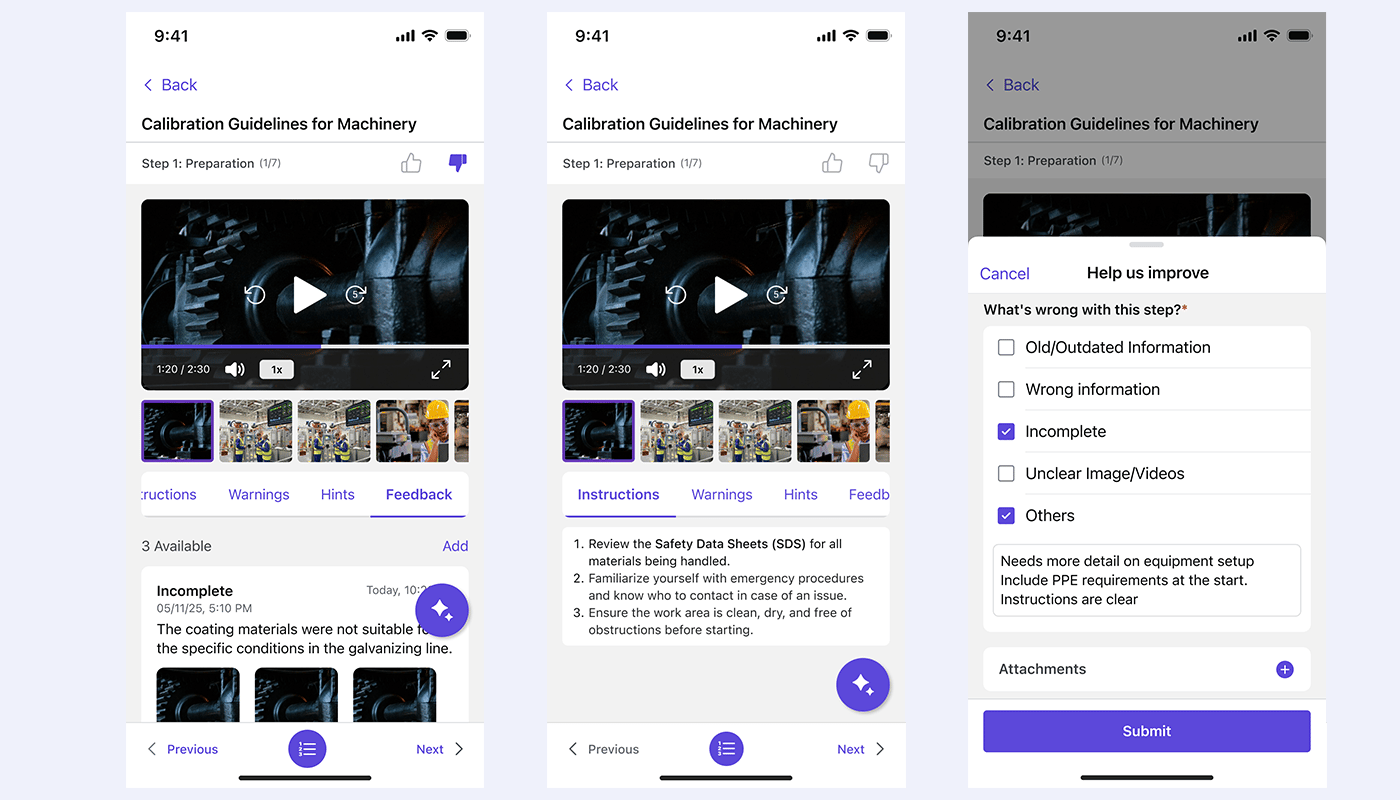
Step-Level Feedback
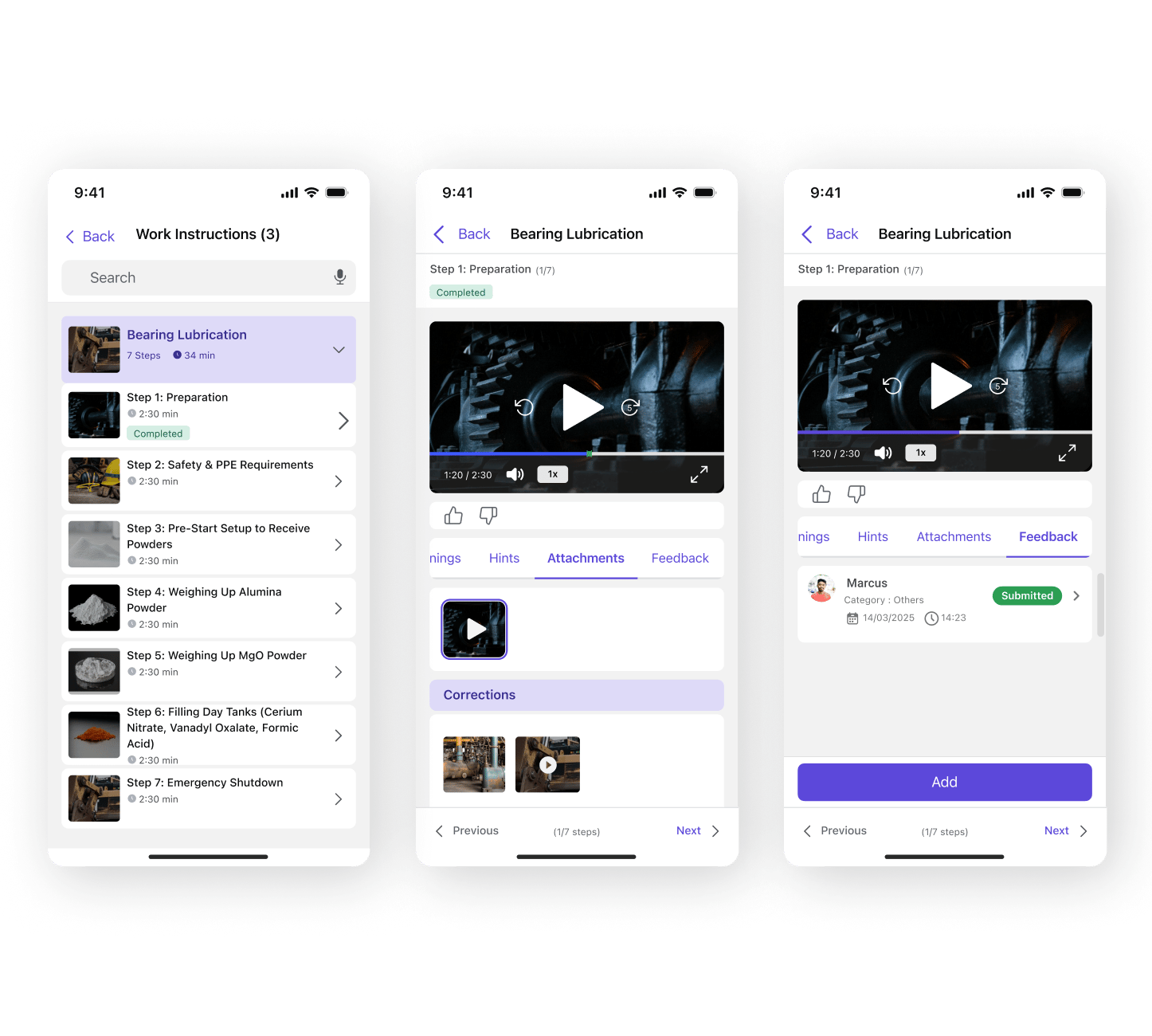
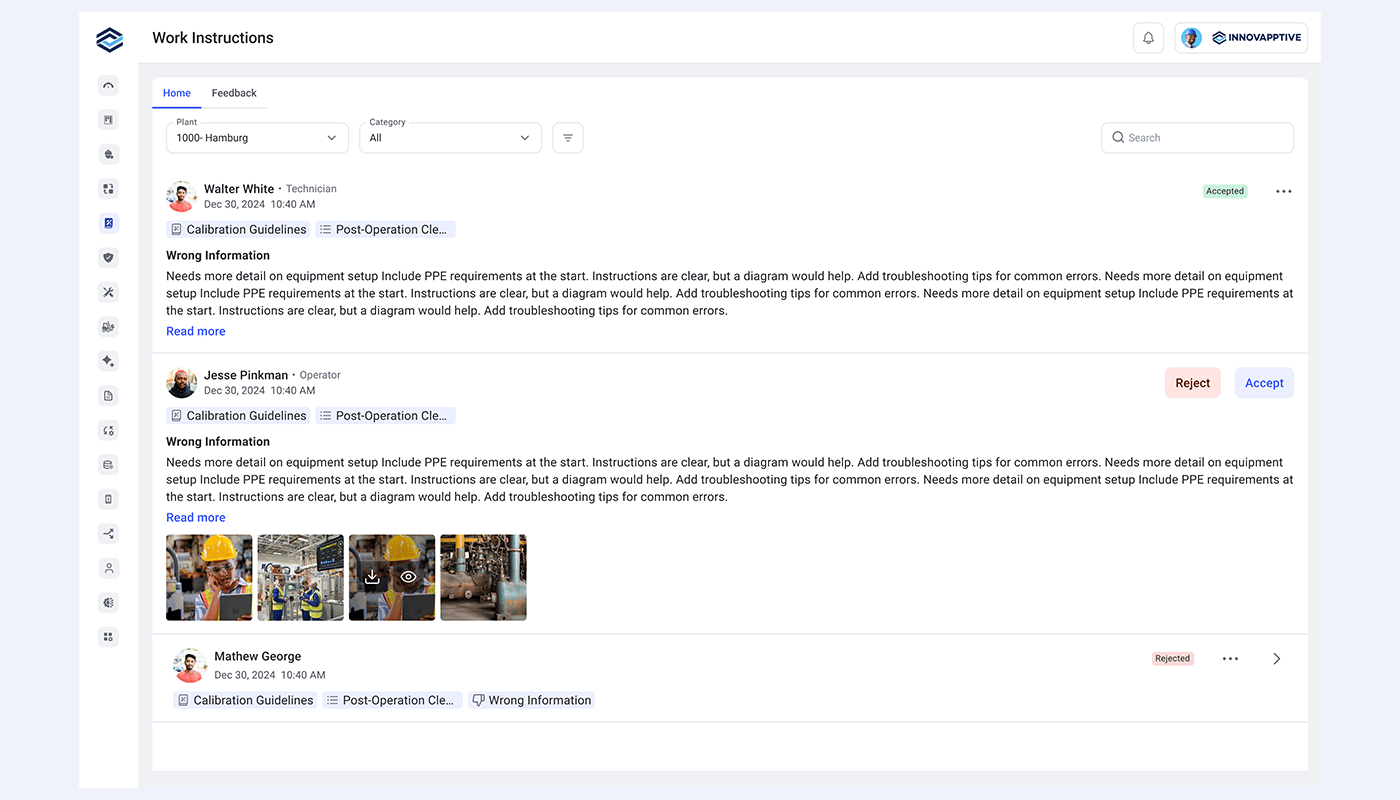
Field feedback lands on the exact step with photo evidence, routes to a reviewer, and updates that step for every future job.
RapidSync™ offline end to end — read, execute and flag steps with no connectivityEvery published version traceable to an author, a date and a change description
Built to plug into the systems you already run.
Bi-directional, pre-built integrations across historians, APM, MES/SCADA, EHS, and ERP/CMMS — so your investments in OT and IT keep compounding.
How Digital Work Instructions Software Compares To Paper, Libraries and ERP Attachments
There are two ways a procedure can reach a technician: the Innovapptive way, embedded inside the job itself, or every other time-taking way, where information is stored somewhere else, on paper, in a document library, or as an attachment, so someone still has to go find it, print it, or link it up. The columns below show what changes when the procedure is embedded instead of just stored.
Capability
Innovapptive Digital Work Instructions
Paper & Document Libraries
ERP-Native Attachments
How It’s Written
Structured digital steps
Printed pages, PDFs or documents
PDF attached to work order
How It Gets Made
AI drafts from video or document
Typed by hand, or uploaded and structured manually
Authored outside, then attached
Time to First Draft
Minutes
Hours to weeks
Days to weeks
How It Reaches the Technician
Embedded automatically, zero lookup
Printed packet, or QR, portal or search lookup
Opened as an attachment
How It Gets Assigned
Work order type, asset, functional location
Planner decides per job, or manual link
Manual attachment per order
Linked to the Asset
At asset and functional location
Folder and tag structure at best
As attached documents
Works Offline
Attached procedures readable offline
Paper always, digital cached and varies
Varies by mobile app
Fixing One Wrong Step
Step-level feedback with photo evidence
Handwritten note or full document revision
New version uploaded
Version Control
Full history and one-click rollback
Uncontrolled copies, or document revision history
Document management system
Proof It Happened
Step completion against the work order
Signature or document view logs
Work order confirmation only
Customer Story
How Indorama Ventures Turned Connected Execution Into $29M in Annual Maintenance Savings
Indorama Ventures connected frontline execution across rounds, maintenance and plant operations to improve how teams detect, act on and close operational issues.
58%Reduction in Maintenance backlog
38%Contractor Reduction
45% to 80%Improvement in Planned-to-corrective maintenance ratio.
Digital Work Instructions Built for Authors, Reviewers, Supervisors & Frontline Crews
90%+Faster procedure authoring
Record the job once instead of writing it up for a week.
Video, document or manual build, whichever suits the procedure. AI drafts the steps and pulls the images, so authoring starts from a draft rather than a blank page. Safety warnings, required tools and checklists go in while building, and the visuals are finished without leaving the platform.
Know which version was in use, and who changed it.
Version history carries timestamps, author attribution and change descriptions. Revisions are compared, rolled back in one click, and field feedback is resolved through a controlled accept or reject workflow. Audit questions are answered from the record rather than reconstructed from recollection.
No crew starts a job without the right procedure attached.
Procedures attach at operation, task and round-plan level before work begins, and operations pulled from task lists arrive with instructions already on them. Standardization stops depending on which technician picked up the job, or on who was free to explain it at the toolbox talk.
The steps are on the job, not in a filing cabinet.
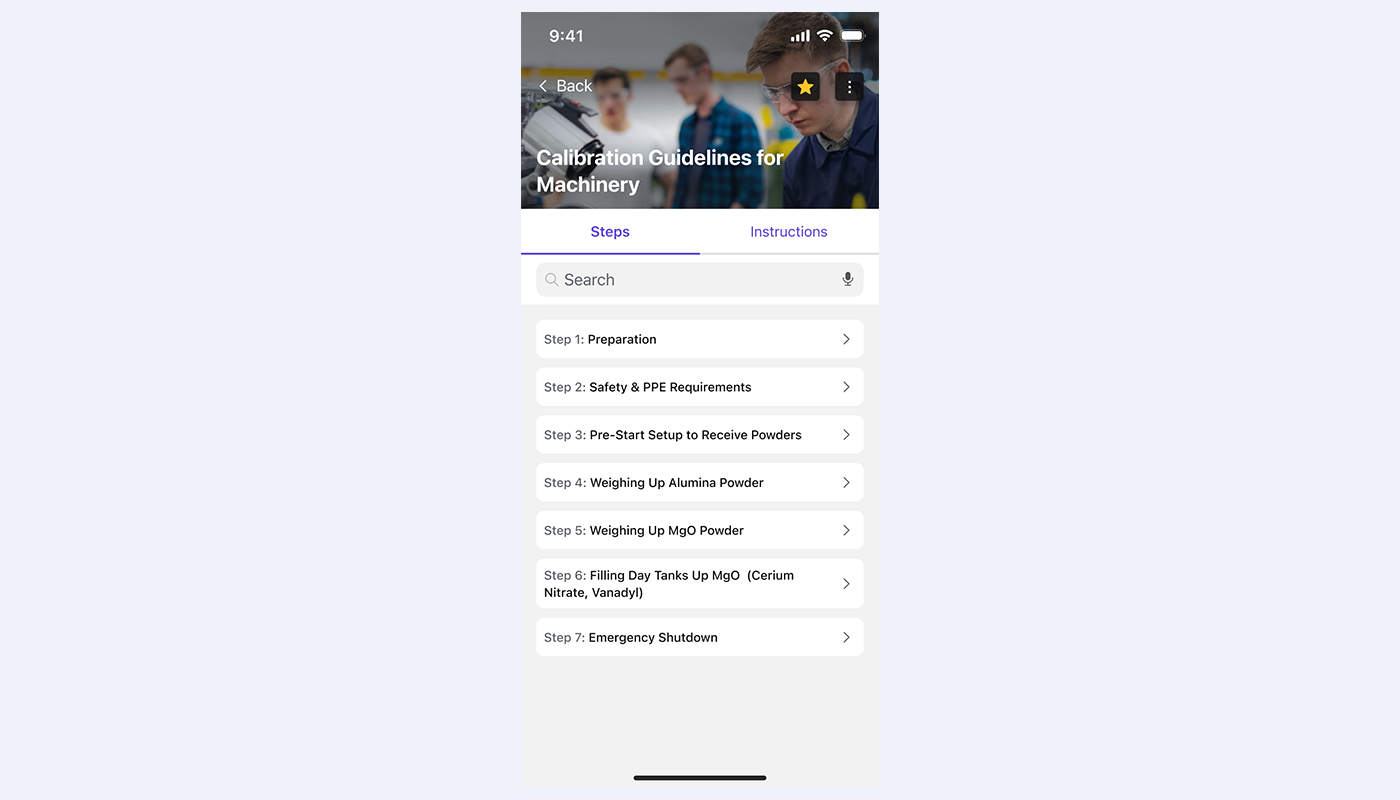
Instructions open inside the work order, operation or round task, with photos, video, required tools and safety notes against each step. They stay readable with no signal. When a step does not match the asset in front of you, flag it with a photo and that step gets fixed.
Retiring expertise stops being an unmanaged operational risk.
Undocumented procedures, compliance exposure from outdated instructions and the cost of shadowing new hires are execution problems, not HR problems. Standardized procedures on every work order make instruction use a number you can report rather than an assumption.
Add procedures without adding another system to support.
Digital work instructions connect to SAP S/4HANA, SAP PM, IBM Maximo or Oracle through Integration Manager, alongside 50+ other enterprise systems. Procedures map to the task lists, asset classes and functional locations your team already maintains, so there is no parallel system to secure and no per-site branch to regression test.
AI-Powered Digital Work Instructions, Delivered to the Right Job
A personalized walkthrough using one of your own procedures. Send a short video of the job, or the SOP you use for it today, and see it authored, published and attached to a work order for that asset. Thirty minutes with a value engineer.
Recognized as a Leader in Connected Worker Platforms
Frost & Sullivan named Innovapptive 2026 Company of the Year and a Leader in its Frost Radar™ for Augmented Connected Worker, End-to-End Platforms, based on platform breadth, AI execution capability, and measurable customer impact.
Frost & Sullivan Best Practices
2026 Company of the Year, Global Connected Worker Platforms
Frost & Sullivan recognized Innovapptive for closing the frontline execution gap with its end-to-end connected worker platform.
“Innovapptive has taken an innovative approach to AI, developing one of the most extensive AI agent portfolios available. These agents assist manufacturers with their maintenance, operations, reliability, safety, and analytics needs.”
Juan Francisco Dell'Era · Senior Research Analyst, Industrial Automation & Software, Frost & Sullivan
Resources
Must-Have Work Instruction Resources for Maintenance and Operations Leaders
Featured Whitepaper
The 15 AI Agents Powering the Future of Frontline Work
How AI Author, AI Work Instructions and AI Assist remove the manual bottlenecks in procedure creation, guidance and troubleshooting, with the value each agent delivers across maintenance, operations and safety.
Frequently Asked Questions About Digital Work Instructions Software
What is digital work instructions software?
Digital work instructions software replaces paper and PDF procedures with structured, step-by-step guidance delivered on a mobile device. Each step carries images, video, required tools and safety warnings. In industrial plants the procedure is also bound to the work it supports, so it arrives with the job instead of waiting in a library for someone to find it.
What is the difference between digital work instructions and standard operating procedures?
Standard operating procedures describe how a job should be done, usually as a document someone has to locate and interpret. Digital work instructions turn that document into an executable sequence followed at the asset, attached to a work order or round task. SOP digitization software is what converts the first into the second.
How is Innovapptive different from other work instruction software?
Procedures are authored as structured digital steps embedded in the work order itself, rather than PDF documents attached alongside it, and the same instruction embeds against equipment and functional locations. Every qualifying work order then picks up the right procedure automatically with no manual linking, and field feedback is resolved at step level rather than by reopening the whole document.
How do work instructions get assigned to the right work order?
Assignment is configured once and runs without human involvement afterwards. A procedure is mapped to a work order type against a specific asset or functional location, and every matching work order picks it up. Supervisors can also embed procedures directly at operation, task or round-plan level while planning the work.
Can technicians use work instruction software offline?
Offline access is standard once a procedure is attached to the work order, operation or round task. Technicians read the steps, media and safety notes in tank farms, underground workings, remote camps and offshore installations with no wireless coverage. RapidSync™ reconciles usage and feedback automatically once the device reconnects.
How long does it take to create a digital work instruction?
A usable first draft takes minutes. Video to work instructions AI converts a recorded job into structured steps with titles, descriptions and images, and document conversion does the same for an existing SOP or manual. Manual work instruction authoring software has historically taken days to weeks per procedure once review and formatting are counted.
Which industries use work instruction software for manufacturing and process plants?
Manufacturing work instruction software is used most heavily where procedures are complex and failure is expensive. Oil and gas across upstream, midstream and downstream, chemicals and petrochemicals, refining, mining and metals, utilities and power generation, pulp and paper, pharmaceuticals, food and beverage, and both discrete and process manufacturing all qualify.
How does step-level feedback keep procedures accurate over time?
A technician flags the specific step that is wrong, attaches a photo and selects a reason code. The feedback routes to a reviewer with a priority and is accepted or rejected against that step alone. Correction stays scoped to what is actually wrong, which is why libraries stay current past the first year.
What is the ROI of digital work instructions software?
Procedure creation typically drops by 90 percent or more, because a recorded job becomes a usable draft in minutes rather than days. Correction effort falls by up to 90 percent, since a fix touches one step. Task completion accuracy improves around 40 percent where steps carry annotated images and video.
Does digital work instructions software work for inspection rounds as well as maintenance work orders?
Yes, when procedures are embedded rather than attached. Innovapptive Digital Work Instructions embeds at the work order and operation level for maintenance jobs, and at the round-plan and round-task level for inspection rounds, using the same authoring, review and version control flow across all four. The technician gets the same structured guidance no matter which one the job started from.
Does digital work instructions software work for inspection rounds as well as maintenance work orders?
Yes, when procedures are embedded rather than attached. Innovapptive Digital Work Instructions embeds at the work order and operation level for maintenance jobs, and at the round-plan and round-task level for inspection rounds, using the same authoring, review and version control flow across all four. The technician gets the same structured guidance no matter which one the job started from.
What should you look for in work instruction software for manufacturing?
Manufacturing work instruction software has to do more than store documents. The test for any work instructions software is whether the right procedure reaches the technician without a manual step: look for AI authoring from video or an existing SOP, structured steps rather than PDF attachments, embedding against the work order and the equipment record, offline access at the asset, and step-level correction so one wrong step does not force a full revision.
How is manufacturing work instructions software different from a document library?
A document library digitizes storage. Manufacturing work instructions software digitizes delivery. In a library the procedure still has to be searched for, opened and followed by hand, which is why adoption stays low. Digital work instruction software embeds the procedure in the job itself, so the technician opens the work order and the current, approved steps are already there.
Is Innovapptive Digital Work Instructions a standalone work instruction authoring software tool?
No. Work instruction authoring software that only authors leaves a gap between the finished procedure and the job. Innovapptive Digital Work Instructions combines authoring, including video to work instructions AI and SOP digitization software for existing documents, with embedded assignment, media editing, step-level feedback and version control in one flow, so the procedure is created and delivered in the same system.
What are connected worker work instructions?
Connected worker work instructions are procedures delivered inside a connected worker platform, tied to the work order, the operation, the round and the equipment record rather than filed separately. Because the instruction is connected to the job and the asset, completion, feedback and version data flow back automatically, which is what keeps the library accurate and gives supervisors a real adoption number.
Does digital work instruction software require replacing SAP, Maximo or Oracle?
No. Digital work instruction software from Innovapptive connects to SAP S/4HANA, SAP PM, IBM Maximo and Oracle through Integration Manager, alongside 50+ other enterprise systems. Procedures map to the task lists, asset classes and functional locations your team already maintains, so the system of record stays in place and there is no parallel platform to stand up.
What is SOP digitization software, and how does it relate to AI work instructions?
SOP digitization software converts a static standard operating procedure into a structured, executable format. AI work instructions take that a step further: the same document is parsed into titled steps with images and required tools, ready to review and publish, and video to work instructions AI does the same from a recorded job. The output is a guided procedure a technician follows at the asset, not a PDF to read.
Get Started
Make the Procedure Part of the Job. Not a Search Away From It.
See how oil and gas, chemicals, mining and manufacturing operators use digital work instructions software to capture expert procedures in minutes and deliver them to the right work order, on the SAP, Maximo and Oracle systems they already run.







.png?width=1400&height=800&name=version-history-(1).png)