
What Industrial Inspection Software Is, and What It Is Not
Industrial inspection software guides plant workers through scheduled equipment, safety and compliance checks on a mobile device, records readings and evidence against a specific asset, and routes exceptions for action. A digital inspection platform covers the full cycle: authoring, scheduling, mobile execution, evidence capture and follow-up tracking.
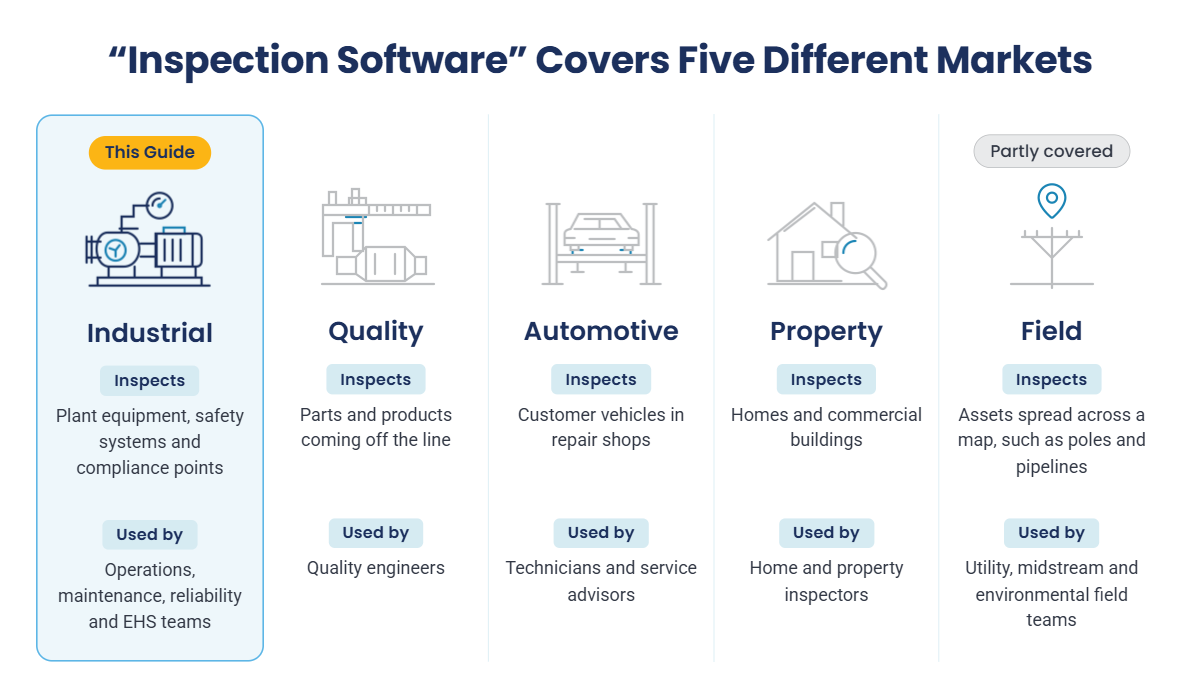
The table below shows how this category differs from the four markets that share its name. Because inspection software covers adjacent markets, start by matching the tool to the object being inspected.
| Category | What is inspected | Typical buyer | Example platforms |
|---|---|---|---|
| Industrial inspection | Plant equipment, safety systems and compliance points | Operations, maintenance, reliability and EHS leaders | Innovapptive, Mitti, MaintainX, AVEVA Mobile Operator |
| Product quality inspection | Parts and products coming off the production line | Quality engineers and manufacturing quality teams | ATS Inspect, Cognex, Keyence, QIMA |
| Automotive inspection | Customer vehicles checked during service or repair | Repair shops and service advisors | AutoVitals, Mitchell 1, Tekmetric |
| Property and home inspection | Houses and commercial buildings | Property inspectors and real estate professionals | Spectora, HomeGauge |
| Field and geospatial inspection | Distributed assets such as poles, pipelines and remote infrastructure | Utility, midstream and environmental field teams | Fulcrum, GIS-based tools |
An inspection platform and a CMMS solve different halves of the same problem. An inspection platform is built around the scheduled check and the evidence it produces. A CMMS is built around the work order and the asset's maintenance history. The useful question is where your failures come from today. If defects go unnoticed because checks are missed, rushed or recorded on paper, start with inspection. If defects are found but the repair is never planned, the problem sits in work execution, and the link between the two systems matters more than either one alone.
The 11 Best Industrial Inspection Software Platforms at a Glance
Use this table to build a shortlist. The eleven platforms fall into four groups by origin: EAM-connected, forms-origin, maintenance-origin, and specialist tools for operator rounds, asset integrity, geospatial work and guided frontline workflows.
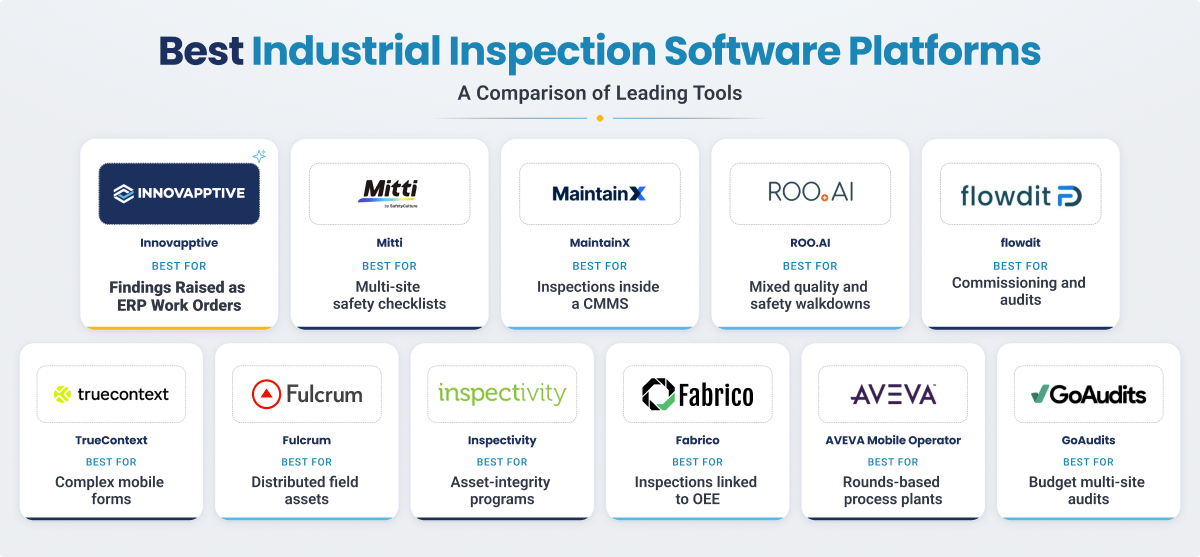
| Platform | Best fit | Built around | Starting price |
|---|---|---|---|
| Innovapptive | Asset-intensive plants on SAP, Maximo or Oracle that need findings to become tracked ERP work | Inspection connected to enterprise execution | Custom enterprise pricing |
| Mitti (formerly SafetyCulture) | Safety and compliance checklists across multiple sites | Forms and checklists | Free up to 10 users; Premium $24/user/month (annual) |
| MaintainX | Inspections and work orders in one CMMS | Mobile-first CMMS | Free Basic; Essential $20/user/month (annual) |
| ROO.AI | Guided quality, safety and maintenance workflows | Guided frontline workflows | Custom pricing |
| flowdit | Manufacturing sites running commissioning, audits and inspections together | No-code operations execution | Free version; Enterprise quote-based |
| TrueContext | Teams with an existing system ready to receive inspection data | Enterprise forms and data capture | Custom pricing |
| Fulcrum | Distributed assets such as poles, pipelines and remote sites | Geospatial field data | From $43/user/month (annual), 5-user minimum |
| Inspectivity | Asset-integrity programs in energy, mining and heavy engineering | Asset-integrity inspection | Contact vendor |
| Fabrico | Production lines where inspection should link to OEE | Manufacturing CMMS and OEE | Contact vendor (not per user) |
| AVEVA Mobile Operator | Process plants on AVEVA and the PI System that inspect during operator rounds | Operator rounds and procedures | Not published |
| GoAudits | Multi-site compliance scoring on a tight budget | Audit and compliance checklists | From $12/user/month (Starter) |
Shortlisting for a Plant That Runs on SAP or Maximo?
See how Innovapptive Digital Inspections builds inspections from your existing SOPs, runs them offline, and posts every finding to SAP or Maximo as a notification with the asset and evidence attached.
How the 11 Platforms Compare on Offline Capture, Corrective Action and ERP Write-Back
The at-a-glance table helps you shortlist. This table shows the functionality of each platform across different areas. For asset-intensive plants the important buying question is not only how quickly an operator can complete a form. It is what happens when a pressure, vibration, temperature or safety check falls outside its limit. Does the result stay as an issue in the inspection app, become a work order in the vendor’s CMMS, or reach the plant’s enterprise asset management (EAM) system with the asset and evidence attached? This table compares the best inspection tools and helps answer these questions.
| Platform | Offline mode | What a failed check becomes | ERP or EAM write-back | Reading feeds asset condition | AI assistance |
|---|---|---|---|---|---|
| Innovapptive | Full: start and close inspections with no signal; syncs on reconnect | Notification or service order in SAP or Maximo | Full: SAP S/4HANA, SAP PM, Maximo, Oracle; two-way | Full: readings sync to measuring points; historian links such as OSI PI | Inspections from SOPs, issues from photos, HMI readings by camera |
| Mitti | Partial: completes downloaded templates offline | Action or issue inside Mitti | Partial: API and third-party connectors | Not documented | Drafts issues from a photo, prompt or voice note |
| MaintainX | Partial: offline app mode; confirm scope | Work order in MaintainX | Partial: ERP integrations; MaintainX stays the record | Partial: meter readings in MaintainX | CoPilot assistant |
| ROO.AI | Not documented | Production rework or maintenance task | Partial: positioned as an extension of EAM and QMS | Not documented | AI-guided workflows and image recognition |
| flowdit | Supported | Task or measure inside flowdit | Partial: claimed for SAP, Oracle, Dynamics | Partial: IoT readings inside flowdit | Not documented |
| TrueContext | Full: photos, signatures and GPS offline | Data sent to the connected system | Partial: integrations to selected enterprise systems; verify SAP/Maximo path | Not documented | Calculated fields; AI not documented |
| Fulcrum | Full: strong offline capture | Task or issue inside Fulcrum | Partial: Maximo among listed integrations | Not documented | Converts spoken notes into form data |
| Inspectivity | Confirm with vendor | Issue and corrective action tracked to closure | Partial: REST API into ERP and RBI systems | Partial: within the Inspectivity asset hierarchy | Not documented |
| Fabrico | Not documented | Corrective work order inside Fabrico | Not documented | Partial: readings trended in Fabrico and linked to OEE | Not documented |
| AVEVA Mobile Operator | Full: offline execution with sync | Work order through CMMS or EAM integration | Partial: SAP PM and AVEVA EAM modules documented | Partial: readings sent to the PI System | Not documented |
| GoAudits | Full: new inspections can be started offline | Corrective action with owner and deadline | No native EAM write-back documented | No asset-condition feed documented | Not documented |
Here full means the capability is described as supported for the stated workflow. Partial means the scope is limited, dependent on a connector, or needs validation. Not documented means public evidence was not found in the source review; it does not prove the capability is absent.
In-Depth Reviews of All 11 Digital Inspection Platforms
The reviews use the same questions for each platform: what it is built to do, where it fits, what happens after a failed check, and where a buyer should validate the fit before signing.
1. Innovapptive Digital Inspections
Best fit: Asset-intensive plants on SAP S/4HANA, SAP PM, IBM Maximo or Oracle that need every inspection finding to become tracked work in that system.
Innovapptive Digital Inspections runs on the Innovapptive Connected Worker Platform, an industrial execution platform that sits on top of the ERP or EAM a plant already runs rather than replacing it. The digital inspection software treats inspection as the front end of maintenance: each reading, photo and finding is tied to an asset in the system of record.
Key capabilities:
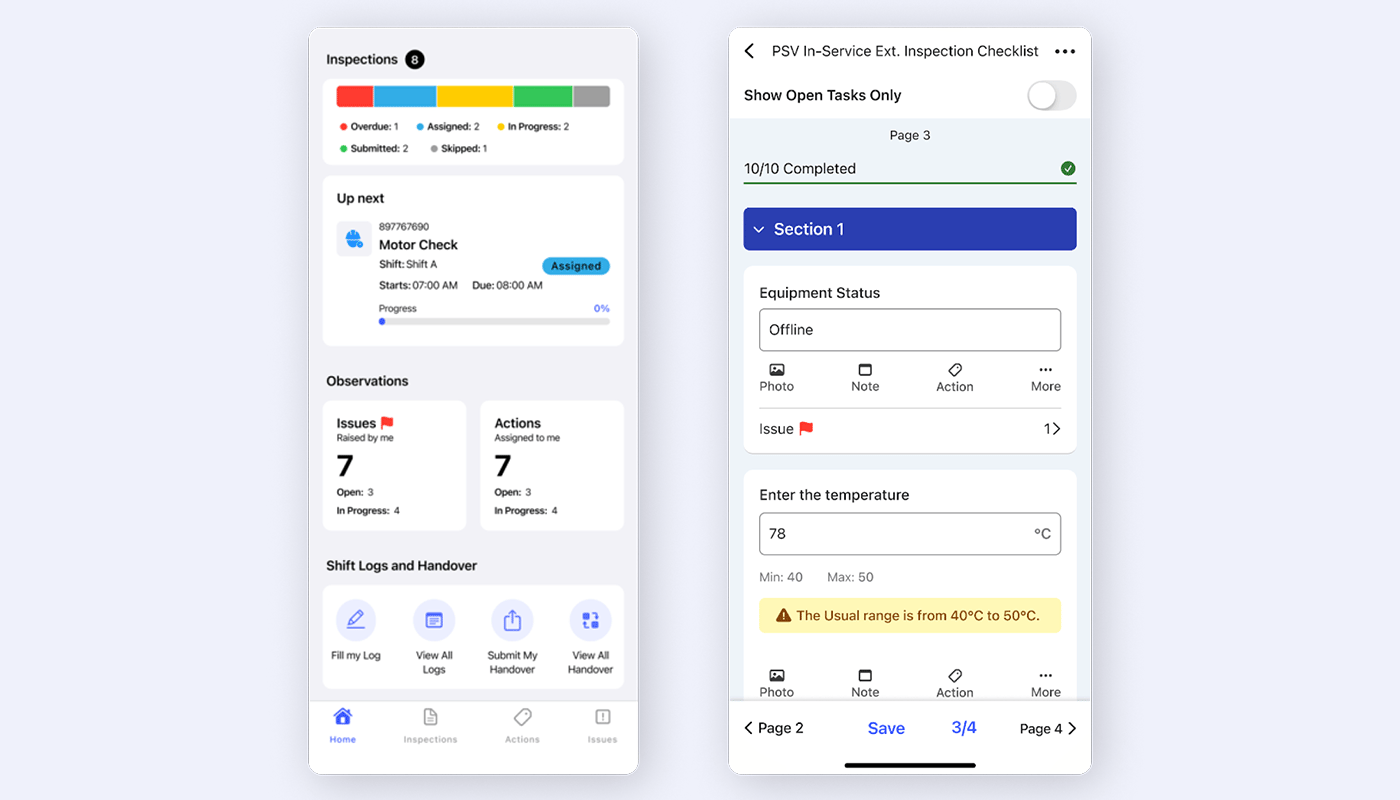
- AI Digitize builds mobile inspections from existing SOPs, PDFs, paper checklists or a prompt, with more than 20 response types including thresholds, formulas and asset scans
- Scheduling by unit, role or asset, including Gemba walks and risk checks, with schedule-compliance tracking
- Full offline execution on iOS, Android, Windows and rugged handhelds, with RapidSync reconciling inspections, readings and evidence on reconnect
- AI Detect drafts an issue record from a photo of a defect, and AI-Autofill reads instrument values from HMI displays through the camera
- Readings sync to measuring points and asset condition, and findings post to SAP or Maximo as notifications or service orders with the asset, location and evidence attached
- Integration Manager connects to historians such as OSI PI and IP21 and to more than 50 enterprise systems
| What stands out | Limitations and considerations |
|---|---|
|
|
Consider another approach when: you need a free, self-serve tool, or findings have no maintenance follow-up in an enterprise system.
Recognition: Frost & Sullivan named Innovapptive the 2026 Global Company of the Year in Augmented Connected Worker, End-to-End Platforms and a Leader in the 2025 Frost Radar for augmented connected worker platforms.
Rating: Rated 4.5 out of 5 on G2
2. Mitti (Formerly SafetyCulture)
Best fit: Multi-site teams that need safety and compliance checklists running quickly across many locations.
Mitti is the new name for SafetyCulture, which rebranded in August 2026 as it expanded into broader frontline operations. Its inspection app is often the first digital checklist a plant team uses.
Key capabilities:
- Large template library with conditional logic, scoring and photo evidence
- Offline completion of inspections from downloaded templates
- Actions assigned to owners with due dates, plus AI that drafts an issue from a photo, prompt or voice note
| What stands out | Limitations and considerations |
|---|---|
|
|
Consider another approach when: findings must land in the maintenance system as planned work against a specific asset.
Pricing and rating: Rated 4.6 out of 5 on Capterra.
3. MaintainX
Best fit: Teams that want inspections and work orders in the same CMMS, with no separate enterprise EAM to update.
MaintainX is a mobile-first CMMS that builds inspection around the work order. Autodesk completed its acquisition of MaintainX on August 3, 2026, so buyers evaluating a multi-year agreement should review the current product roadmap and support commitments with the vendor.
Key capabilities:
- Procedure-based inspections that create a corrective work order when a step fails
- Preventive and condition-based scheduling with meter readings
- Asset history and parts inventory in the same system
| What stands out | Limitations and considerations |
|---|---|
|
|
Consider another approach when: SAP PM or Maximo already runs maintenance and must stay the single record.
Pricing and rating: Rated 4.8 out of 5 on Capterra.
4. ROO.AI
Best fit: Manufacturing departments that want quality, safety and maintenance inspections in one guided app, built with vendor help.
ROO.AI is a frontline AI platform that guides workers through inspections with visuals, single-tap commands, voice and video, and positions itself as an extension of existing QMS and EAM systems.
Key capabilities:
- AI-directed branching workflows with image recognition that flags defects during the check
- Routing of each defect to production rework or a maintenance task
- Short training content delivered inside the workflow
| What stands out | Limitations and considerations |
|---|---|
|
|
Consider another approach when: you want plant staff to author and change inspections themselves from day one.
Pricing and rating: Rated 4.8 out of 5 on Capterra
5. flowdit
Best fit: Manufacturing sites that run commissioning, audits and maintenance inspections and want one no-code tool for all three.
flowdit is a no-code operations execution platform focused on manufacturing inspections, audits, checklists and commissioning.
Key capabilities:
- Commissioning handled as a full workflow alongside maintenance and quality checks
- Offline mobile capture with IoT sensor readings inside inspections
| What stands out | Limitations and considerations |
|---|---|
| Commissioning support. Few inspection tools treat the checks that bring new equipment into service as a structured workflow. |
|
Consider another approach when: documented EAM write-back is a firm requirement for go-live.
Pricing and rating: Rated 5.0 out of 5 on Capterra.
6. TrueContext
Best fit: Organizations that already have a strong system of record and need a configurable mobile form engine to feed it.
TrueContext, formerly ProntoForms, is an enterprise field workflow and data capture platform with a long record in field service.
Key capabilities:
- Form builder with conditional logic and calculated fields
- Offline capture with photos, signatures and GPS
- Integrations with Salesforce, ServiceNow and Microsoft systems
| What stands out | Limitations and considerations |
|---|---|
| Depth of the form engine. Complex inspection logic that breaks simpler apps can usually be modeled here. |
|
Consider another approach when: you do not yet have a system that will act on what inspectors find.
Pricing and rating: Rated 4.6 out of 5 on Capterra.
7. Fulcrum
Best fit: Utility, midstream and environmental teams inspecting distributed assets such as poles, pipelines and remote sites.
Fulcrum is a geospatial field operations platform that organizes inspections around where the work happens.
Key capabilities:
- No-code form builder with strong offline capture
- Esri ArcGIS integration and location-verified records
- Audio FastFill, which turns spoken field notes into structured form data
| What stands out | Limitations and considerations |
|---|---|
| Location intelligence. For linear and distributed assets, the map is the natural way to plan inspections and prove coverage. |
|
Consider another approach when: your inspections happen inside one site with a defined functional location hierarchy.
Pricing and rating: Rated 4.7 out of 5 on Capterra.
8. Inspectivity
Best fit: Asset-integrity teams in energy, oil and gas, minerals and heavy engineering.
Inspectivity is a no-code inspection platform built around asset hierarchies and aimed at integrity programs rather than daily operator checks.
Key capabilities:
- Configurable asset hierarchies, with barcode and RFID scanning to start the right inspection
- Issue and corrective action tracking through to closure
- REST API into ERP and risk-based inspection systems, with ISO 9001 and ISO 27001 certification
| What stands out | Limitations and considerations |
|---|---|
| Asset-integrity focus. The data model starts from the asset and its inspection plan, which matches how integrity engineers work. |
|
Consider another approach when: most of your inspection volume is high-frequency operator checks across many units.
Pricing and rating: Rated 4.8 out of 5 on Capterra.
9. Fabrico
Best fit: Discrete manufacturers who want inspection results tied to machine reliability and OEE.
Fabrico is a manufacturing CMMS and OEE platform that treats inspection as a reliability tool.
Key capabilities:
- A QR scan at the asset is required to open the checklist, which proves the inspector was there
- A failed check requires a photo and failure code, then creates a corrective work order
- Numeric readings plotted over time and linked to OEE data
| What stands out | Limitations and considerations |
|---|---|
| The link to OEE. On a connected production line, a team can see whether a degrading reading is already costing output. |
|
Consider another approach when: your inspections are mainly safety, environmental or regulatory checks.
Pricing and rating: Rated 4.9 out of 5 on Capterra.
10. AVEVA Mobile Operator
Best fit: Process plants standardized on AVEVA software and the PI System that inspect during operator rounds.
AVEVA Mobile Operator, formerly IntelaTrac, is a rounds and procedures product from AVEVA, part of Schneider Electric. It is built around operator rounds and procedural execution, with inspection capabilities included in that workflow.
Key capabilities:
- Barcode and RFID scanning to start a procedure at the right equipment, with offline execution and sync
- Manual readings such as vibration and temperature sent to the PI System
- Environmental, fire and safety inspections, with documented integration modules for SAP PM and AVEVA EAM
| What stands out | Limitations and considerations |
|---|---|
| Manual readings such as vibration and temperature can be sent to the PI System, and AVEVA documents integration options for SAP PM and AVEVA EAM. It is a relevant option when rounds and process data already run through the AVEVA environment. |
|
Consider another approach when: you are not on AVEVA software and need an inspection program first.
11. GoAudits
Best fit: Compliance managers who compare audit and inspection scores across many sites on a tight budget.
GoAudits is a multi-site audit and inspection app positioned on price and quick setup.
Key capabilities:
- True offline capture, including new inspections started with no connection
- Branded PDF reports generated as soon as an inspection is submitted
- Corrective actions with owners and deadlines, plus weighted scoring and cross-site benchmarking
| What stands out | Limitations and considerations |
|---|---|
| A practical option for teams standardizing audits and compliance checks on a limited budget |
|
Consider another approach when: a failed check needs to become maintenance work against a specific asset.
Pricing and rating:. Rated 4.8 out of 5 on Capterra.
Other Inspection Platforms To Consider, and Where They Belong
Many inspection tools did not make this list because they solve a different problem. Consider these alternatives when the primary workflow differs:
| Category | Platforms | Why they are not on this list |
|---|---|---|
| Automotive inspection | AutoVitals, Mitchell 1, Tekmetric, Xtime, BOLT ON, Garage360 | Built for repair shops inspecting customer vehicles and quoting the follow-up work. |
| Home and property inspection | Spectora, Home Inspector Pro, HomeGauge, Palmtech | Built to produce property reports for buyers, sellers and agents. |
| Jobsite and rental-fleet condition | Record360, HCSS, Driveroo, ToolSense | Built to record equipment condition at check-out and return on construction jobs. |
| Asset registers with inspection added | Asset Panda, MapTrack | Asset tracking comes first; inspection is a feature of the register rather than a managed program. |
| Product quality and machine vision | ATS Inspect, Cognex, Keyence, Landing AI, Inspectorio, QIMA | They inspect the product, not the equipment. Look for quality inspection software instead. |
| Remote video inspection | Blitzz | Lets an expert inspect through a live video call. Useful alongside an inspection platform, not instead of one. |
| Retail and hospitality operations | Xenia, Jolt, Lumiform, Operandio | Built for store and restaurant checklists across many locations. |
| Shift and operations management | Octave operations management (formerly Hexagon j5), eschbach Seqonis | Strong on shift handover, operating procedures, logbooks and KPI visibility. Neither publishes an inspection workflow with evidence captured against an asset and a corrective-action loop. |
See What AI Can Do Beyond the Inspection Checklist
Building inspections from SOPs and drafting issues from photos are only the start. Learn how 15 AI agents support operators, technicians, planners and EHS teams, from the first reading on a round to the repair that follows.
How to Evaluate Industrial Inspection Software
We reviewed inspection products named in category roundups, software directories and plant shortlists, including every product in the table above. A product made this list only if its core job is equipment, safety or compliance inspection in an operating plant. Each platform was then judged, weighted for asset-intensive plants rather than small teams against the following:
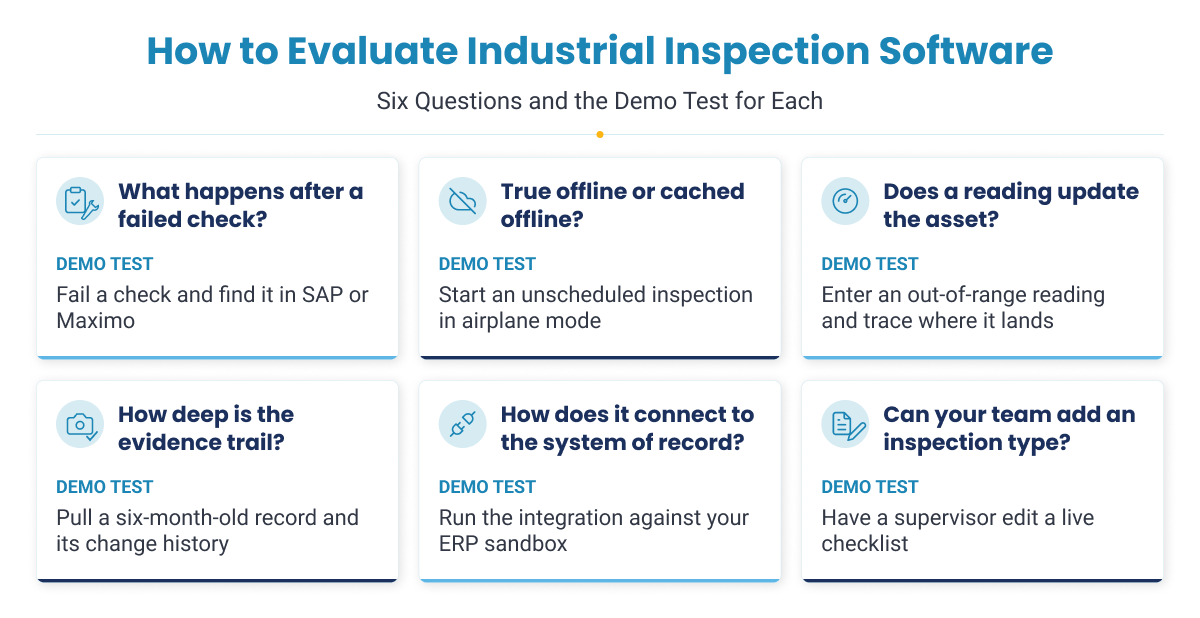
1. What happens after a failed check?
This question decides most purchases. In some tools a failed item creates a task inside the app. In others it raises a work order in the vendor's own CMMS. In a few it posts a notification or service order to the plant's EAM with the asset, location and evidence attached. Only the last option puts the defect in front of the planner who schedules the repair.
Ask for this in the demo: Fail a check on a real asset from your hierarchy and show where the finding appears in SAP or Maximo, and what the planner sees.
2. Is offline mode true offline or cached offline?
True offline means an inspector can start a new or unscheduled inspection, capture readings, photos and signatures, and close it with no connectivity, and the app reconciles everything when the device reconnects. Cached offline means only inspections downloaded in advance can be completed. The difference matters most for unplanned checks in shielded units, tank farms and remote areas, where the need for an inspection appears after the signal is gone. Ask as well how the platform handles two people changing the same record before they sync.
Ask for this in the demo: Turn off connectivity before starting a check. Can the user identify the asset, capture photos and readings, and finish? Reconnect and check for duplicates or missing evidence.
3. Does a reading update the asset, or only the form?
A temperature or vibration reading typed into a form is a number in a report. The same reading posted to a measuring point becomes part of the asset's condition history, where thresholds, trends and condition-based maintenance can use it. If reliability engineers have to export inspection data to see a trend, the reading is stuck in the form.
Ask for this in the demo: Enter an out-of-range reading and show where it lands in the asset record and whether it triggers any follow-up.
4. How deep is the evidence trail?
An audit-ready record shows who inspected, when, where, against which asset, what was checked and what was found, with photos and GPS where relevant, and it cannot be edited without a trace. Proof of presence, such as a QR, barcode or RFID scan at the asset, shows the inspector was actually there.
Ask for this in the demo: Pull up a six-month-old inspection, show its change history, and show how it proves the inspector was at the asset.
5. How does it connect to the system of record?
Every vendor will say it integrates. Ask what is documented: whether the connector is pre-built or a services project, which objects it writes (notifications, work orders, measuring points), whether it works in both directions, and who maintains it when the ERP is upgraded.
Ask for this in the demo: Run the integration against an SAP or Maximo sandbox, and show what happens in the app when the work order changes status in the ERP.
6. Can your team add an inspection type without the vendor?
A plant's inspection program changes constantly: a new regulation, a new asset, a lesson from an incident. If every change needs the vendor or a developer, the program falls behind. Look for no-code configuration and for authoring help, such as building a draft inspection from an existing SOP or PDF.
Ask for this in the demo: Hand the vendor one of your current paper checklists and ask them to build it live, then have one of your supervisors change it.
What a Compliant Industrial Inspection Record Must Contain
For process equipment covered by OSHA process safety management, the content of an inspection record is set by regulation, not by the software vendor. The process safety management mechanical integrity requirements in 29 CFR 1910.119(j)(4)(iv) require every inspection and test to be documented with five elements:
- The date of the inspection or test
- The name of the person who performed it
- The serial number or other identifier of the equipment
- A description of the inspection or test performed
- The results of the inspection or test
Each element is a software requirement as much as a paperwork one. The date and inspector name should come from a timestamped, signed-in record rather than a typed field. The description should come from a versioned inspection template, so an auditor can see which version was used. Results need structured responses rather than free text that varies from one inspector to the next.
The element generic forms apps most often miss is equipment identity. A form can show that an inspection happened. A compliant record ties it to a specific serial number or functional location. If that identifier is typed by hand, or missing because the form was built per area rather than per asset, the record is weak however good the form looks. OSHA has also stated that these records must be kept for the life of the process and should be held electronically as long as they stay retrievable, which favors a searchable archive over folders of PDFs.
How to Choose the Right Inspection Platform for Your Plant
Start from where your inspection program breaks down, not from a feature list. Two plants can run the same EAM and still need different tools because their inspection volume, field conditions and maintenance processes differ.
| Your situation | Platform type to investigate | Examples in this comparison |
|---|---|---|
| Findings must become planned work in SAP, Maximo or Oracle, and readings should build asset condition history | EAM-connected execution platform | Innovapptive |
| Maintenance runs, or will run, in a CMMS that can be the system of record | Maintenance-origin CMMS with inspections | MaintainX, Fabrico |
| Safety and compliance checks need to be live across many sites quickly | Forms-origin inspection app | Mitti, GoAudits, or TrueContext if you already own the system of record |
| Inspections happen during scheduled rounds and readings belong in the historian | Operator rounds platform | Innovapptive Operator Rounds, AVEVA Mobile Operator |
| Formal integrity plans, assets spread across a map, or mixed quality and safety walkdowns in a manufacturing department | Specialist platform | Inspectivity, Fulcrum, ROO.AI, flowdit |
Whichever type you shortlist, run the six demo requests question given above against your own assets and an ERP sandbox. A platform that cannot show a failed check reaching the planner in a live demo is unlikely to do it in production.
Benefits of Digital Inspection Software for Industrial Plants
Digital inspection software changes the daily work of several roles in a plant, and each one gains something different. Operators spend less time on paperwork, reliability engineers get condition data they can use, EHS managers can prove compliance, planners receive findings they can schedule, and plant leaders can see the whole inspection program at once.
Field operators: more inspecting, less writing. Structured responses, camera capture of gauge and HMI readings, and photo-based issue reporting let an operator finish a round and raise a finding without stopping to type a report. An out-of-range value is flagged while the operator is still at the equipment, so it can be rechecked on the spot. Offline capture means the work does not wait for a signal.
Reliability engineers: condition data they can trend. Readings are captured against a specific asset, and threshold and formula responses record the judgment behind each value. When those readings reach the asset record instead of a spreadsheet, condition-based maintenance can use them, and early signs of degradation become visible before a failure.
EHS and safety managers: compliance proven on record. Every check carries the inspector, time, location, asset and result, with photos where needed. Hazards go to a named owner and stay open until they are closed. Overdue safety checks show up while there is still time to complete them, and preparing for an audit becomes a search rather than a hunt through binders.
Maintenance planners: findings that are ready to plan. Instead of an email or a note such as pump noisy, the planner receives the asset, location, reading and photo, ideally as a notification in the maintenance system. Less time goes into chasing the inspector for details and more into preparing the job.
Plant and operations managers: one view of the program. Schedule compliance, open findings and exception trends are visible across units, shifts and sites. Because every shift uses the same template and required evidence, results are comparable, and the knowledge of experienced operators is written into the inspection rather than held in their heads.
IT and integration teams: fewer custom projects. Platforms configured without code, with documented connectors to the ERP and historian, leave less custom software to test and maintain after each ERP upgrade.
The largest benefit, fewer failures that stop production, depends on more than the inspection. It depends on whether each finding turns into a completed repair before the equipment fails.
How Inspection Findings Turn Into Avoided Downtime
Inspection pays off through a chain of events, and the value only appears if every link holds:
- A defect is captured during an inspection.
- It becomes tracked work with an owner and a due date.
- The repair is planned and completed before the component fails.
- The failure does not take the unit down.
- The production that would have been lost is not lost.
In most plants the chain breaks in one of three places:
- The finding is recorded but not routed: It sits in a report or an app that no planner opens.
- It is routed but not prioritized: It waits in the backlog behind louder work until the component fails.
- It is prioritized, but the planner cannot act on it: A note such as pump noisy does not say what is wrong, which part is needed or how urgent the job is, so someone has to go back and look.
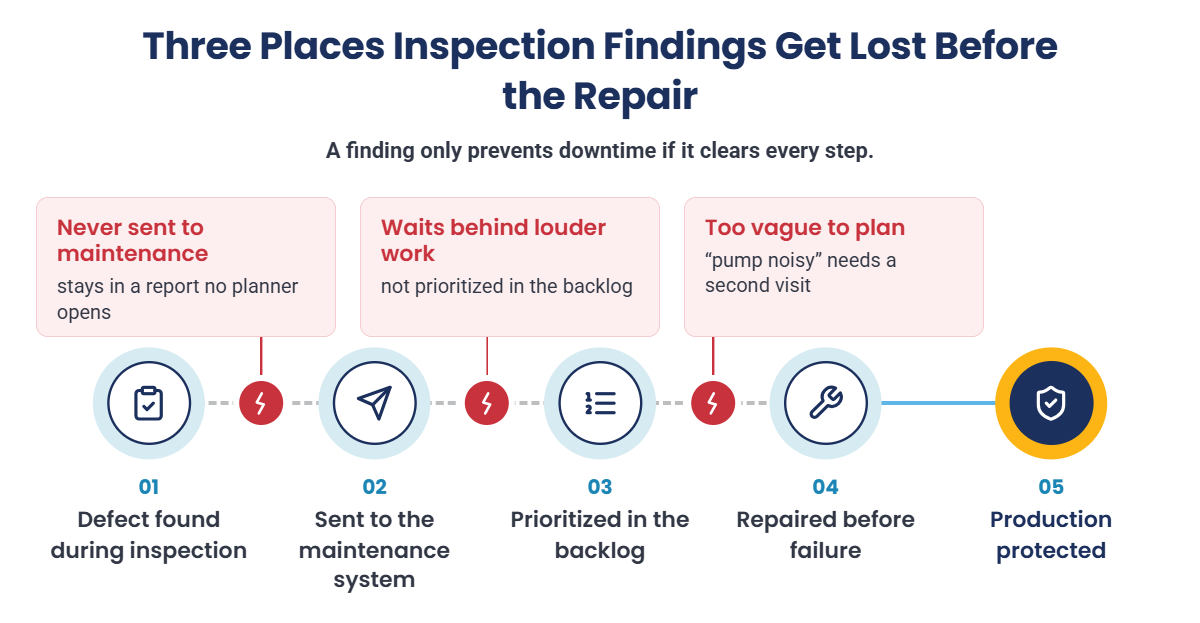
Software can fix the first and third breaks directly, by posting the finding into the work management system and attaching the asset, reading, photo and condition to it. The second break is a planning discipline that software supports but cannot replace.
However, there is also an honest limit. Better inspection improves detection, and detection only reduces unplanned downtime when the plant has the maintenance capacity to act on what it finds. More findings without the people, parts and planning to fix them produce a longer backlog, not more uptime. That is why the link between inspection and work execution matters as much as the inspection itself.
Shorten the Time From Inspection Finding to Completed Repair
Plants have invested heavily in monitoring and analytics, yet many findings still stall before anyone acts on them. Learn why frontline execution platforms are becoming the missing layer between your ERP, your historian and the people doing the work.
How Innovapptive Helps Plant Teams Turn Inspection Findings Into Tracked Work
Innovapptive Digital Inspections is built for the step most inspection tools leave out: getting each finding into the maintenance system as work that someone owns. It runs on top of SAP S/4HANA, SAP PM, IBM Maximo or Oracle, so the plant keeps a single system of record.
| Differentiator | What it means for the plant |
|---|---|
| Inspection wired to the asset | A failed check raises a notification or service order in SAP or Maximo with the asset, location and evidence attached, so it reaches the planner as work to schedule. |
| Readings feed asset condition | Readings sync to measuring points, so reliability engineers see condition trends in the asset record rather than in exported forms. |
| AI authoring and defect detection | AI Digitize builds inspections from existing SOPs and checklists, and AI Detect turns a photo of a defect into an issue record, so programs go digital quickly and anomalies are reported while they are still minor. |
| Evidence on every inspection | Geotagged, timestamped readings and photos are kept as a searchable record, so schedule compliance and audit readiness can be shown at any time. |
Two platform capabilities make this practical across many sites. Inspection types, response sets and workflows are configured in the no-code RACE configuration engine, so administrators can add or change an inspection without a development project or a separate build for each site. Integration Manager connects to SAP, Maximo and Oracle, and to historians such as OSI PI and IP21, so findings and readings reach the right system without a custom integration project. First-site deployments typically run in weeks.
Indorama Ventures: Maintenance Backlog Cut From 24 Weeks to 10
At its Port Neches, Texas site, Indorama Ventures connected inspections, rounds and maintenance on the Innovapptive Connected Worker Platform, integrated with SAP and IBM Maximo. These results come from that full deployment, not from inspections alone:
- Maintenance backlog reduced 58%, from 24 weeks to 10
- Contractor headcount reduced 38%, from 140 to 87
- Planned-to-corrective maintenance ratio improved from 45% to 80%
- $19M in realized maintenance savings, with a $50M opportunity identified across the enterprise
Stop Losing Inspection Findings Between the Report and the Repair
Indorama Ventures connected frontline inspections and maintenance to SAP and IBM Maximo and realized $19M in maintenance savings. See how the same approach would work on your assets and inspection types.

Unlock Margins Hidden in your Maintenance
Watch how leading manufacturers improve OEE, increase PM compliance, and reduce downtime through connected execution.

- 27-10-2026
Best Industrial Inspection Software: 11 Platforms Compared
Inspection software encompasses a broad market with its functionality varying widely. Repair shops...

- 23-10-2026
Maintenance Planning and Scheduling: The Ultimate Guide
A mechanical crew reaches a boiler feed water pump at 7 a.m. to change a bearing, then waits three...
- 21-10-2026
10 Best Work Instructions Software: Compared and Reviewed
Choosing work instructions software is about more than turning a PDF into guided steps on a tablet....