
What Is an Electronic Permit to Work (ePTW)?
An electronic permit to work is the digital version of the permit that authorizes and controls hazardous, non-routine work before it begins. It is easiest to understand across three separate layers.
What it replaces: It removes the paper permit form and the handwritten sign-off that used to travel between the requester, the issuer, and the approver. On paper, a permit is a form that gets filled in by hand, signed, and carried around the site. In an ePTW, the same permit becomes a guided digital workflow.
What it adds: Every action now carries state, time, and identity. The system knows which stage a permit is in, when each step happened, and who took it. The record updates in real time and stays available for audits long after the job is done.
What it does not change: An ePTW does not change your permit-to-work procedure, and it does not change who is accountable for the work. The Permit Issuer and Permit Approver carry the same responsibility they always did. A digital system only works well when the underlying procedure is sound, so the first step is a clear, well-designed permit process, and the software then enforces it.
| In plain terms: ePTW stands for electronic permit to work. It is the software that manages the full life of a work permit, from the first request to verified closure, on a mobile device instead of on paper. |
ePTW vs PTW: What Actually Changes When the Permit Goes Digital
A paper permit and an electronic permit contain the same information and carry the same authority. The difference is visibility and control.
A paper permit exists in one place at a time. It cannot tell anyone when it is about to expire, and it cannot be checked against other permits that are open in the same area. If a Permit Coordinator wants to know how many permits are live right now, someone has to physically gather the paperwork.
An electronic permit removes that blind spot. Status, approvals, and conditions are visible to everyone who needs them, expiry is tracked automatically, and every permit can be seen in one place. The Area Authority spends less time chasing signatures and more time confirming that conditions are actually safe before work starts.
.png?width=1200&height=828&name=paper-vs-electronic-permit%20(1).png)
Why Paper Permits Break Down on a Live Plant
Paper permits work well enough for a single, simple job. They start to fail when a plant runs many permits at once, across shifts and contractors, which is the norm in refineries, chemical plants, and heavy manufacturing.
The core problem is that a paper permit is only as visible as the sheet of paper it lives on. That single limitation creates the same failures again and again:
- Approvals stall. If the only person who can issue a permit is off shift or off site, the permit waits, or work starts on a quick verbal approval that leaves no record.
- Expiry goes unnoticed. Paper cannot warn anyone that a permit is about to run out, so a field technician can end up working on one that has quietly lapsed.
- Monitoring drifts. After a permit is issued, the person watching the job can step away early, ventilation can be switched off, or a required gas test can be skipped, and the paper still reads as fully compliant until someone walks the job.
US regulators see the results of these gaps. OSHA regularly cites employers for confined space entries carried out without a required attendant and for missing lockout/tagout procedures, and the U.S. Chemical Safety Board has repeatedly traced serious incidents back to permit and control-of-work failures rather than to the task itself.
|
Failure mode |
What happens with paper |
What an electronic permit changes |
|---|---|---|
|
The permit is not where the work is |
Conditions change at the worksite, but the form is sitting in the permit office. |
Status and conditions travel with the job on a mobile device and can be updated on the spot. |
|
No single view of live permits |
No one can see every open permit at once, so overlaps are found in the field, if at all. |
Every live permit is visible in one place, tagged by area and equipment. |
|
Isolation status is tracked by memory |
The state of valves, breakers, and drained lines lives in a second document or in someone's memory. |
The isolation record is attached to the permit and confirmed at the point of work. |
|
Expiry is handled informally |
A permit runs out while a crew is still inside a vessel, tracked only by a note at shift change. |
Expiry alerts fire automatically, and extensions follow a controlled approval path. |
|
Rebuilding the record after an incident |
Reconstructing what happened depends on legible handwriting and a complete paper trail. |
A timestamped record shows the exact state of the permit at any moment. |
There is a cost to the business as well as to safety. Every minute a crew waits on a permit is a minute not spent on the actual job. Across a large maintenance schedule, permit delays quietly reduce wrench time, the share of a technician's shift spent doing maintenance rather than waiting, and that lost time rarely shows up in any report.
The ePTW Lifecycle: From Permit Request to Verified Closure
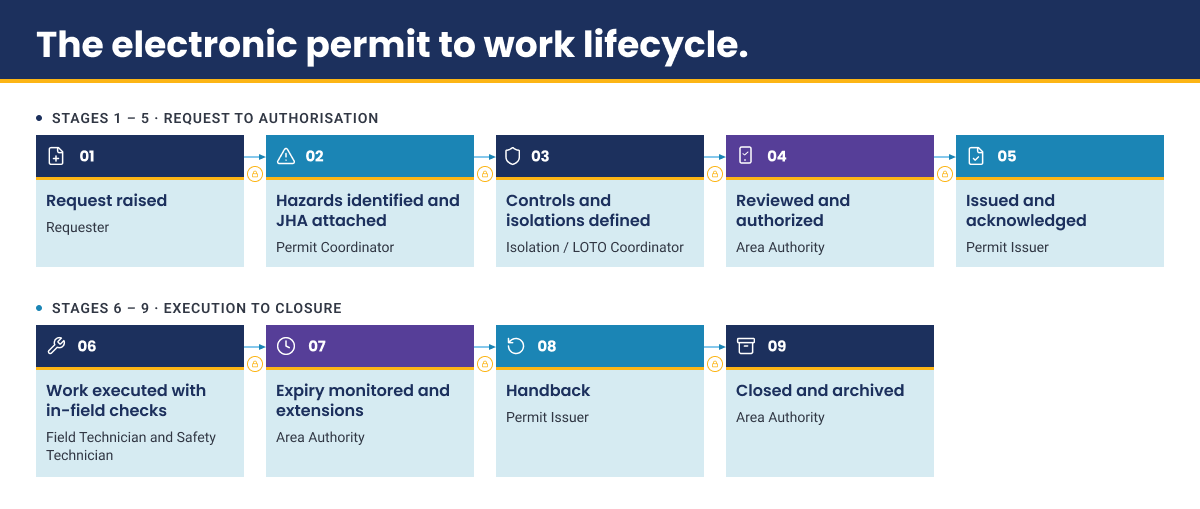
An electronic permit moves through a fixed sequence of stages, and the software makes sure each stage is completed before the next one can begin. A permit cannot skip ahead, which is exactly what stops corners being cut when a plant is busy. The table below follows a single confined space entry on a process vessel during a planned shutdown.
|
Stage |
Who owns it |
What happens |
What the electronic version adds |
|---|---|---|---|
|
1. Request raised |
Requester |
A permit is raised for a defined job, such as entry into a specific vessel. |
The request is tied to a scope of work and cannot move forward without one. |
|
2. Hazards identified and JHA attached |
Permit Coordinator |
The Job Hazard Analysis (JHA), the document that lists the hazards and controls for the job, is completed and attached. |
Approval stays locked until a current JHA is attached. |
|
3. Isolations and controls defined |
Isolation/LOTO Coordinator |
The required isolations and controls are specified. |
Controls are recorded on the permit, not held on a separate sheet. |
|
4. Reviewed and authorized |
Area Authority |
The permit is reviewed and authorized for the area. |
Only a person with the right authority can approve, and the approval carries their identity and a timestamp. |
|
5. Issued and acknowledged |
Permit Issuer |
The permit is issued and the work crew acknowledges its conditions. |
Work cannot start until the crew has acknowledged the permit. |
|
6. Work carried out with in-field checks |
Field Technician and Safety Technician |
Gas readings, PPE checks, and other conditions are recorded during the job. |
Due, missed, and out-of-limit readings are flagged in real time. |
|
7. Expiry tracked and extensions approved |
Area Authority |
Validity is tracked, and any extension is requested and re-approved. |
Expiry alerts fire automatically, and extensions follow a controlled path. |
|
8. Handback |
Permit Issuer |
The worksite and equipment are returned to operations. |
Handback is recorded before closure can start. |
|
9. Closed and archived |
Area Authority |
The permit is closed and the full record is retained. |
A complete, searchable record is kept for audits. |
Who Signs What: Role Accountability in an Electronic Permit Workflow
An electronic permit follows the same chain of responsibility as a paper one. Five roles carry the work. The Area Authority or Permit Issuer authorizes the permit for a defined area. The Permit Coordinator manages the queue and sequences permits. The Field Technician and their Contractor Supervisor carry out the work. The Safety Technician confirms conditions such as gas readings. The Operations Supervisor keeps the plant running around the job.
A question EHS teams often ask is whether a digital approval carries the same weight as a signature on paper. It does. The person who approves the permit is still accountable. The difference is that the electronic approval also records who approved it and when, which strengthens the record rather than weakening it. Because the system knows who holds which authority, it will not let a permit be advanced by someone without the standing to do so.
The Types of High-Risk Work an ePTW Controls
An electronic permit to work is not a single permit type. It manages a set of permit types, and the type is decided by the hazard the job introduces, not by the department doing the work. A maintenance crew, a contractor, and an operations team all use the same hot work permit if their task involves hot work.
Often a single job needs more than one permit at the same time. Entering a vessel to carry out welding can require a confined space permit, a hot work permit, and an isolation certificate together, because the job carries several separate hazards at once.
|
Permit type |
Hazard it controls |
What the electronic version adds |
|---|---|---|
|
Hot work |
Sparks or heat that could ignite a flammable atmosphere |
Tracks the fire-watch period and prompts the required post-work checks |
|
Confined space entry |
Restricted exit and hazardous atmospheres |
Records live gas readings and alerts on out-of-limit results |
|
Energized electrical work |
Work on or near live electrical parts |
Enforces the control checks tied to the task |
|
Line break |
Opening a pipe or vessel that held a hazardous substance |
Records isolation and drain-down steps before the line is opened |
|
Work at height |
Falls from height |
Captures control checks at the point of work |
|
Lifting operations |
Loads moving over people or live areas |
Tags the location so overlapping permits are visible |
|
Excavation |
Buried services and trench collapse |
Keeps pre-dig checks with the permit record |
|
Cold or general work |
Lower-risk routine maintenance |
Applies standard checklists so records stay consistent |
Each permit type carries its own checklist. A confined space checklist and a hot work checklist ask for different controls, and an electronic system makes sure the correct checklist travels with the correct permit every time, which is easy to get wrong on paper.
See Where Permits Fit in the Bigger Shift to AI-Driven Frontline Work.
Our whitepaper, Industrial AI in Action, shows how connected worker platforms are moving frontline execution from paper and manual steps to real-time, AI-assisted work across the plant.
Hazardous Work Coordination: Managing Overlapping Permits Across a Live Plant
Each permit on a plant can be filled in perfectly and still be unsafe when it runs at the same time as another. This is the single hardest thing for a paper system to manage, because paper cannot show several permits together.
Consider three situations that are safe on their own permit but risky in combination.
- Hot work is approved next to a line that has just been opened and may still hold flammable material.
- Two crews are working on either side of the same isolation point, so unlocking it for one crew puts the other at risk.
- A crane is lifting a load over an area where a crew is already inside a vessel.
On paper, no one can see these overlaps in one view, so the conflict is usually spotted by chance in the field. The industry term for running several hazardous jobs at the same time is simultaneous operations, or SIMOPS.
This is where an electronic system provides something paper cannot: a single, live view of every open permit, tagged by location and equipment, so overlapping high-risk work is flagged before it becomes a problem. The pressure is highest during a shutdown or turnaround, when the number of open permits can jump from a handful to well over a hundred in a week. A live view that surfaces conflicts across the plant is one of the most valuable capabilities to look for when choosing an ePTW.
.png?width=1200&height=556&name=live-permit-view%20(2).png)
Isolation, LOTO and JHA: The Controls That Must Travel With the Permit
A permit authorizes work, but it is only trustworthy when the supporting records sit with it. The Job Hazard Analysis (JHA) lists the hazards and controls. The isolation certificate records how the equipment was made safe. Gas readings and PPE checks confirm conditions on the day. When these live in different binders and systems, the permit is an approval with no evidence behind it, and pulling the full picture together during an audit becomes slow and unreliable.
An electronic permit keeps all of it in one place.
- The JHA is built from reusable templates, which keeps the quality of hazard assessment consistent across shifts and across contractor crews, where standards most often slip.
- The isolation record shows exactly how the equipment was secured, such as which valves are locked and which breakers are open, and it can be updated if the isolation boundary changes partway through the job.
- Gas readings are logged with a time and value, so a missed or out-of-limit reading is flagged while the crew is still working, not discovered afterward.
The reason this matters becomes clear during an audit or investigation. If a question is raised about a job at 2:20 p.m., an EHS Manager needs to show how the equipment was isolated, who confirmed it, and what the last gas reading was, all for that exact moment. A connected permit answers in seconds. Records spread across three systems may never give a clear answer at all.
What Measurably Changes After a Plant Moves Off Paper
Moving from paper to an electronic permit changes outcomes that safety and operations leaders track directly. The gains fall into a few clear areas:
- Fewer safety incidents. Controls are confirmed before work starts and monitored while it runs.
- Better compliance and audit readiness. Every permit leaves a complete, searchable record.
- Shorter permit cycle time. Approvals no longer wait on someone finding the paperwork.
- More wrench time. Crews spend less of the shift waiting on permits.
- Fewer schedule delays. Permit status is visible to the people planning the work.
- Clearer end-to-end visibility. Permits, JHAs, isolations, PPE checks, SIMOPS, and closure all sit in one place.
These are not abstract claims. W.R. Grace, a specialty chemicals manufacturer running on SAP, moved its highest-priority break-in maintenance work through connected execution and now handles that work eight times faster than before, without replacing its ERP system.
Discover how Electronic Permit to Work Software Cuts Permit Creation From 20 Minutes to Under 2 Minutes
Where an ePTW Fits Alongside Your Maintenance and ERP Systems
On most plants, the work order lives in SAP Plant Maintenance or IBM Maximo, while the permit lives in a separate process. When a scheduled job fails to start on time, the Maintenance Manager often cannot see that the permit is the reason. The delay between deciding to do a job and the work actually starting is what teams on the floor call execution latency, and an unconnected permit is one of its most common causes.
Connecting the permit to the work order closes that gap in three ways.
- The schedule becomes realistic, because a job is not planned into a slot where the permit cannot be issued in time.
- Permit status becomes tangible which the planner can see, instead of a hidden step that stalls the job.
- Permit closure and work order completion line up, so what was authorized matches what was actually done.
This is the point where a connected worker platform earns its place. Innovapptive's Electronic Permit to Work Software sits between systems like SAP and IBM Maximo and the crew in the field, so the permit, its checks, and its closure move in step with the work order rather than in a separate silo. It is worth being clear about the boundary, though. An ePTW is not a maintenance management system or an ERP module. The stronger approach is to connect it to those systems, so each one does the job it is built for.
Closing the Gap Between Insight and Action: The Grace Story
W.R. Grace, a global specialty chemicals company, had the information it needed to act but was slow to turn it into completed work in the field. Rather than add another reporting tool, Grace leveraged Innovapptive to build a connected worker execution layer on top of its existing SAP system, with no ERP replacement.
The most telling result for a safety team is what happened to frontline reporting. As adoption grew, Grace saw P1 and P2 break-in work orders handled 8 times faster which enabled them to achieve a 1.75 times increase in proactive EHS submissions from workers on the floor.
Discover how Grace increased proactive EHS submissions by 1.75x
Learn how industrial manufacturers can convert digital investment into measurable EBITDA impact.
7 Key Questions to Ask Before You Choose an Electronic Permit to Work System
The right ePTW fits the way your site already runs permits. These seven questions help you separate a system that will stick from one that will stall. Ask them internally and of any vendor.
- Which permit types do we need on day one? Start with your highest-volume, highest-risk types, such as hot work and confined space entry, rather than trying to launch every type at once.
- Can the workflow match our existing permit procedure? The system should follow your approval chain and your site rules, not force your team to change how they already work.
- Can permits be raised, acknowledged, and closed offline? Many plant areas lose signal. Full offline use is very different from offline viewing only.
- How do contractors get access? A system that charges a full licence for every contractor becomes expensive and slow when contractor numbers rise for a turnaround.
- Does the permit connect to the work order? A permit that cannot link to SAP or IBM Maximo leaves the Maintenance Manager without visibility.
- Is approval authority enforced by role? The system should stop a permit being advanced by anyone without the authority to do so, rather than relying on training alone.
- What does the audit record capture, and for how long? You need a record that can rebuild the exact state of a permit at a point in time, not just a folder of stored files.
Contractor Permits: The Access Question That Decides Whether a Turnaround Adoption Sticks
Contractors are usually the largest group of permit users during a turnaround and the shortest-tenured, so anything that slows them down slows the whole event. Getting their access right is often what decides whether a rollout succeeds.
There are a few common ways to give contractors access to an electronic permit system. A named licence for each contractor is the heaviest and most costly for short-term crews. A lighter contractor or guest tier reduces that cost. Lighter still is access by QR code or a secure link, which lets a contractor receive and acknowledge a permit without a full account. Whichever model you choose, the contractor's competence and authorization should carry over from their own records, so an unqualified person cannot be added to a work crew.
Rolling Out an ePTW Without Stalling the Plant
Rolling out an electronic permit to work system is mostly a change-management challenge, not a technical one. The hardest part is the experienced Permit Issuer who has signed paper for twenty years. A phased rollout, rather than a full-site switch, is what wins that person over.
A sequence that works well looks like this:
- Map your existing permit procedure before configuring anything.
- Digitize one permit type first, usually your highest-volume one.
- Run paper and digital side by side for a short, fixed period with a firm end date.
- Train the Permit Issuers and Approvers first, since no permit moves without them.
- Extend access to contractors.
- Add the remaining permit types.
Two mistakes cause most stalled rollouts. The first is running paper and digital together with no end date, which doubles the work and gets the new system blamed. The second is building the tool around an idealized procedure instead of the one the site actually follows. There is also a fair objection to expect: paper is familiar to everyone, and any new system has a learning curve. The way to answer it is to make the digital permit clearly faster than the paper one from the first week, so the crew has no reason to go back. On timing, it is usually better to go live after a major turnaround than before one, because a turnaround is the worst moment to learn a new system.
What OSHA, HSE and ISO 45001 Actually Require of a Permit System
A common concern is whether a digital permit is acceptable to regulators. It is. The standards set out what a permit must contain and who must authorize it, not whether it lives on paper or on a screen. An electronic permit meets the same requirements as a paper one, as long as the content, the authorization, and the record-keeping are all in place. The summary below is general guidance rather than legal advice, and US operators should treat OSHA as the primary reference.
|
Standard |
What it requires |
What it means for an electronic permit |
|---|---|---|
|
OSHA 1910.146 (permit-required confined spaces) |
The entry permit must record the space and purpose, allowed duration, entrants and attendants, hazards, controls and isolation, test results, and rescue arrangements, and it must be available at the point of entry. |
A digital permit can hold every required field and make it available on a device at the entry point, with live gas readings attached. |
|
OSHA 1910.147 (control of hazardous energy, lockout/tagout) |
Hazardous energy must be isolated and secured through documented lockout/tagout procedures before work begins. |
The isolation record can be linked to the permit and confirmed at the point of work, rather than tracked on a separate sheet. |
|
OSHA 1910.119 (Process Safety Management) and ISO 45001 |
Process Safety Management covers highly hazardous chemical processes, and ISO 45001 expects documented control of high-risk work. Neither sets a required permit format. |
A digital record provides more complete evidence of control than paper, without changing what the standards require. |
For sites that also manage incident records, see our guide to OSHA incident reporting requirements. Operators outside the US will find that the UK HSE and ISO 45001 set very similar expectations.
Where Electronic Permits Are Heading: AI-Assisted Authoring and Live Risk Visibility
The next stage of electronic permitting is already taking shape, and each direction answers a real limitation of today's systems.
AI-assisted permit creation: A permit and its hazard list can be drafted automatically from the job scope and from past permits on the same equipment, which saves the Permit Coordinator time. The safeguard that matters is that a person still reviews and approves the permit, so authoring is assisted but authorization stays human.
Live, plant-wide risk visibility: Instead of reviewing one permit at a time, safety teams get a single view of all the risks running across an area at once. This is the capability that turns the overlapping-permit problem into something a team can manage in advance.
Using permit data as an early warning signal: Numbers such as permit volume, cycle time, extension rate, and expiry breaches show where a permit system is under strain, often before an incident does. Most plants do not measure these yet, and they are a strong reason to move off paper.
How Innovapptive Helps: iPermits for Control of Work
Innovapptive's iPermits digitizes the full permit-to-work process on a mobile device and connects it to the systems a plant already runs. It is built for asset-heavy industries such as oil and gas, chemicals, mining, and heavy manufacturing, where permit volume is high and contractor use is heavy.
The capabilities map directly to the problems in this guide:
- A guided, AI-assisted permit builder that drafts a permit and its hazards from past permits and safety rules, with a person reviewing before approval
- Built-in JHA, isolation records, and PPE validation, so the controls travel with the permit
- Mobile, offline permit acknowledgement, so contractor crews can receive and accept permits in areas with no signal
- A live dashboard of every open permit, with alerts for expiry and bottlenecks
- A direct link between permits and work orders in SAP and IBM Maximo
These capabilities run on a wider connected worker platform that includes a set of purpose-built AI agents for frontline work, with dedicated agents for permits, job hazard analysis, and PPE checks.
Ready to see what your permit process looks like without paper?
Get a working walkthrough of AI-assisted permit and JHA creation on a live plant scenario, mapped to your permit types, your approval chain, and your existing SAP or IBM Maximo setup.

Unlock Margins Hidden in your Maintenance
Watch how leading manufacturers improve OEE, increase PM compliance, and reduce downtime through connected execution.

- 15-10-2026
Maintenance Digitalization: A Digital Transformation Guide
Maintenance digitalization is the shift from paper, spreadsheets and disconnected tools to...
- 12-10-2026
Manufacturing Skills Gap: What It Costs and How to Close It
A plant can have every role filled and still experience a manufacturing skills gap. Very often,...

- 05-10-2026
10 Best Shift Handover Software Platforms for Plant and Process Operations
Shift handover software can mean different things depending on the operating environment. Some...