
What Work Instructions Software Actually Does on a Plant Floor
Work instructions software delivers step-by-step guidance for a specific task to the person doing the work, usually on a phone, tablet or workstation display, and records what was completed. It replaces static paper and PDF procedures with structured steps that can include images, tools, safety warnings, readings, signatures and required checks.
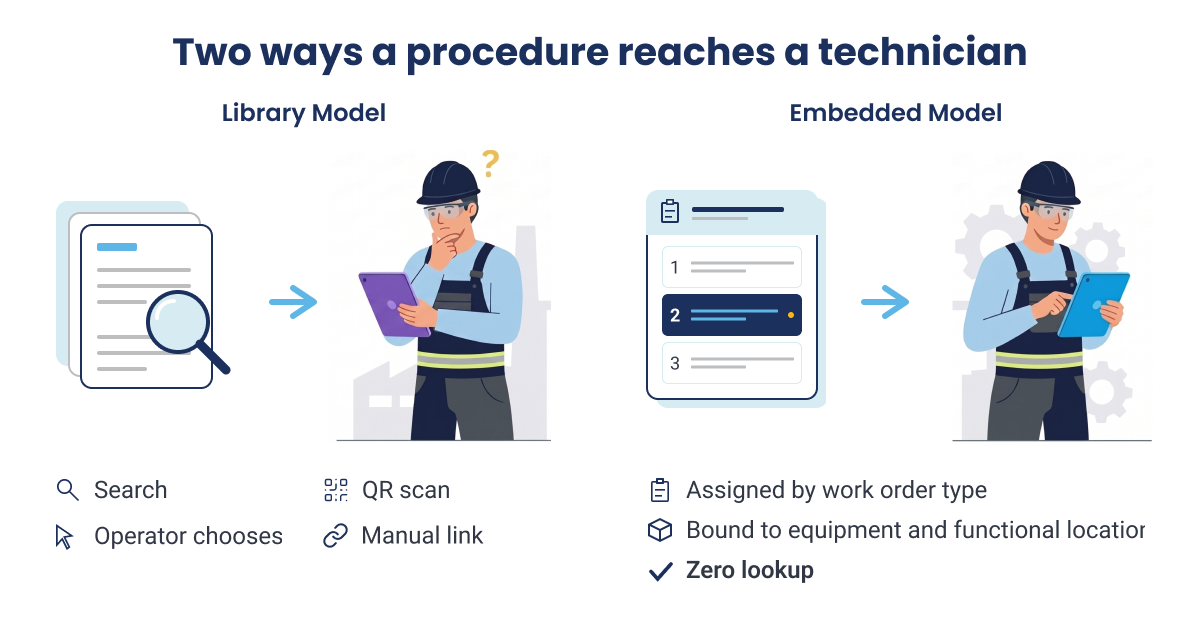
A standard operating procedure (SOP) describes a process, its purpose and responsibilities. A work instruction explains how to perform one task within that process. In a plant, the distinction also affects delivery: a procedure stored in a separate library may have to be searched for or selected, while an instruction embedded in a work order can arrive with the assigned job and be tied to the relevant equipment and functional location.
The 10 Best Work Instructions Software Platforms, Compared and Reviewed
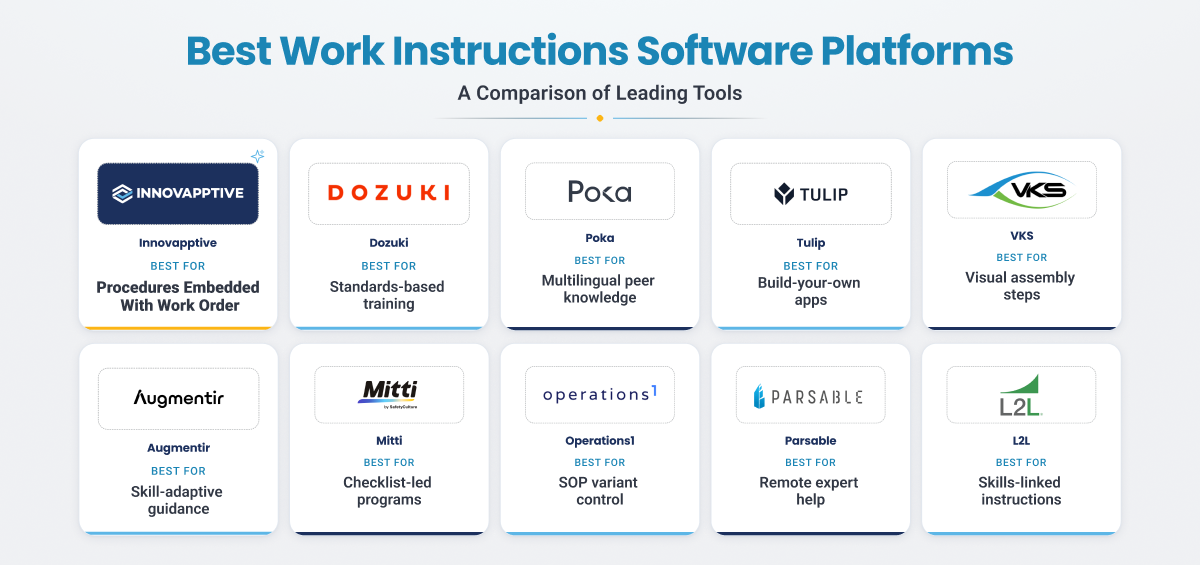
These ten platforms address different work instruction needs, from procedure authoring and training to execution linked to enterprise work. All of them turn a paper or PDF procedure into guided steps on a mobile device. The main difference is how the right procedure reaches the job. Some platforms keep instructions in a library that workers search or open with a QR code. Others build the procedure into an app, a checklist or a training path. A few attach it to the work order and the asset record. The delivery model affects how much manual work it takes to get the correct procedure to the technician.
Work Instructions Software at a Glance
The table below shows where each platform fits before the detailed reviews. It compares who each platform is built for, where it sits in your systems, whether technicians can work offline, and how pricing starts.
| Platform | Best fit | Where it sits in the stack | Offline execution | Starting price |
|---|---|---|---|---|
| Innovapptive | Asset-intensive plants that need the procedure inside the work order, operation or round | Execution layer over SAP, IBM Maximo or Oracle | Full offline execution with RapidSync | Custom enterprise pricing |
| Dozuki | Standard work authoring and standards-based training in manufacturing | Standalone authoring and training platform | Limited offline in the mobile app | Custom pricing |
| Poka (by IFS) | Multilingual food, beverage and light manufacturing floors | Connected worker platform inside the IFS stack | Not published | Custom pricing |
| Tulip | Regulated manufacturers with in-house engineers to build apps | No-code frontline app platform | Not published | From $100 per interface per month; 10-interface minimum |
| VKS | Visual assembly instructions with in-step data capture | Standalone visual work instruction platform | Not published | Custom pricing; free trial |
| Augmentir | Guidance that adapts to each operator's skill level | AI guidance layer over existing processes | Not published | Custom pricing |
| Mitti (formerly SafetyCulture) | Inspection and audit programs with instructions attached | Checklist and inspection platform | Offline in the mobile app | Free up to 10 seats; Premium from $24 per seat per month |
| Operations1 | Deep SOP documentation and variant control | Documentation-first process platform | Full offline in the mobile app | Custom pricing |
| Parsable | Large industrial organizations that need remote experts in the procedure | Connected worker platform | Offline execution in the mobile app | Custom pricing |
| L2L | Instructions tied to a live skills matrix and maintenance dispatch | Connected workforce platform with the former SwipeGuide engine | Not published | Custom pricing |
*Pricing note: Listed prices are vendor-published starting points at the time of writing, billed annually where stated. Actual terms depend on users, sites, integrations and deployment. Not published means the vendor does not document the capability publicly. It does not mean the capability is missing, so confirm those cells directly with the vendor.
1. Innovapptive: Best for Procedures That Have to Arrive Inside the Work Order
Innovapptive Digital Work Instructions Software runs inside its Connected Worker Platform, an execution layer that works on top of SAP S/4HANA, SAP PM, IBM Maximo or Oracle without replacing them. Each procedure is built as structured digital steps and embedded in the work order, operation, round plan or round task, bound to the equipment and functional location it belongs to.
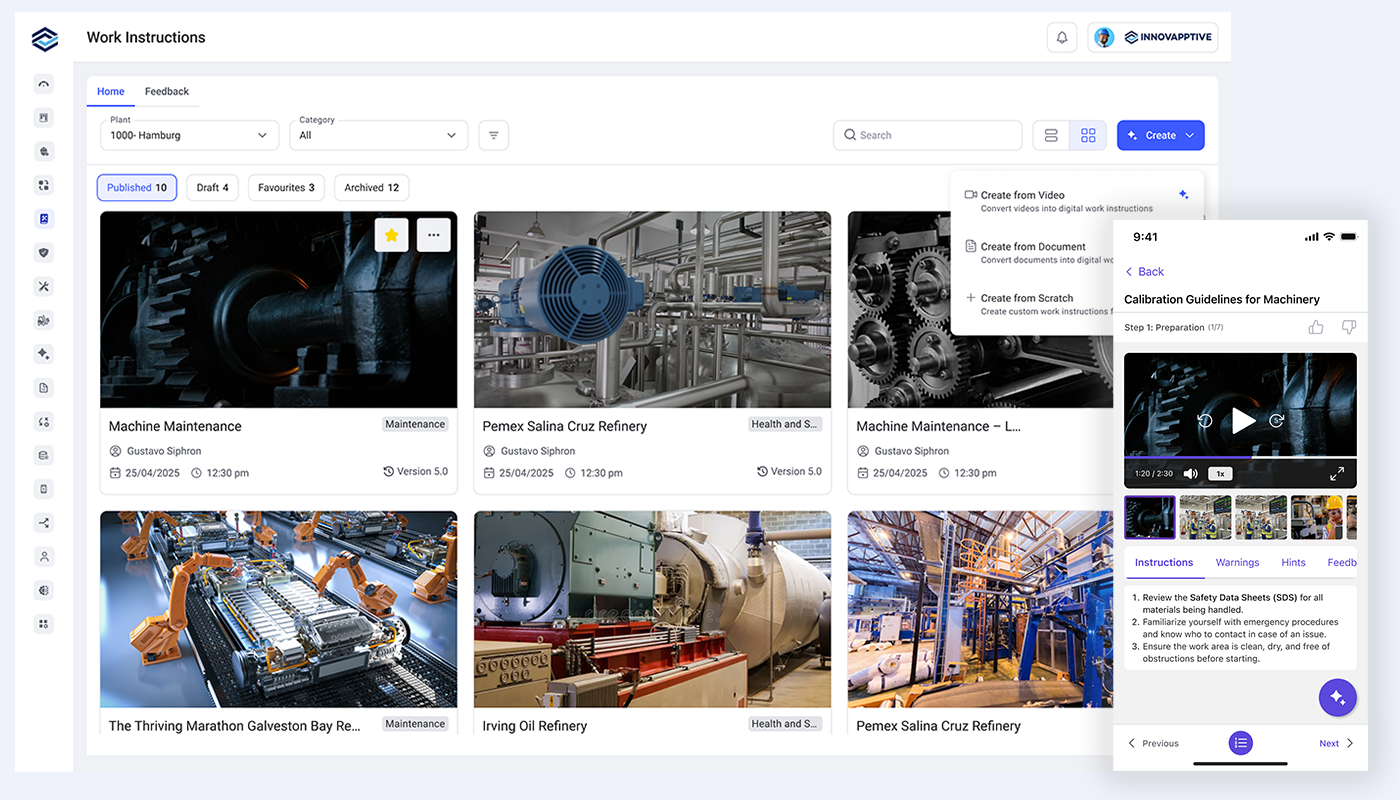
The workflow moves in a clear sequence. An expert records the job on video, or uploads an existing SOP, manual or PDF, and AI drafts the steps, images and required tools. A reviewer approves the draft before it is published. The approved procedure is mapped to a work order type against an asset or functional location, so every qualifying work order picks it up without manual linking. Technicians follow the steps on a mobile device, offline where needed. When a step is wrong, they flag that single step with a photo and a reason code, and the reviewer accepts or rejects the change.
Key capabilities:
- AI authoring from a recorded video or an existing SOP, manual or PDF. Innovapptive reports creation time falling by 90 percent or more compared with manual authoring.
- Assignment by work order type, asset and functional location, plus supervisor attachment at the operation, task and round plan level
- Step-level feedback with photo evidence, reason codes and an accept or reject review
- Full version history with author attribution, version comparison, one-click rollback, and archive and restore
- Built-in media editor for cropping, trimming and annotating images and video
- Offline execution through RapidSync, with feedback synced when the device reconnects
- 50+ ERP, CMMS, EHS, historian, APM and MES connectors through Integration Manager
| What stands out | Limitations and considerations |
|---|---|
|
|
Best fit for: Asset-intensive plants on SAP, IBM Maximo or Oracle where the procedure has to be tied to the work order and the asset record.
Consider another approach when: You want a lightweight, standalone authoring tool with no system of record behind it.
Ratings: 4.5 / 5 on G2
2. Dozuki: Best for Standard Work Authoring and Standards-Based Training
Dozuki combines controlled work-instruction authoring with standards-based training. Teams can manage a procedure through review and approval, then track training completion against the approved revision. That makes it relevant when production consistency, onboarding and evidence of qualification are central to the procedure program.
Key capabilities:
- Document control with custom approval workflows and revision history down to author, date and change detail
- In-line data capture, including supervisor sign-off and quality check values
- SCORM-compatible standards training with skill tracking
- QR-code access at the workstation and automatic translation
- Worker suggestions submitted directly from any step
| What stands out | Limitations and considerations |
|---|---|
|
|
Best fit for: Manufacturers whose business case rests on onboarding time, changeover time and audit readiness.
Consider another approach when: A failed instruction step needs to become a tracked action with an owner, due date and connection to the work order.
Ratings: 4.4 / 5 on G2
3. Poka (by IFS): Best for Multilingual Floors Built on Peer Knowledge
Poka focuses on frontline knowledge sharing and short lessons created by workers. Its Training Within Industry-style approach supports knowledge transfer across a multilingual workforce. Since its acquisition by IFS, buyers can also consider it within a broader ERP, EAM and field-service portfolio.
Key capabilities:
- Multimedia lessons with automatic translation
- QR-code access at the workstation without a personal login
- Skills matrix linked to training and lessons
- Knowledge sharing and collaboration tools for frontline teams
| What stands out | Limitations and considerations |
|---|---|
|
|
Best fit for: Food, beverage and light-manufacturing plants where multilingual training and sharing shop-floor knowledge are the main needs.
Consider another approach when: The procedure must be assigned with a maintenance job and return completion evidence to a system of record.
Ratings: 4.6 / 5 on G2
4. Tulip: Best for Regulated Manufacturers With In-House Build Capacity
Tulip is a no-code application platform, rather than a fixed work-instructions product. Teams build station-specific apps and can use them to deliver work instructions, capture data and connect procedures to equipment or sensors. That flexibility is valuable when an engineering team wants to shape a digital process around a specific line, but it also creates an ongoing app-design and maintenance responsibility.
Key capabilities:
- No-code app editor with AI conversion of PDFs into apps
- Edge connectivity to machines, sensors and smart tools
- ERP integration for order and material data
- GxP tooling, including 21 CFR Part 11 electronic signatures and auditable record history
| What stands out | Limitations and considerations |
|---|---|
|
|
Best fit for: Pharma, medical-device and other regulated manufacturers with internal engineering capacity to build and maintain frontline apps.
Consider another approach when: The maintenance team needs a governed procedure library and does not have staff to support custom app development.
Ratings: 4.5 / 5 on G2
5. VKS: Best for Visual Assembly Instructions With In-Step Traceability
VKS builds guided visual procedures from images, video and interactive annotations, and captures data inside each step. It is built for assembly and production lines where the visual step and the data it records become part of the product history.
Key capabilities:
- Visual authoring with images, video and interactive annotations
- In-step data capture through signatures, smart forms and IoT connections
- Mass updates across instruction templates and support for 30 languages
- Audit log, electronic device history record and certification tracking
| What stands out | Limitations and considerations |
|---|---|
|
|
Best fit for: Discrete manufacturing and assembly operations where the visual step and its captured data are part of the product record.
Consider another approach when: Most procedures are asset-based maintenance tasks rather than instructions for building or assembling a product.
Ratings: 4.2 / 5 on Capterra
6. Augmentir: Best for Guidance That Adapts to Operator Skill Level
Augmentir adapts guidance to the worker, taking proficiency, recent experience and certifications into account. Rather than delivering the same path to every operator, it focuses on supporting frontline performance through skill-aware instructions, remote help and AI-assisted workflows.
Key capabilities:
- Instructions personalized to the individual worker's skill level
- Remote expert support with live video and AR annotation
- Delivery on phones, tablets, AR headsets and wearables
- Generative AI assistant and AI agent tooling for frontline workflows
| What stands out | Limitations and considerations |
|---|---|
|
|
Best fit for: Plants where operator skills vary and adaptive guidance or remote expertise is a priority.
Consider another approach when: The primary requirement is a system that manages the complete instruction record and captures what happened after a step failed.
Ratings: 4.4 / 5 on G2
7. Mitti (formerly SafetyCulture): Best for Checklist-Led Programs With Instructions Attached
Mitti’s core workflow remains inspection and checklist management, with work instructions available as one of its template types. It can suit teams that already run audits and inspections in the platform and want to attach guidance without deploying a separate procedure system.
Key capabilities:
- Large template library for inspections and operational checks.
- QR-code issue reporting with photo and video evidence.
- Action assignment and custom report layouts.
- Mobile app with offline use.
| What stands out | Limitations and considerations |
|---|---|
|
|
Best fit for: Teams whose main requirements are inspections, audits and checklists, with work instructions as a secondary use case.
Consider another approach when: You need a dedicated procedure program linked to asset records, work orders and revision governance across multiple sites.
Ratings: 4.6 / 5 on G2
8. Operations1: Best for Deep SOP Documentation and Variant Control
Operations1 is designed for managing extensive procedure libraries, particularly when documents share reusable content and have many variants. Changes to a shared module can flow through all the instructions that use it, reducing the effort required to keep large libraries aligned.
Key capabilities:
- Drag-and-drop authoring with multi-level review workflows.
- AI-assisted conversion of Word, Excel, PowerPoint and PDF content into structured instructions.
- Image and video editing, plus if-then process logic.
- Variant-specific content, AI translation and full offline use in the mobile app.
| What stands out | Limitations and considerations |
|---|---|
|
|
Best fit for: Mechanical engineering and discrete manufacturers maintaining a large, high-variant procedure library.
Consider another approach when: Your main requirement is to prove that maintenance work was performed against a specific job and asset in real time.
Ratings: See reviews on Capterra
9. Parsable: Best for Remote Expert Collaboration Inside the Procedure
Parsable lets frontline workers bring a local or remote expert into a procedure through the mobile app. It combines structured instructions with collaboration, conditional workflows and data capture, making it relevant to large plants where specialist knowledge is spread across sites.
Key capabilities:
- No-code conversion of paper forms, checklists and SOPs into digital instructions and one-point lessons (OPL).
- Data from ERP, MES, CMMS and connected equipment pulled into the instruction
- Conditional logic for complex SOPs and compliance traceability
- In-app messaging and expert collaboration, including in areas with poor or no connectivity
- Support for 17+ languages
| What stands out | Limitations and considerations |
|---|---|
|
|
Best fit for: Large industrial organizations where expert time is scarce and support needs to be available inside the procedure.
Consider another approach when: You are a small, single-site team that needs a simple rollout with minimal configuration.
Ratings: 4/7/5 on G2
10. L2L: Best for Instructions Tied to a Live Skills Matrix
L2L combines the visual authoring engine formerly sold as SwipeGuide with broader manufacturing workflows for maintenance dispatch, production and quality. It connects instruction completion to training and skills qualification, so a worker’s task history can help maintain a live view of workforce capability.
Key capabilities:
- Drag-and-drop authoring from the former SwipeGuide engine
- Maintenance dispatch tickets and work orders linked to the relevant instruction
- Training assigned by role, machine or required skill
- Live skills matrix connected to instruction completion
- Execution AI that suggests root causes and next actions
| What stands out | Limitations and considerations |
|---|---|
|
|
Best fit for: Manufacturers that want instructions, training and skills qualification managed in one system.
Consider another approach when: You want the standalone visual authoring product SwipeGuide used to be.
Ratings: 4.3 / 5 on G2
Detailed Work Instructions Software Comparison
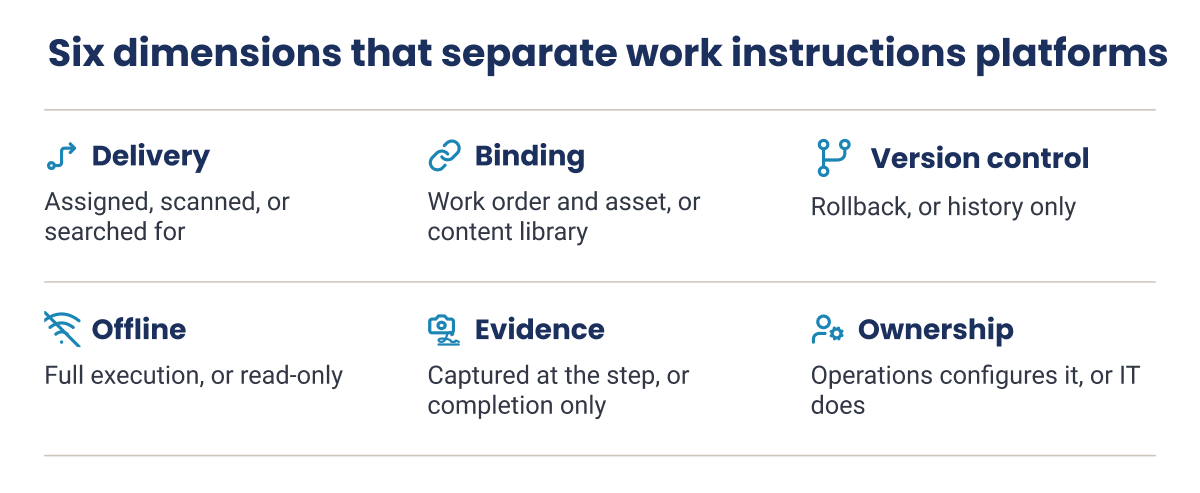
The detailed comparison focuses on operational differences that are easy to miss in a product demo: how a procedure reaches the worker, how it is linked to an asset or work order, what revision controls are available, whether technicians can complete the task offline and what evidence is recorded.
| Platform | How the procedure reaches the technician | Bound to an asset or work order | Version control and rollback | Offline execution | Evidence captured in the step | How content is updated | Where it may not fit |
|---|---|---|---|---|---|---|---|
| Innovapptive | Assigned automatically by work order type, asset and functional location | Work order, operation, round plan, round task, equipment and functional location | Full history with author, version comparison and one-click rollback | Full offline execution with RapidSync | Step completion against the work order; photo evidence with step feedback | Step-level field feedback with accept or reject review; archive and restore | Small team seeking standalone authoring only |
| Dozuki | QR scan at the workstation or library search | Workstation and content library | Revision history with author, date and detail; approval workflows | Limited offline in the mobile app | Sign-offs and quality check values in the step | Approval workflows; worker suggestions from any step | Needs automatic work-order action tracking after a failed step |
| Poka (by IFS) | QR scan at the workstation, no personal login | Workstation and machine | Not published | Not published | Completion and skills records | Operators create and share lessons | Needs strong work-order-driven procedure execution |
| Tulip | Opens in the app built for that station | Station and machine through app logic | App versioning and auditable record history | Not published | Machine and sensor data, electronic signatures | Apps edited by in-house builders | No internal resources to build and maintain apps |
| VKS | Opened at the workstation | Product and workstation | Version control with audit log | Not published | Signatures, smart forms and IoT data | Mass updates across instruction templates | Procedures are mainly asset-based maintenance tasks |
| Augmentir | Assigned and adapted to worker proficiency | Job and worker profile | Not published | Not published | Completion and performance data | Not published | Needs the platform to manage the record after a failed step |
| Mitti (formerly SafetyCulture) | Template chosen by the user or a schedule; QR scan | Templates and asset records inside the platform | Not published as a named feature | Offline in the mobile app | Photos, notes and signatures | Template edits by administrators | Dedicated procedure program tied to an asset register |
| Operations1 | Selected from assigned processes | Product variant | Multi-level review workflows | Full offline use in the mobile app | Not published | Module changes carry into every linked document | Needs real-time evidence tied to work orders |
| Parsable | Job opened in the mobile app with ERP and MES data pulled in | ERP, MES and CMMS data in the job | Not published | Offline execution in the mobile app | Data capture with compliance traceability | No-code template edits | Small single-site team needing minimal setup |
| L2L | Linked from dispatch tickets and work orders | Machine and dispatch ticket | Not published | Not published | Checklist completion tied to the skills matrix | Drag-and-drop instruction edits | Needs standalone SwipeGuide authoring product |
Most Rollouts Stall on Authoring, Not Software
The solution brief shows how Digital Work Instructions turns a video or existing SOP into an approved procedure, delivers it inside the work order, and keeps it current with step-level corrections from the field.
How We Evaluated These Work Instructions Platforms
We considered eighteen platforms used to create and deliver work procedures and reviewed ten in depth. The comparison draws on vendor product documentation and third-party review or customer-reference pages. We assessed each platform against six dimensions that affect whether an approved procedure can be used consistently on a real plant floor:
- Procedure delivery: How the procedure reaches the technician, whether it is assigned automatically, scanned or searched for. This affects whether the right procedure is used on every job or only when someone remembers.
- Asset and work-order binding: Whether the procedure is tied to a work order, equipment and functional location, or kept in a content library. Binding lets the system of record decide which procedure arrives.
- Version control and rollback: Whether every revision keeps its author, date and change description, and whether a bad edit can be reversed quickly. Auditors ask which version was live, so history matters as much as the current text.
- Offline execution: Whether technicians can read, perform and record steps with no signal, or only view cached content. Many plants have tank farms, basements and remote areas with poor coverage.
- Evidence capture: Whether photos, readings, signatures and reason codes are captured at each step or only at job completion. Step-level evidence shows how the work was done, not just that it was closed.
- Content migration and ownership: How much effort it takes to move the existing library, and whether operations or IT keeps it current afterwards.
Related Tools for Adjacent Workflows
Several related products solve neighboring problems. They may be the right choice for a different workflow, but they were not included among the ten detailed reviews because their primary use case differs from delivering and governing task instructions for physical plant work.
- Scribe captures screen-based steps for software and office processes. It is useful for desk procedures, but it is not designed around offline plant work or asset-linked instructions.
- MaintainX is a maintenance management platform with checklists and procedures. It is worth evaluating when work orders and maintenance management are the main requirement rather than dedicated procedure authoring.
- SwipeGuide is no longer sold as a standalone product; its authoring engine is now part of L2L, which is reviewed above.
- Siemens Tecnomatix supports engineering and manufacturing planning. It is different from a frontline platform that delivers procedures to operators during the job.
- SweetProcess and Trainual focus on business-process documentation and employee onboarding. They are better aligned with office and administrative workflows than asset-bound plant execution.
- BILT provides 3D interactive instruction content as a service, rather than a procedure platform that an operations team governs end to end.
- DeepHow focuses on converting expert video into step-by-step instructions, including translation. Buyers needing work-order binding and asset-level execution records should confirm whether they need a complementary platform.
Work Instructions Are One Part of a Bigger Execution Gap
Plants have more alerts, analytics and procedures than ever, yet much of it never reaches consistent frontline action. This whitepaper explains how AI agents, from digitizing procedures to delivering work instructions, connect insight to execution across operations, maintenance, reliability and safety.
How to Choose Work Instructions Software for Your Operation
Company size tells you very little in this category. What matters is where your procedures need to live, what they are for and how your plant runs. The four questions below cover the most common deciding factors, and the table at the end summarizes them. If your needs go beyond procedures to rounds, permits and inspections, compare the best connected worker platforms as well.
If Your Procedures Have to Live Against SAP, Maximo or Oracle
If your work orders live in SAP, IBM Maximo or Oracle, the key test is whether the procedure arrives with the work order or has to be attached by hand. When a planner has to link a PDF to each job, the procedure is skipped whenever that link is missed.
In a demo, ask the vendor to open a real work order for one of your assets and show the correct procedure already in place. Then ask what flows back. Read-only integration pulls work order data in. Write-back sends step completion, readings and findings to the system of record, so it reflects what was actually done.
If You Run High Product Variance and Assembly Work
One product family can create dozens of instruction versions. If each variant is a separate document, the library quickly becomes too large to keep current. The authoring model needs to handle variants without making technicians choose from a long list or follow a procedure intended for a different product configuration. Look at how conditions, options, images and data capture are represented and what changes when an engineering specification is updated.
In a demo check for capabilities such as : i) modular authoring that lets you change a shared step once and have it update everywhere it is used. ii) Variant control and selection driven by order data help make sure the operator sees the right version without choosing it from a long list.
If Compliance Evidence Is What the Procedure Is For
This is usually the priority for operations managers who own compliance documentation and process standards across shifts and sites. Three requirements matter most: only an approved version can reach the floor, that the current approved revision is the one workers use, and that the record identifies the version, approver and completion evidence. An auditor will typically ask which version was live on a given date, who approved it, who was trained on it, and what shows the steps were performed. Ask the vendor to retrieve a historical job and show the procedure revision and associated records exactly as they existed at the time.
In US process plants, procedure governance may support obligations under OSHA process-safety and control-of-hazardous-energy requirements. Regulated manufacturers may also need to meet 21 CFR Part 11 or quality-system document-control requirements. Map the platform’s capabilities to your specific obligations rather than assuming a general audit trail satisfies every standard.
Where Work Instructions Software Fits Alongside Your CMMS, MES and Document System
Work instructions software works next to several systems a plant already runs, and it helps to be clear about which system owns what. A manufacturing execution system (MES) schedules and tracks production. CMMS, EAM and Maintenance management software, owns the work order and the asset record. A document management or PLM system stores and version-controls the approved document. Work instructions software should deliver the approved steps to the worker and capture how the task was performed, while respecting those existing systems rather than creating conflicting records.
Key things to look for are:
- Look for duplicate procedure libraries where changes must be maintained in more than one place.
- Check whether CMMS checklists repeat the same steps already managed in the work-instructions platform.
- Avoid forcing workers to use two mobile apps for one task unless the workflow and responsibility split are clear.
Are You Digitizing a Paper Library for the First Time?
Content migration is often a larger task than installing the software. Ask vendors to estimate the effort per procedure, explain how existing Word files and PDFs are converted, and show how approvals and safety checks are preserved. AI may create a useful first draft, but a qualified owner still needs to verify the steps against the equipment and approve the final procedure.
Pilot a common job rather than a showcase procedure. It should involve the usual work order, asset, tools, parts, access constraints and offline conditions. Track how long it takes to prepare the instruction, how many manual steps the technician performs to find it, and whether the final evidence returns to the right record.
The table below summarizes which platforms to consider first for each situation.
| Your situation | What to prioritize | Platforms to consider |
|---|---|---|
| Instructions must run against SAP, IBM Maximo or Oracle | Automatic assignment to work orders, binding to equipment and functional location, write-back of results | Innovapptive, Parsable, Tulip |
| Complex product or process variants | Modular content, variant control, selection driven by order data | Operations1, VKS, Tulip |
| Auditability and controlled revisions | Approval before release, version history with rollback, step-level evidence | Innovapptive, Dozuki, Tulip |
| First move from paper | AI conversion, migration effort per procedure, clear content ownership | Innovapptive, Operations1, Dozuki |
| Training and skills are the main gap | Skill-based guidance, skills matrix, multilingual lessons | Augmentir, L2L, Poka |
| Inspections first, instructions second | Template library, issue reporting, low-cost entry | Mitti (formerly SafetyCulture) |
Six Key Benefits of Work Instructions Software
The biggest operational benefit comes from reducing the manual work between approving a procedure and using it on the job. In industrial environments, the value depends on how instructions are assigned, updated and recorded, not just on digitizing the original document.
1. The Right Procedure Reaches the Job
Paper copies and PDFs depend on workers or planners to find the right document, confirm its revision and attach it to the job. When instructions are assigned by work order type, equipment and location, that lookup step can be reduced. Supervisors can also see whether the procedure was used instead of relying on informal confirmation.
2. Experienced Workers’ Knowledge Becomes Reusable
Experienced technicians often rely on details that never made it into the formal SOP. Recording a task and using AI to draft the initial steps can help capture that knowledge before it is lost. The draft still needs review by a qualified person, especially where safety, isolation or compliance steps are involved.
3. Procedure Changes Stay Controlled
When a step changes, document control needs to show who changed it, who approved the revision and where it became effective. Version comparison and rollback help teams correct mistakes without losing the history of earlier revisions. Reusable content modules can also reduce the effort of keeping similar instructions aligned across equipment variants.
4. Audit Evidence Is Easier to Retrieve
When readings, photos, signatures and exception reasons are recorded as work progresses, the evidence is easier to trace than information scattered across paper forms, email and separate spreadsheets. For regulated operations, the team should be able to retrieve the approved revision and the associated completion record for a given job and date.
5. New Technicians Can Qualify Faster
Consistent step-by-step guidance gives less experienced workers a reference they can use at the equipment. Training and skills features can help supervisors see which procedures an employee has completed and where further coaching is needed. The effect depends on procedure quality and supervision; digitizing a confusing procedure does not make it clearer.
6. Corrections Can Improve the Standard Work
A technician who finds a missing step or unclear image should have a simple way to flag it. A reviewer can then evaluate the feedback and update the controlled instruction. Over time, this provides a practical route to improve procedures from field experience without allowing unapproved edits to become the new standard.
Cut Manual Documentation by 80 to 90 Percent
See the 15 AI agents behind these results, from authoring and work instructions to troubleshooting and inspections, and where each one fits in your maintenance and operations workflows.
Why Asset-Intensive Plants Choose Innovapptive for Work Instructions
For an asset-intensive plant, a work instruction is most useful when it is part of the job rather than a separate document the technician must locate. Innovapptive links structured instructions to work orders, operations, round plans and round tasks, bound to the equipment and functional location in systems such as SAP, IBM Maximo or Oracle. This helps maintenance and operations teams keep the procedure, field activity and enterprise record connected without replacing the system they already use.
Innovapptive Digital Work Instructions Software combines AI-assisted authoring, assignment in the planning workflow, offline execution through RapidSync, step-level feedback and controlled revisions. The practical distinction is the connection between those functions: teams can create or update a procedure, get it approved, deliver it with the job and review feedback from the field. Frost & Sullivan recognized this end-to-end execution model, along with platform breadth and AI capability, and named Innovapptive as 2026 Company of the Year award for Global Augmented Connected Platforms.
Customer Result: Indorama Ventures
Indorama Ventures, a global chemical manufacturer, deployed the Innovapptive Connected Worker Platform at its Port Neches, Texas site. The rollout connected work orders, operator rounds, work instructions and inventory with the SAP PM and IBM Maximo systems the site already ran. Within 12 months, the site reported these results:
| Metric | Before | After |
|---|---|---|
| Realized annual maintenance savings | $19M | |
| Work instruction use | Under 20% | 85% |
| Maintenance backlog | 24 weeks | 10 weeks (58% lower) |
| Contractor headcount | 140 | 87 (38% lower) |
| PM-to-CM ratio | 45% | 80% |
Results are from the full Connected Worker Platform deployment at one site.
For work instructions, the usage figure is the one to watch. Procedure use rose from under 20 percent to 85 percent once instructions reached crews in the same mobile workflow as their work orders and rounds.
From Under 20% to 85% Work Instruction Use at Indorama Ventures
See how one chemical site connected work orders, rounds and procedures to SAP PM and IBM Maximo, then realized $19M in maintenance savings. Or bring your own procedure and see it delivered to a live work order.

Unlock Margins Hidden in your Maintenance
Watch how leading manufacturers improve OEE, increase PM compliance, and reduce downtime through connected execution.
- 21-10-2026
10 Best Work Instructions Software: Compared and Reviewed
Choosing work instructions software is about more than turning a PDF into guided steps on a tablet....

- 15-10-2026
Maintenance Digitalization: A Digital Transformation Guide
Maintenance digitalization is the shift from paper, spreadsheets and disconnected tools to...

- 12-10-2026
Manufacturing Skills Gap: What It Costs and How to Close It
A plant can have every role filled and still experience a manufacturing skills gap. Very often,...