
What Is a Work Order?
A work order is the formal document, on paper or in a digital system, that authorizes a maintenance, repair or service task and records how it was carried out. It names the asset, describes the work, sets the priority, assigns the job to a technician or crew, lists the parts and labor, and captures the result once the job is closed. In short, it turns a maintenance request into a task someone is accountable for and that the plant can track.
| A work order is the authorization to begin a defined maintenance task and the permanent record of how that task was completed. |
This dual role of work order is easy to miss. Often plants while describing work order stop at the first half of that job, the instruction to do the work. The second half, the record of what was actually done, matters just as much.
Before the job, the work order tells a technician what they are cleared to do, on which asset, with which parts and under which safety conditions. After the job, it is often the only evidence the work happened at all. That second half is what audits, warranty claims and capital planning depend on, and it is the half most teams often fail to capture.
A work order is used to:
- Authorize and prioritize a specific task against a specific asset.
- Give the technician the scope, parts, permits and safety requirements for the job.
- Capture the labor hours, materials and cost the task consumed.
- Build the maintenance history that reliability and replacement decisions rely on.
- Provide the audit and compliance record that proves the work was done.
Depending on the plant and system a work order is also called as a maintenance job card or a job ticket. However, irrespective of the term they serve the same purpose.
The Anatomy of a Work Order: The Fields That Actually Get Used
A work order has a lot of fields, but a handful carry most of the weight. These are the ones that decide whether the technicians arrives ready and whether the record is useful once the job is closed. The table below lists them and what each one drives downstream:
| Field | What it holds | Why it matters downstream |
|---|---|---|
| Work order number | The unique ID for the job | Ties every cost, part and labor entry back to one traceable record |
| Asset or functional location ID | The equipment or plant location the work is against | Decides whether cost of ownership can be tracked at the asset level |
| Work order type | The classification, such as preventive or corrective | Sets priority, planning treatment and cost coding for the whole job |
| Priority | How urgent the work is | Governs where the job sits in the schedule and which work gets displaced |
| Status | Where the job is in its lifecycle | Tells planners and supervisors what is open, blocked or ready to close |
| Requester | Who raised the work | Supports follow-up and separates the request from the approval |
| Assigned technician or crew | Who is responsible for execution | Enables labor tracking and accountability for the job |
| Task description | What needs to be done | Determines whether the crew arrives ready or has to diagnose on site |
| Safety and isolation requirements | Permits, lockout and PPE needed | Confirms the job cannot start until hazardous energy is controlled |
| Parts and materials | The components the job needs | Drives reservation, staging and the accuracy of stock records |
| Estimated vs actual labor hours | Planned hours against hours booked | Feeds planning accuracy and the true labor cost of the work |
| Scheduled and actual dates | When the job was planned and done | Supports schedule compliance and backlog age tracking |
| Completion notes | What the technician found and did | Turns a closed ticket into usable knowledge for the next job |
| Failure or root cause code | Why the asset needed work | Makes reliability analysis and mean time between failures possible |
Two of these fields are skipped more than any other, and both omissions are expensive. Failure coding is the first. Without it, a closed work order records that a repair happened but not why, so the asset history cannot support any reliability analysis later. Actual labor hours are the second. When technicians book estimated hours instead of real ones, or skip the entry altogether, the plant loses the one number that shows where maintenance labor actually goes.
Work Order vs Work Request vs Purchase Order vs Job Order
A work order is often confused with the documents that sit around it. The table below separates them.
| Document | What it authorizes | Who raises it | How it relates to a work order |
|---|---|---|---|
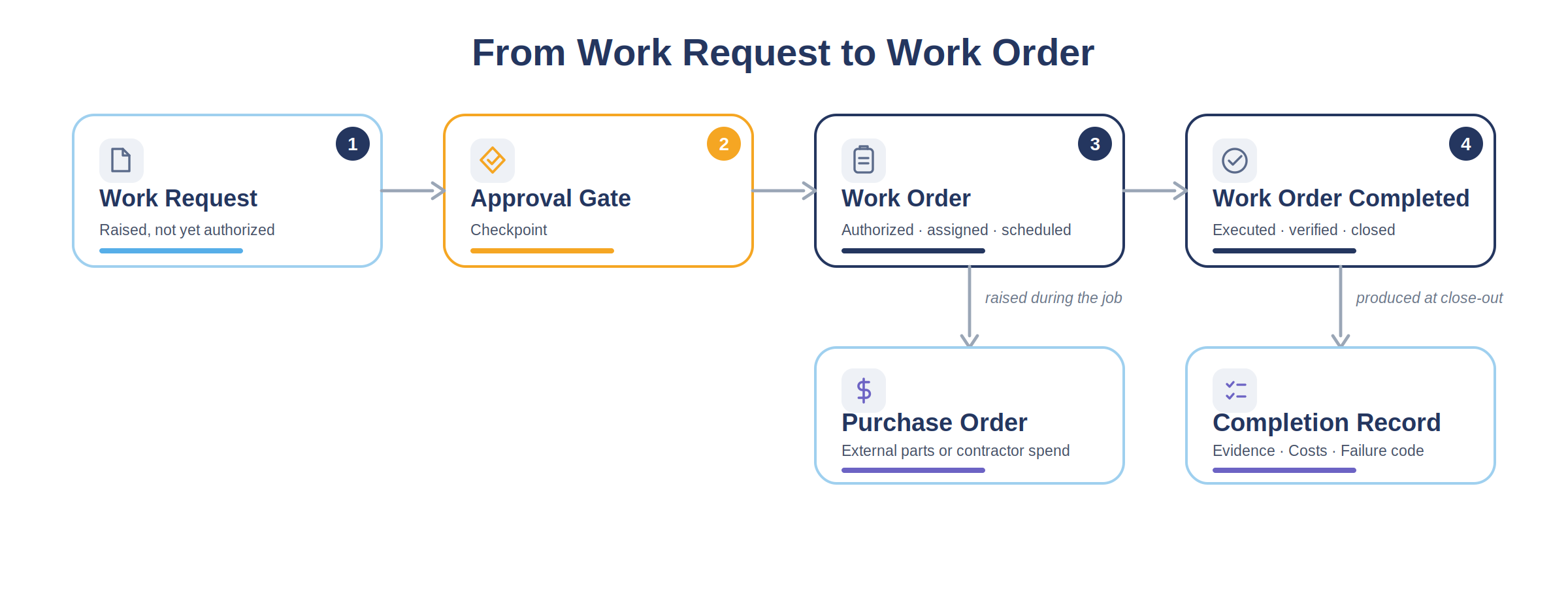
| Work request or maintenance request | Nothing yet: it is a report that something needs attention | An operator, technician or automated alarm | Becomes a work order only after it passes the approval gate |
| Work order | A specific maintenance task on a specific asset | A planner or supervisor, after approval | The approved, resourced and scheduled job itself |
| Purchase order | External spend on parts, materials or contractor labor | Procurement, against a job requirement | Pays for parts or contractor labor a work order needs. It is not the work order itself |
| Job order | A production run in manufacturing | Production planning | Shares the name but authorizes making product, not maintaining an asset |
| Service order | A customer-facing, often billable job | A service or field team | A work order variant used when the work is done for a customer |
| Service request | A report asking for service | A customer or internal user | The service-side equivalent of a work request, upstream of a service order |
One distinction here does real damage when it is blurred: the gap between a request and an approved work order. A work request is not authorization. If a technician treats an unapproved request as a green light to start work, two problems follow. There is a safety exposure, because the isolation and permit checks that approval triggers have not run. And there is a data problem, because unapproved work never gets planned, priced or counted properly.
A Maintenance Work Order Template Built For Reliability, Not Just Record-Keeping.
Get a maintenance work order template built for asset-intensive plants, with functional location, permit and isolation checks, per-technician labor, and a failure code built in.
The 9 Types of Work Orders, and When Each One Is the Right Call
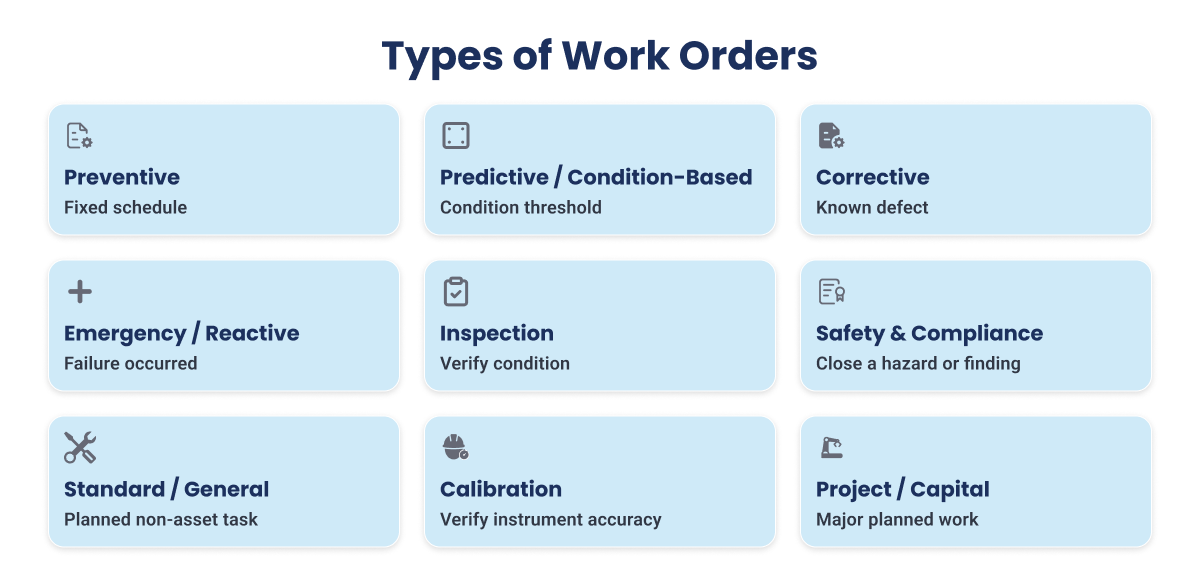
There are nine common types of work orders: preventive, predictive or condition-based, corrective, emergency or reactive, inspection, safety and compliance, calibration, standard or general, and project or capital. Each one describes a different reason the work exists, and each one is planned, prioritized and cost-coded differently.
Work order types often vary based on the source used for classification. While some classify work order by maintenance strategy, such as preventive versus reactive, others classify by administrative purpose, such as project versus standard. Neither basis is wrong, but mixing them is how enterprises end up with contradictory lists. This guide groups work orders by the reason the work is raised, because that is the question a planner is actually answering when they classify a job. On that basis, nine types cover the work an asset-intensive plant runs.
1. Preventive Maintenance Work Orders
A preventive maintenance work order schedules a task before failure, on a fixed interval.
- Triggered by: a calendar date, a runtime threshold or a cycle count, not a fault.
- Example: a compressor valve inspection due every 4,000 runtime hours.
- Data it produces: PM compliance, the share of scheduled preventive work completed inside its due window. It feeds a wider preventive maintenance strategy that decides which intervals are worth keeping.
2. Predictive and Condition-Based Work Orders
A predictive or condition-based work order is triggered by a measured condition rather than a fixed schedule. Here, predictive maintenance is an industry category, not a specific technology claim.
- Triggered by: a sensor reading or an inspection measurement crossing a set limit.
- Example: a rising vibration trend on a pump drive-end bearing that crosses its alarm level.
- Data it produces: the lead time between the alert and the intervention, which shows how much warning the plant is acting on.
3. Corrective Work Orders
A corrective work order repairs a defect that has been found but has not yet caused a failure. The job is planned into the next suitable window rather than done in a rush.
- Triggered by: a finding, usually from an inspection or a preventive task.
- Example: a seal weeping on a route inspection, scheduled for the next unit window.
- Data it produces: corrective backlog age, the time a known defect waits before it is fixed.
One point is worth making clear: corrective work is planned work that comes from a defect you found. It is not the same as reactive work, which comes from a failure that has already happened.
4. Emergency and Reactive Work Orders
An emergency or reactive work order responds to a failure that has already happened and carries a safety, environmental or production-critical consequence. The work starts immediately, often ahead of everything else.
- Triggered by: an unplanned trip or breakdown.
- Example: a critical feed pump tripping and halting a production train.
- Data it produces: the share of unplanned work as a percentage of total, one of the clearest signals of how reactive a plant still is. A high, rising figure usually points back to gaps in the preventive and corrective work that should have caught the problem earlier.
5. Inspection Work Orders
An inspection work order verifies condition or compliance rather than carrying out a repair. Its findings often generate corrective work orders. In process plants an inspection record is a legal document, not just an internal task.
- Triggered by: a scheduled route, a regulatory interval or a post-event check.
- Example: a relief valve inspection on a pressure vessel.
- Data it produces: inspection findings and a compliance record. OSHA 1910.119(j) mechanical integrity requirements require written procedures and documentation of each inspection and test performed.
6. Safety and Compliance Work Orders
A safety and compliance work order corrects an identified hazard or closes a regulatory finding. Work of this kind almost always carries an isolation dependency: energy has to be controlled before the job can begin.
- Triggered by: a hazard, an audit finding or a mandated corrective action.
- Example: a guarding repair on an agitator drive.
- Data it produces: time to closure on safety findings. OSHA 1910.147 control of hazardous energy sets the lockout procedures that must be satisfied before energy is restored, which is why this work order cannot be treated as a standalone instruction.
7. Calibration Work Orders
A calibration work order verifies and adjusts an instrument against a traceable standard. In several industries, including custody transfer, pharmaceutical and food processing, calibration intervals are set by external regulation rather than chosen internally.
- Triggered by: a calibration interval or a post-repair check.
- Example: calibrating a transmitter on a custody transfer meter.
- Data it produces: the traceability record that an audit relies on, and the formal proof that the interval was met.
8. Standard and General Work Orders
A standard or general work order covers a planned task with no asset failure behind it. However, a key aspect here that plant managers should note is a growing uncategorized work bucket, and an oversized general category is itself a warning sign.
- Triggered by: a non-critical need rather than a fault.
- Example: relocating a spare parts staging rack.
- Data it produces: visibility into labor that is not tied to a specific asset. When a large share of hours lands here, the plant has lost the ability to see where its labor actually goes.
9. Project and Capital Work Orders
A project or capital work order covers major planned work. This is where maintenance execution meets capital accounting, and miscoding distorts both: capital work booked as expense understates the asset base, and expense work booked as capital overstates it.
- Triggered by: an approved capital project, a turnaround scope or a major modification.
- Example: a heat exchanger bundle replacement during a scheduled turnaround.
- Data it produces: a clean separation between capital and expense cost.
Choosing the Right Work Order Type: A Decision Table
Definitions are only useful if you can apply them to the job in front of you. The table below covers the boundaries where planners actually hesitate, and names the specific data problem each miscoding creates.
| If this is true | Then use this type | Common miscoding to avoid |
|---|---|---|
| A defect was found during an inspection but the asset is still running | Corrective | Logging it as reactive, which inflates unplanned work and hides that the plant caught the defect in time |
| The asset has already failed and stopped | Emergency or reactive | Logging it as corrective, which understates true reactive load and flatters the planned ratio |
| Work is triggered by a sensor threshold, not a date | Predictive or condition-based | Logging it as preventive, which hides how much condition data is actually driving action |
| A hazard was found and needs correcting | Safety and compliance | Logging it as a standard job, which buries safety response time inside general work |
| A repair is large enough to be a capital replacement | Project or capital | Logging it as expense maintenance, which distorts both the maintenance budget and the asset base |
| A recurring task keeps being raised one job at a time | Preventive | Leaving it as repeated general orders, which hides a task that should be on a schedule |
| The work has no asset and no failure behind it | Standard or general | Coding it to a nearby asset, which corrupts that asset's maintenance history and cost |
The exact label matters less than using the same one every time. A plant where every planner records a found defect as corrective will read its data correctly. A plant where the same job is classified three different ways cannot trust any of its maintenance numbers, however carefully the categories are defined. The point is not perfect categories. It is a consistent process, because random classification quietly corrupts every number that depends on it.
Make Work Order Discipline The Default, Not The Exception.
Discover how asset-intensive plants standardize all nine work order types across crews and sites, on top of SAP, IBM Maximo or Oracle, so every job is classified and closed the same way.
What Changes When It Is a Maintenance Work Order in a Process Plant
A maintenance work order differs from a general work order in one important way: it is tied to a specific physical asset that has its own maintenance history. That link is what makes the record worth analyzing, and it brings in three things a general work order does not have to deal with.
Asset and functional location hierarchy: In an asset-intensive plant, every job is recorded either against a specific asset or against a functional location, which is the position in the plant where that asset sits. This is not a small detail. If a job is recorded against the location instead of the asset in it, the cost and failure history builds up at the wrong level, and you can no longer track the true cost of owning that asset. Over the years, that is how a plant loses the ability to compare two pumps and decide which one to replace.
Work order dependencies: A maintenance work order is rarely ready to go the moment it is raised. It usually depends on parts being staged, a permit to work being issued, an isolation being confirmed, and technicians with the right certification being available. If any one of these is missing, an otherwise complete work order cannot be carried out, and a crew that travels to the job loses wrench time as they find something missing at the asset. Treating these dependencies as part of the order, rather than as separate things to check on the morning of the job, is what keeps the schedule realistic.
| Dependency | What it blocks if missing |
|---|---|
| Parts and materials | The job cannot start, or starts and stalls waiting for a part |
| Permit to work | Execution cannot legally begin in a high-hazard area |
| Isolation and lockout | Work on energized equipment cannot proceed safely |
| Crew certification | The assigned technician is not cleared for the task |
Multi-technician labor capture: Process plant jobs often involve two to six people at once: a fitter, an electrician, a rigger, a safety watch. A system that assumes one technician per work order records one person's hours and misses the rest, which understates what the job really costs in labor. On a turnaround, where most work involves several trades, that gap is big enough to make the labor numbers meaningless. Capturing hours for each technician against the order is the only way the recorded cost matches what the job actually took.
These three issues are exactly what a connected worker platform is built to close. As an industrial execution platform, Innovapptive keeps the work order tied to the right asset and its dependencies rather than to a location or a loose queue. Mobile maintenance runs the job at the asset, planning and scheduling confirms parts and permit readiness before a crew mobilizes, and labor is captured for each technician on the order, so multi-crew jobs cost what they actually took.
Work Order Examples From the Plant Floor
The examples below are complete work orders as they would appear in an asset-intensive plant, with realistic values in every field. They use the same field structure throughout, so the fields stay consistent from one example to the next.
A preventive work order on a rotating asset.
| Field | Value |
|---|---|
| Work order number | WO-104582 |
| Type | Preventive |
| Asset | P-2301A boiler feed pump |
| Functional location | UNIT-23 / PUMPS / P-2301A |
| Priority | 3 (routine) |
| Trigger | 4,000 runtime hours reached |
| Task | Inspect and replace mechanical seal, check coupling alignment |
| Safety | Lockout tagout required, hot work permit not required |
| Parts | Seal kit SK-2301, coupling insert |
| Estimated hours | 6.0 |
| Actual hours | 7.5 |
| Completion notes | Seal replaced, alignment corrected within tolerance |
| Failure code | PM-SEAL-PREVENTIVE (no failure found) |
A corrective work order raised from an inspection finding.
| Field | Value |
|---|---|
| Work order number | WO-104731 |
| Type | Corrective |
| Asset | HX-1140 shell and tube heat exchanger |
| Priority | 2 (schedule next window) |
| Trigger | Tube-side gasket weep found on route inspection |
| Task | Replace channel head gasket, re-torque to spec |
| Safety | Lockout tagout, line drain and flush required |
| Parts | Spiral wound gasket GK-1140 |
| Estimated hours | 10.0 |
| Actual hours | 9.0 |
| Completion notes | Gasket replaced, no leak on restart |
| Findings code | CM-GASKET-LEAK |
An inspection work order with a regulatory driver.
| Field | Value |
|---|---|
| Work order number | WO-104802 |
| Type | Inspection |
| Asset | PSV-0455 relief valve on V-410 separator |
| Priority | 2 |
| Trigger | Statutory inspection interval due |
| Task | Remove, bench test and reset relief valve, verify set pressure |
| Safety | Lockout tagout, isolation and blind list attached |
| Parts | Test seal kit as required |
| Estimated hours | 4.0 |
| Actual hours | 4.0 |
| Completion notes | Set pressure verified at 150 psig, tag renewed |
| Findings code | INSP-PSV-PASS |
A project work order tied to a turnaround scope.
| Field | Value |
|---|---|
| Work order number | WO-105010 |
| Type | Project or capital |
| Asset | HX-2205 reactor feed exchanger |
| Priority | Turnaround critical path |
| Trigger | Approved turnaround scope, tube bundle replacement |
| Task | Pull and replace tube bundle, hydrotest, reinstate |
| Safety | Full isolation, confined space, lifting plan attached |
| Parts | Replacement bundle BN-2205 |
| Estimated hours | 240 (all technicians) |
| Actual hours | 268 (all technicians) |
| Cost coding | Capital |
| Completion notes | Bundle replaced, hydrotest passed, returned to service |
| Findings code | CAP-BUNDLE-REPLACE |
The Difference Between a Vague Request and a Complete Work Order
Field completeness is not paperwork for its own sake. It changes what the job costs. The table below shows the same requests written two ways, and what the gap costs the plant.
| What the requester wrote | What a complete work order says | What the difference costs |
|---|---|---|
| Pump leaking | P-2301A boiler feed pump, seal leak at drive end, isolate and replace mechanical seal, seal kit SK-2301 required | Two trips instead of one: about 2 to 3 labor hours lost on a diagnostic visit, plus a second mobilization once the part is known |
| Exchanger needs looking at | HX-1140 channel head gasket weep, schedule for next unit window, spiral wound gasket GK-1140 staged | A job that misses its planning window and slips a full cycle because parts were never staged, often weeks of added backlog |
| Valve problem | PSV-0455 relief valve on V-410, statutory test due, bench test and reset, isolation list attached | An unnecessary isolation of the wrong equipment, or a compliance date missed for lack of a clear scope |
| Fix the agitator | Agitator drive guard damaged on R-320, guarding repair, lockout tagout required, hazard logged | A safety job buried as a general task, with no record of how long the hazard stayed open |
The pattern is the same every time. A vague request forces the technicians to spend the first part of the job working out what the last person meant, and it leaves a failure history too incomplete to support any reliability decision later. That ties straight back to the failure-coding gap covered earlier.
The Work Order Lifecycle, Stage by Stage
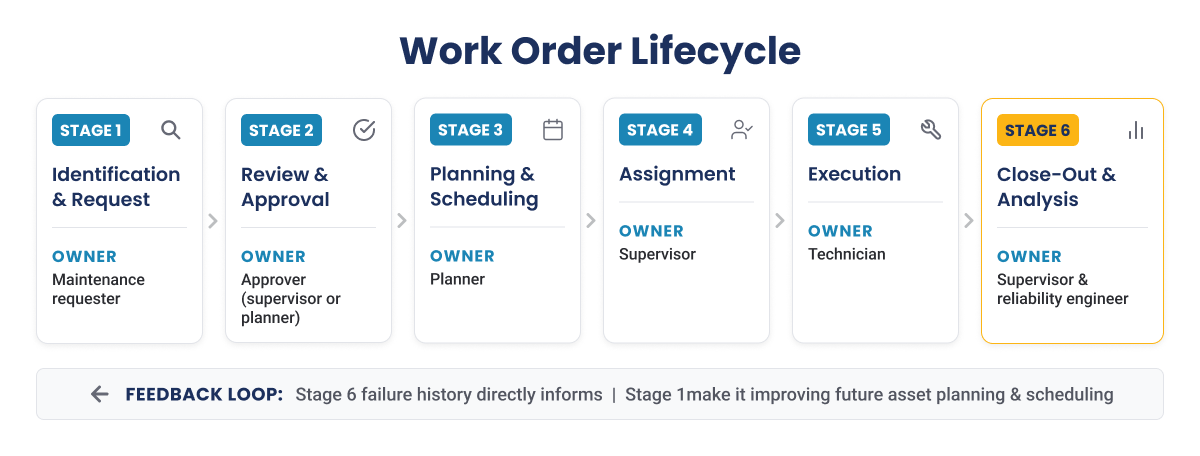
A work order moves through six stages: identification and request, review and approval, planning and scheduling, assignment, execution, and close-out and analysis. Each stage has an owner, a condition that must be met before the work can move on, and a common mistake that stalls it. The table below lays them out.
| Stage | Who owns it | Exit condition | Common mistake |
|---|---|---|---|
| 1. Identification and request | Maintenance requester | A request captured against a specific asset | Naming a symptom but not the asset, so the work cannot be planned without a follow-up call |
| 2. Review and approval | Approver (supervisor or planner) | An approved work order with a type and a priority assigned | Approval by default, where everything is waved through, so priority stops meaning anything |
| 3. Planning and scheduling | Planner | Confirmed parts, permit readiness and a scheduled date | Scheduling work whose parts are not actually staged, which turns into a lost trip on the day |
| 4. Assignment | Supervisor | A job accepted by a named, qualified crew | Assigning whoever is free rather than whoever is qualified, which shows up as rework later |
| 5. Execution | Crew | The physical work complete and verified | Recording hours later from memory at a desk, which loses detail and delays the record |
| 6. Close-out and analysis | Supervisor and reliability engineer | A closed work order with complete failure and labor data | Closing without failure coding, which ends the record just before the useful part |
The execution stage is where the record is either made or lost. When the crew works from digital work instructions and captures readings, parts and labor as the job proceeds, the record is complete by the time the job is done. When the work is written up later, detail is already gone.
Why Some Models Show Four Stages and Others Nine
Very often work order stages are classified as six, four or nine stages. This difference is not a real disagreement about how work happens. It comes from where each source draws the lines: whether the first request counts as part of the lifecycle or a step before it, whether approval and planning are treated as one stage or two, and whether after-the-fact analysis is counted at all. The number of stages is a modeling choice. What matters in practice is that every stage, however you group them, has a named owner and a clear condition for moving to the next one.
| Six-stage model (this guide) | Four-stage model | Nine-stage model |
|---|---|---|
| Identification and request | Request | Identify, Request |
| Review and approval | Part of request | Review, Approve |
| Planning and scheduling | Plan | Plan, Schedule |
| Assignment | Part of plan | Assign |
| Execution | Execute | Execute |
| Close-out and analysis | Close | Verify, Close, Analyze |
Where the Lifecycle Meets the ERP System of Record
In asset-intensive organizations the work order does not live in a standalone tool. It starts in, or writes back to, an enterprise system of record: SAP S/4HANA, SAP ECC, SAP PM or IBM Maximo, depending on the plant. The catch is that every stage change has to be reflected in that system, or the record and reality drift apart. The gap between what has happened on the floor and what the system knows is the insight-to-execution gap, and it is where most of the delay and error creeps in.
This drift shows up in two ways. In the first, stage changes are written on paper at the asset and keyed into the system later, which adds both delay and transcription error. In the second, a separate system runs alongside the system of record, and the two disagree about the state of the same job. Either way, the enterprise system ends up holding a version of events that no longer matches the floor, which is the opposite of what a system of record is for.
Your ERP Recorded The Work. Your Monitoring Watched The Asset. Neither One Closes The Loop.
The missing layer is execution. This whitepaper shows how a frontline execution platform connects insight to action across operations, maintenance, reliability and safety, so every issue detected on the floor leads to a measured outcome instead of a delayed one.
Where Work Orders Leak Money, and What Type Discipline Recovers
Inconsistent work order typing costs real money, and the path from cause to cost is short. When work is typed inconsistently, planning accuracy drops, because planners cannot see what kind of work is really coming. When planning accuracy drops, wrench time falls, because crews spend more of the shift waiting and less of it turning a wrench. And lower wrench time is paid for directly in maintenance labor cost. Three leaks carry most of that cost.
- Work miscoded as general or standard: When real maintenance is logged in the general bucket, the plant loses sight of where its labor actually goes. Weeks of labor hours can disappear into uncategorized work, with no way to say which assets used them. That hidden labor is the hardest cost to recover, because you cannot manage what you cannot see.
- Unplanned work displacing planned work. Every time reactive work pushes a planned job off the schedule, a low-cost planned intervention turns into an expensive reactive one. The planned maintenance percentage falls, overtime and rush freight rise, and the plant often has to bring in extra contractor capacity to catch up on work that was preventable in the first place. Left alone, this feeds on itself: reactive work crowds out the planned work that would have prevented the next failure.
- Missing close-out data. A work order closed without failure coding and actual hours stops short of the part that makes it useful. Without that data, the failure analysis that would have prevented the next event cannot run, and the maintenance backlog fills with repeat work that better records would have caught. The cost is not one job. It is every future job the missing data would have prevented.
What Work Order Discipline Recovered at One Chemical Plant
Indorama Ventures, a global chemical manufacturer, ran its Port Neches, Texas site with exactly these leaks: a reactive culture, a 24-week backlog and heavy contractor use, even with SAP PM and IBM Maximo already in place. By moving execution onto mobile and tightening work order discipline as part of a wider maintenance optimization program, the single site delivered the results below.
| Measure | Before | After |
|---|---|---|
| Maintenance backlog | 24 weeks | 10 weeks (down 58 percent) |
| Contractor headcount | 140 | 87 (Down 38 percent) |
| Realized EBITDA savings | Not captured | $19 million in 2025 |
The same work of closing the frontline execution gap is what earned Innovapptive Frost & Sullivan 2026 Company of the Year recognition.
See How Indorama Cleared A 24-Week Backlog and Cut Contractor Headcount By 38 Percent.
Read the full Indorama Ventures case study: how one plant moved from reactive repairs to planned maintenance on the ERP it already ran, and delivered $19 million in realized EBITDA savings in 2025.
From Paper Work Orders to Digital Execution
Paper work orders fail in four specific ways:
- Transcription lag: the job is done at the asset and written up later at a desk, so the data arrives late and loses detail.
- No evidence at the point of work: photos, readings and findings are described from memory rather than captured as they happen.
- No mandatory fields: paper cannot stop a work order from being closed with the failure code left blank.
- No offline access to asset history: the technician works without the one thing that would speed up the diagnosis.
Moving execution to a mobile digital record fixes each of these. The record is created as the work happens, not rebuilt afterward. Evidence is captured against the order at the point of work. Mandatory fields can be enforced, so a job cannot close with the failure code missing. Asset history travels with the technician and stays available offline, in the intrinsically safe zones and dead spots where a signal cannot be assumed. AI-assisted work order creation adds one more shift: a technician can turn a photo, a voice note or a short prompt into a structured work order in seconds, instead of working through a chain of ERP screens at a desk.
| Attribute | Paper work order | Digital work order |
|---|---|---|
| Record timing | Written up later, from memory | Created at the asset as the work happens |
| Evidence | Described after the fact | Photos, readings and findings captured against the order |
| Mandatory data | Cannot be enforced, fields left blank | Failure code and hours enforced before close |
| Access at the asset | No history without returning to a desk | Asset history available on the device, including offline |
A realistic transition does not start with every work order type at once. Most plants begin with the highest-volume, highest-pain type, usually breakdown and corrective work, prove the record stays clean, then extend to preventive, inspection and the rest. Running this on mobile maintenance that sits on top of the existing ERP, rather than replacing it, keeps the system of record as the single source of truth and avoids a rip-and-replace project.
How Innovapptive Runs the Full Work Order, End to End
Everything above describes what a clean work order process looks like. Innovapptive is the industrial execution platform that runs it, on top of SAP, IBM Maximo or Oracle rather than in place of them. The work order stays in the enterprise system of record, and execution moves to the frontline, so the record and the floor stay in step across all six lifecycle stages.
Here is how Innovapptive Work Order Software maps to the stages this guide covered:
- Raise and approve: operators and technicians raise clean, asset-linked requests from the field, and AI-assisted creation turns a photo, voice note or prompt into a structured work order, so approval starts from good data.
- Plan and schedule: parts, permits and certifications are checked as part of the order, so a job is not scheduled until it can actually be executed.
- Execute at the asset: crews work from mobile digital instructions and operator rounds, capturing readings, parts and per-technician labor as the job proceeds, online or offline.
- Keep parts moving: connected warehouse and inventory management keeps stock records accurate so the part is staged before the crew mobilizes.
- Close and learn: failure coding and actual hours are enforced before close, and every close writes straight back to the ERP, so the history is complete and current.
Two capabilities hold this together at the frontline. WorkSmart AI helps technicians create and complete work orders in plain language, and RapidSync offline mode keeps the work order, its history and its evidence available in the dead spots and intrinsically safe zones where a signal cannot be assumed. Together they close the insight-to-execution gap: the distance between what the system says and what is actually happening on the floor.
See A Work Order Go From A Photo On The Floor To A Closed Record In your ERP.
Work order types pay off when every technician classifies them the same way on every job, across crews and sites. See how asset-intensive plants standardize work order types on top of the ERP they already run, with no rip and replace.

Unlock Margins Hidden in your Maintenance
Watch how leading manufacturers improve OEE, increase PM compliance, and reduce downtime through connected execution.

- 23-10-2026
Maintenance Planning and Scheduling: The Ultimate Guide
A mechanical crew reaches a boiler feed water pump at 7 a.m. to change a bearing, then waits three...

- 21-10-2026
10 Best Work Instructions Software: Compared and Reviewed
Choosing work instructions software is about more than turning a PDF into guided steps on a tablet....

- 15-10-2026
Maintenance Digitalization: A Digital Transformation Guide
Maintenance digitalization is the shift from paper, spreadsheets and disconnected tools to...