
The 11 Best Maintenance Management Software Tools
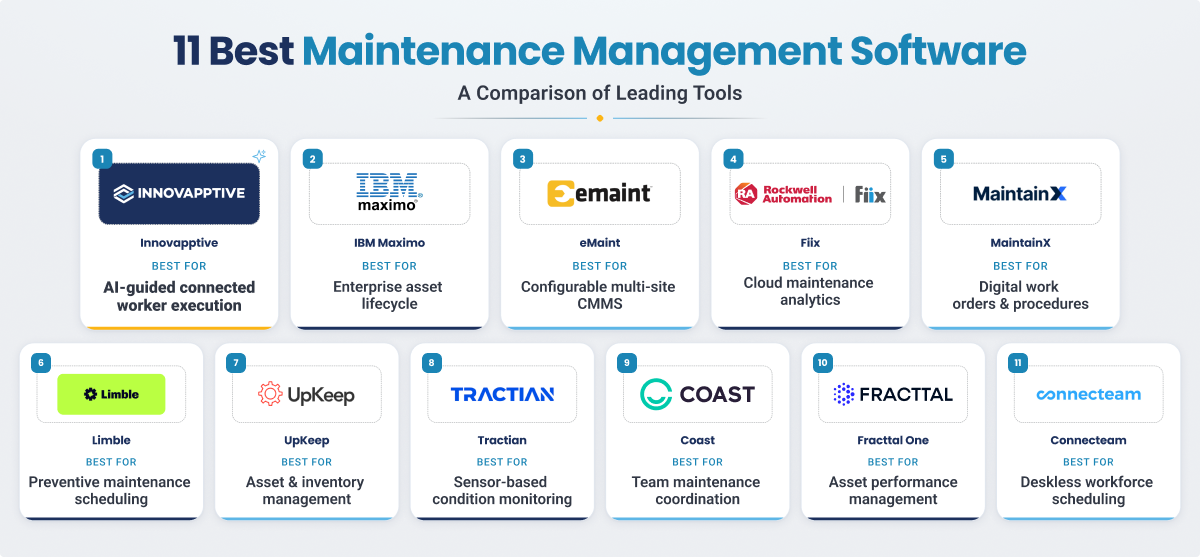
No maintenance system fits every organization. To help you match a platform to your scale, we evaluated the following tools based on operational mobility, preventive maintenance (PM) compliance, reporting depth, change management complexity, and backend ERP integration.
Software | Best Fit For | Pricing | Primary Focus |
|---|---|---|---|
Innovapptive | Asset-intensive enterprises with SAP/Maximo and mobile field execution needs. | Custom enterprise pricing. | Mobile-first maintenance and connected worker workflows. |
IBM Maximo | Large enterprises requiring EAM and asset lifecycle control. | Custom enterprise pricing. | Enterprise asset management. |
eMaint | Mid-enterprise and multi-site teams wanting structured CMMS control. | Starts at $69/user/month. | CMMS and maintenance tracking. |
Fiix | Manufacturers that want CMMS with plant-floor alignment. | Free / from $45/user/month. | CMMS and maintenance operations. |
MaintainX | Deskless maintenance teams. | Free plan; paid plans start at $16/user/month. | Mobile CMMS and work execution. |
Limble | Teams prioritizing PM compliance. | Starts at $28/user/month. | PM-focused CMMS. |
Upkeep | Mobile-first SMB and mid-market teams. | Starts at $20/user/month. | Mobile CMMS and asset tracking. |
Tractian | Teams wanting CMMS plus condition monitoring.. | From $60/user/month (5-user minimum). | CMMS and predictive maintenance. |
CoastApp | CMMS for small and mid-sized teams. | Free / from $20/user/month. | Light maintenance coordination. |
Fracttal One | Teams wanting AI-driven maintenance with flexible entry pricing. | Custom pricing. | AI-powered maintenance management. |
Connectteam | Deskless teams that require scheduling and communication first. | Free (up to 10 users) / paid plans start at $29/month. | Workforce scheduling and coordination. |
*List of leading tools. Order is not a ranking .
What Is Maintenance Management Software?
Maintenance management software is a digital system used to plan, schedule, track, and optimize maintenance work across assets, equipment, and teams. Depending on the platform, it can range from a basic CMMS for work orders and preventive maintenance to a broader enterprise platform that supports inspections, inventory, reliability, analytics, and connected worker execution.
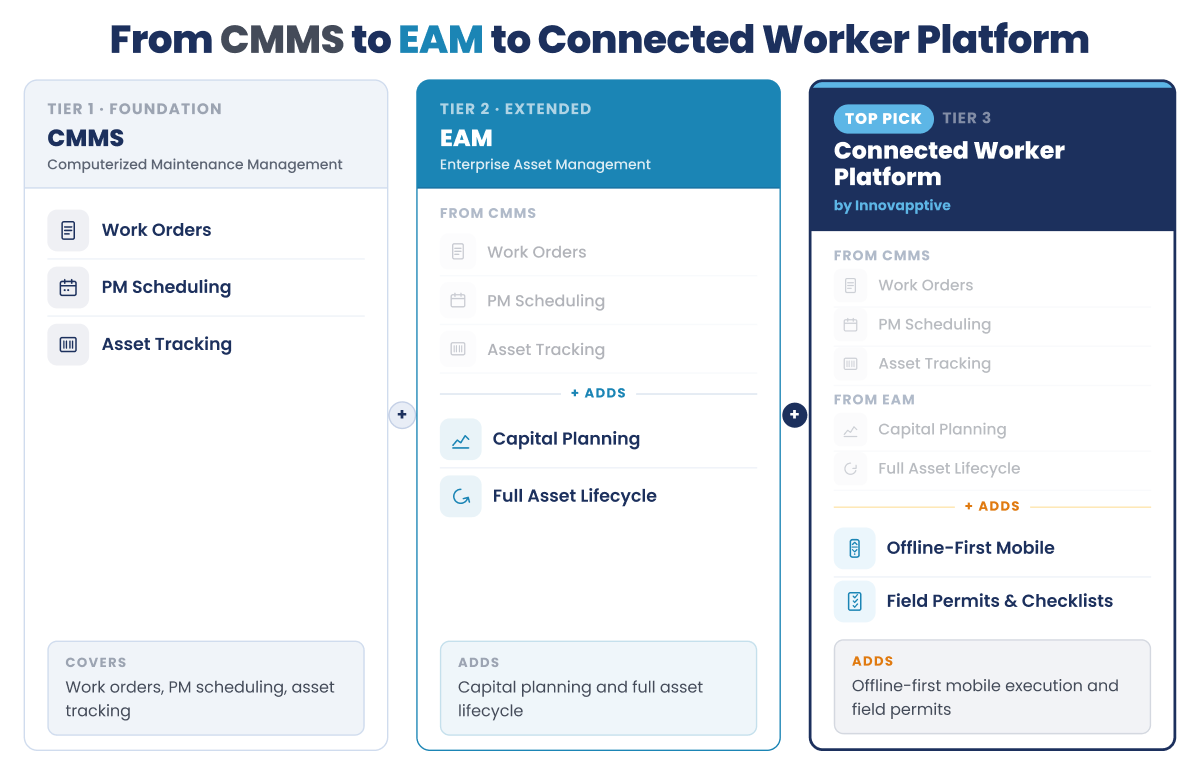
While the term is broad, platforms generally fall into three distinct categories based on their depth and architecture:
- CMMS (Computerized Maintenance Management System): Focuses primarily on daily operations, including work orders, preventive maintenance (PM) scheduling, and standard asset tracking.
- EAM (Enterprise Asset Management): Extends standard CMMS functionality to cover the full asset lifecycle, including capital planning, depreciation, and high-level compliance documentation.
- Connected Worker Platforms: These systems do not replace an EAM; instead, they serve as an execution layer above it. They provide mobile and offline functionality that bridges back-office EAM data with the frontline field technicians actually performing the work.
Top Maintenance Management Software
1. Innovapptive: Best for Asset-Intensive Enterprise Maintenance
Innovapptive is built for asset-intensive enterprises that need more than basic work order tracking. Rather than replacing your standalone CMMS or EAM, Innovapptive’s Mobile Maintenance Software functions as a mobile execution layer that sits directly on top of your existing backend architecture. This approach is engineered for complex, heavy industrial environments, such as chemicals, oil and gas, mining, utilities, and large-scale manufacturing, where field technicians operate far from a desktop terminal and network connectivity is highly unreliable. By combining a mobile-first interface, true offline capability, and AI-supported workflows, the platform closes the execution gap between back-office planning and the frontline.
What truly differentiates the platform is its deep integration infrastructure. Innovapptive’s Integration Manager uses more than 50 pre-built, bidirectional connectors to link frontline mobile apps directly to major enterprise systems like SAP, IBM Maximo, and Oracle, as well as operational technology (OT) systems like OSI PI and SCADA. This real-time synchronization eliminates manual data entry and duplicate logs entirely. Work orders generated within SAP PM appear automatically on field devices, and completed tasks sync back immediately providing a single source of truth.
The real-world financial and operational impact of this closed-loop system is demonstrated at Indorama Ventures' Port Neches facility. Despite already running both SAP PM and IBM Maximo, the site's paper-based frontline execution had caused a 24-week maintenance backlog and a preventive-to-corrective maintenance ratio below 50%. After rolling out Innovapptive’s Connected Worker Platform, the facility improved PM CM ratio to 80%, reduced its contractor headcount from 140 to 83, and elevated inventory accuracy to 99.5%. This proven scalability and focus on measurable outcomes earned Innovapptive recognition as a market Leader in Frost & Sullivan's 2025 Frost Radar for Augmented Connected Worker Platforms.
Key capabilities
- Mobile-first maintenance execution for work orders, inspections, issue capture, and technician workflows.
- Offline capability through RapidSync for low-connectivity industrial environments.
- Bidirectional prebuilt integrations with SAP, IBM Maximo, Oracle, historians, and alarm systems.
- Purpose built AI agents powering issue capture, autonomous work packaging, guided execution with WorkSmartAI support.
- Real-time dashboards and workflow visibility across assets, jobs, and maintenance activity.
Key outcomes
- 15–20% improvement in workforce productivity.
- 20–30% reduction in unplanned downtime.
- 10–15% reduction in maintenance spend.
- 20–40% reduction in contractor and overtime costs.
Limitations
- Best suited to larger asset-intensive environments rather than small teams looking for a basic CMMS.
- Buyers get the most value when they need enterprise integration and frontline execution improvement together.
- Provides more platform depth than smaller maintenance teams need.
Take a self-guided tour of the Connected Worker Platform and see the mobile execution experience technicians use in the field every day.
Take Product Tour
2. IBM Maximo: For Large-Scale EAM in Regulated Industries
IBM Maximo is preferred by organizations that require broad EAM capability, strong governance, and support for complex asset environments. It is often chosen by organizations that want maintenance, inspections, monitoring, and asset lifecycle management inside a mature enterprise framework rather than a lighter mobile-first system. It is typically a better fit for large enterprises than for teams looking for a simple or fast-to-deploy CMMS.
Key capabilities
- Enterprise asset management coverage across maintenance, inspections, and asset operations.
- Enterprise-grade configurability for large operational environments.
- Strong fit for regulated and operationally complex industries
Key outcomes
- Better long-term control over asset performance and maintenance strategy.
- Stronger support for compliance-heavy and reliability-driven environments.
- Improved visibility across large maintenance programs and asset bases.
Limitations
- Can have a steep learning curve for new users.
- Less intuitive than lighter-weight maintenance tools for everyday use.
- SAP integration runs through middleware rather than a native connector.
3. eMaint CMMS: For Mid-Enterprise Maintenance Operations
eMaint is a mature CMMS platform that is built for mid-enterprise organizations running multi-site maintenance operations without a SAP ERP requirement. The platform balances functionality and flexibility for organizations seeking more structure than spreadsheets without the complexity of a full enterprise EAM deployment. The platform provides preventive maintenance, work order management, reporting, and asset tracking capabilities while allowing organizations to configure workflows around their operational requirements.
Key capabilities:
- Provides customizable work order workflows.
- Configurable workflows for maintenance teams with more structured processes.
- Provides a multi-site dashboard.
Key outcomes
- Better process consistency across maintenance administration and planning.
- Useful for teams that want a proven CMMS foundation with room for process standardization.
- Stronger maintenance control than spreadsheets or lighter entry-level tools.
Limitations:
- SAP integration runs through API work rather than a native connector, so it suits teams without a bidirectional SAP requirement.
- Reporting and customization may feel limiting for some teams.
- Interface can feel less modern than newer CMMS tools.
4. Fiix: ERP-Connected Manufacturing Maintenance
Fiix, now part of Rockwell Automation, is the strongest fit for manufacturing teams already using Rockwell PLCs or FactoryTalk. The CMMS platform combines maintenance management fundamentals with analytics, reporting, and integration capabilities designed to support manufacturing operations.
Key capabilities
- Core CMMS capabilities across work orders, assets, PMs, reporting, and mobile support.
- Provides Rockwell ecosystem integration and an open API.
- Provides multi-site support.
Key outcomes
- AI-assisted maintenance scheduling and insights.
- Day-to-day asset and work order visibility.
- Practical fit for teams that want functionality without a heavy enterprise deployment.
Limitations:
- SAP integration runs through middleware rather than a native connector, so it's a better fit for Rockwell-centric environments.
- Can feel expensive for smaller teams
- Best suited to manufacturing teams rather than facilities or mixed-trade operations.
5. MaintainX: For Modern Deskless Maintenance Teams
MaintainX is built for mobile-first, deskless maintenance teams that want fast deployment and a clean interface. It is especially attractive for teams moving off paper, spreadsheets, or fragmented communication tools.
Key capabilities
- Mobile-first work orders, inspections, procedures, and team communication.
- Fast implementation and easy adoption for frontline teams.
- Useful for digitizing maintenance and operations workflows without a heavy setup cycle.
Key outcomes
- Faster adoption across technicians and frontline teams.
- Better visibility into work execution and team communication.
- Easier shift from manual or disconnected processes into a digital workflow.
Limitations:
- No native SAP integration, so it suits operational maintenance execution more than ERP-tied enterprise workflows
- Parts inventory and API access are reserved for the Premium tier and above
- According to Capterra reviews, some users mention constraints in more complex materials or workflow scenarios.
6. Limble CMMS: For PM-Heavy Maintenance Programs
Limble is a user-friendly CMMS for small to mid-sized teams that want a simple way to manage preventive maintenance, work orders, and asset records. It is often a good fit for maintenance organizations moving off spreadsheets, paper, or older software and looking for a cleaner day-to-day system.
Key capabilities
- Straightforward CMMS workflows for work orders, PMs, and asset tracking.
- Quick onboarding and easy everyday use.
- Strong fit for teams that want maintenance software without a long learning curve.
Key outcomes
- Faster adoption for maintenance teams with limited system admin resources.
- Better organization of day-to-day maintenance work.
- Useful for teams that want simplicity and speed.
Limitations:
- API access, advanced reporting, and purchase order management are gated to Premium+ and Enterprise tiers
- No native SAP integration, so SAP-running enterprises typically pair it with middleware or a connected worker layer
- Built primarily for PM-driven programs rather than condition-based or predictive maintenance
7. UpKeep: Mobile-First Maintenance for SMB and Mid-Market
UpKeep is built for SMB and mid-market teams across manufacturing, property management, and hospitality that want mobile-first work order management. It works well for teams prioritizing technician usability and quick deployment and is often chosen by organizations that want to digitize work orders and maintenance activity without taking on a large enterprise implementation.
Key capabilities
- Mobile-friendly maintenance workflows and technician access.
- Work orders, asset tracking, reporting, and daily maintenance visibility.
- Useful for organizations that want a simpler alternative to more complex legacy tools.
Key outcomes
- Faster technician adoption and easier mobile usage.
- Provides tracking of asset maintenance and work history.
- Practical fit for teams looking for fast operational improvement.
Limitations:
- No native SAP integration, so enterprise SAP environments typically need a different tier of platform
- Advanced preventive maintenance optimization and deeper analytics sit on the Premium tier and above
- Some users report a learning curve and limited customization.
8. Tractian: For Condition Monitoring and Predictive Maintenance
Tractian is best known for combining maintenance workflows with condition monitoring and predictive maintenance. It is often more attractive to reliability-led teams that want stronger machine-health visibility than to companies looking only for standard CMMS administration.
Key capabilities
- Combines maintenance software with monitoring and predictive maintenance positioning.
- Stronger fit for reliability and early fault detection use cases.
- Useful where condition-based maintenance is a priority.
Key outcomes
- Better machine-health visibility and earlier issue detection.
- More support for predictive maintenance initiatives.
- Useful for plants trying to move beyond purely scheduled maintenance.
Limitations:
- Hardware deployment adds procurement and installation steps that a software-only CMMS doesn't require
- May not be the best fit for teams primarily looking for broad enterprise workflow control.
- Better fit for monitoring and predictive programs than deep maintenance administration.
9. CoastApp: All-in-One CMMS for Small to Mid-Sized Teams
Coast is designed for smaller maintenance teams looking for a straightforward way to manage work orders, assets, and preventive maintenance activities. Its simplicity and accessible pricing have made it popular among growing organizations. It is most relevant for smaller teams or multi-site operators that care about adoption and day-to-day coordination.
Key capabilities
- Centralized work orders, maintenance requests, and recurring task coordination.
- Easier setup and lower complexity than enterprise-oriented tools
- Useful for basic operational coordination in less complex environments.
Key outcomes
- Improved day-to-day maintenance coordination.
- Lower implementation overhead for small teams.
- A simpler option for organizations that do not need deep maintenance system complexity.
Limitations
- Better suited to smaller teams than large enterprise maintenance programs.
- Not positioned as a deep enterprise asset management platform.
- Does not provide advanced enterprise functionality.
10. Fracttal One: AI-Powered CMMS for International Operations
Fracttal One is a cloud CMMS option for organizations managing maintenance across distributed sites and teams. It combines mobile access, offline support, and integration-led positioning in a modern platform. It is a good option for organizations seeking more than a basic CMMS.
Key capabilities
- Cloud-based CMMS for remote asset and maintenance management.
- Offline mobile functionality for field work.
- Integrations with systems such as SAP and Oracle through APIs and connectors.
Key outcomes
- Provides coordination across distributed maintenance environments.
- Visibility across maintenance work and asset activity.
- Useful for organizations looking for practical maintenance software without full enterprise-suite complexity.
Limitations
- Setup can take time for some teams.
- Workflow friction may show up in some work order processes.
- According to Capterra reviews, some users also mention a need for broader integrations in more complex environments.
11. Connecteam: For Field Team Scheduling and Communication
Connecteam is a workforce operations platform rather than a dedicated maintenance management system. It is useful for field teams that need scheduling, communication, GPS tracking, and mobile workforce coordination, but it is not built to replace a CMMS or EAM platform in asset-intensive environments.
Key capabilities
- Strong mobile workforce coordination, scheduling, and communication tools.
- GPS tracking and field team visibility.
- Good fit for smaller field service and deskless workforce use cases.
Key outcomes
- Better coordination for distributed field teams.
- Easier communication and workforce oversight from mobile devices.
- Useful where the main challenge is workforce execution rather than maintenance planning.
Limitations
- Not designed as a full maintenance or EAM platform.
- Does not currently support offline use.
- Better for workforce coordination than asset-intensive maintenance management.
Building an AI Roadmap for Maintenance? Start Here.
A practical playbook for maintenance and reliability leaders covering data strategy, RCM optimization, and permit automation, with benchmarks on cost, wrench time, and downtime improvement.
Detailed Comparison of Maintenance Management Software
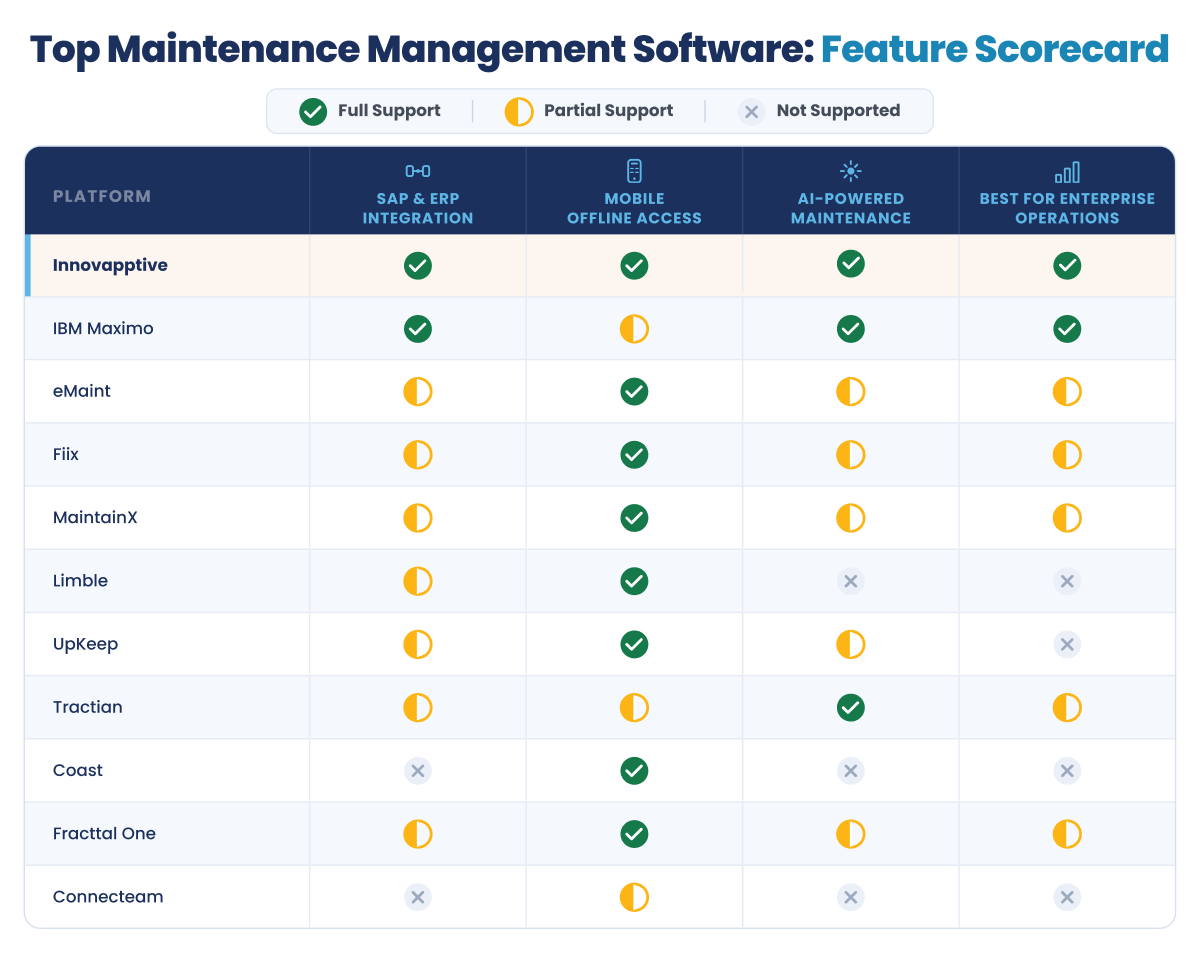
Beyond basic feature checklists, selecting the right platform comes down to how a tool handles your specific infrastructure and frontline environment. The table below breaks down each software by its core operational capabilities, focusing on industry fit, integration depth, offline reliability, and automation capabilities.
Software | Integration Depth | Mobile/Offline | AI/Automation | Industry |
|---|---|---|---|---|
Innovapptive | Bidirectional pre-built integrations across historians, APM, MES/SCADA, EHS, and ERP/CMMS such as SAP, Oracle, Maximo and Infor | Offline-first (RapidSync); built mobile-first, not retrofitted | WorkSmartAI agents (AI Detect, AI Plan, AI Assist) for issue capture, work order generation, and field guidance | Oil & Gas, Chemicals, Mining, Manufacturing. |
IBM Maximo | Full EAM; SAP integration via middleware. | Mobile app; field UX is not the platform's primary differentiator. | Maximo Application Suite includes IoT and AI via IBM Watson. | Utilities, Oil & Gas, Aerospace, Government. |
eMaint | API-based ERP/SCADA/PLC integration on Enterprise tier only. | Mobile app works offline. | Asset Insights; auto-generates work orders from condition thresholds. | Manufacturing, Facilities, Energy, Utilities. |
Fiix by Rockwell | Native to Rockwell ecosystem; ERP integration via Integration Hub, gated to Enterprise tier. | Mobile app, online and offline. | AI-powered insights, parts forecasting, and anomaly flagging on Professional tier and above. | Manufacturing. |
MaintainX | API access on Premium tier; no native SAP integration. | Mobile-first. | AI embedded in work order workflows. | Facilities, Food & Beverage, Manufacturing. |
Limble CMMS | API access gated to Premium+ and Enterprise. | Mobile app with offline mode. | PM triggers. | Manufacturing, Facilities, Fleet. |
UpKeep | API access on higher tiers; no native SAP integration. | Mobile-first. | UpKeep Intelligence (AI) for insights. | Manufacturing, Property, Hospitality. |
Tractian | No native SAP integration; connects to SAP, IBM Maximo, Oracle NetSuite, and others via API | Mobile app, offline-ready. | AI-driven anomaly detection;work order generation from sensor alerts. | Industrial, Oil & Gas equipment |
CoastApp | No native ERP/SAP integration. | Mobile app with offline support. | None significant | Hospitality, Property, SMB. |
Fracttal One | API connections to SAP, Oracle, Microsoft Dynamics; no native SAP PM module. | Mobile app with offline mode. | Automates records and suggests tasks. | Multi-country operations, Manufacturing. |
Connecteam | No ERP integration; limited third-party integrations overall. | Strong mobile app with GPS tracking; not built for offline field execution | Workforce scheduling and communications focus, not maintenance AI. | Field service, small teams. |
*List of leading tools. Order is not a ranking .
What to Look for in Maintenance Management Software
When evaluating these tools, look past generic feature lists and apply a rigorous framework built around your operational realities. Some key capabilities to look for are:
- Integration depth: Integration is the difference between a true system of record and a disconnected app. Avoid platforms with no integration or manual one-way APIs. If you run SAP PM or IBM Maximo, prioritize bidirectional, real-time synchronization to eliminate duplicate data entry and maintain a single source of truth.
- Preventive, predictive, and condition-based maintenance: Most systems handle basic time-based preventive maintenance (PM) scheduling. However, organizations with critical assets must also evaluate support for condition-based triggers (operating thresholds) and predictive, AI-driven failure detection.
- Mobile and offline architecture: A basic mobile-responsive CMMS app and a true connected worker platform are not the same thing. The CMMS app needs a signal to work. A connected worker platform is built to function offline in a refinery, mine, or remote facility, then sync once connectivity returns. If your sites have spotty connectivity, this distinction matters more than any feature list.
- Reporting and KPI tracking: Your software should measure performance, not just record activity. Look for native reporting on five metrics: OEE (Overall Equipment Effectiveness), MTBF (Mean Time Between Failures), MTTR (Mean Time To Repair), PM compliance rate, and unplanned downtime percentage. These are the numbers most maintenance leaders get asked about. A tool that surfaces them natively saves you from building custom reports later.
- Scalability and implementation complexity: Maintenance software implementations often fail because teams struggle to drive frontline adoption. Prioritize mobile usability and ease of onboarding. Further, organizations need to note that SMB-focused tools typically deploy in days to weeks. However, enterprise platforms that integrate with SAP or Maximo typically take 3 to 6 months. That timeline isn't just software setup, it includes data migration, change management, and integration testing.
How to Choose Maintenance Management Software by Industry
The right maintenance management software depends on more than company size. It depends on the operating environment, the systems already in place, and the kind of work the team must execute every day. A refinery, a multi-site manufacturer, a facilities team, and a field service operation may all need work orders and preventive maintenance, but they do not need the same depth of integration, mobility, or operational control.
Here’s how the choice changes across five common operating environments:
Asset-Intensive Enterprise (Oil & Gas, Chemicals, Mining, Power Generation)
Heavy industries require systems capable of managing complex asset lifecycles and strict safety compliance in remote environments.
Key maintenance challenges:
- Most sites already use SAP PM or IBM Maximo, but frontline execution often remains paper-based or disconnected from daily system updates.
- Remote locations (refineries, mines, offshore sites) have unreliable connectivity.
- Backlogs and reactive maintenance build up when the ERP and the field aren't actually connected.
Must-have features:
- Bidirectional SAP PM or IBM Maximo integration (real-time sync, not one-way export).
- Offline-first mobile architecture for low-connectivity sites.
- Predictive or condition-based maintenance support.
- Multi-site asset management.
- Compliance documentation for ISO 55001 and OSHA.
Recommended software:
- Innovapptive: Best fit for asset-intensive enterprises that need mobile-first maintenance execution tied closely to enterprise systems.Provides bidirectional data flow across SAP, Maximo, Infor and Oracle, with 50+ plug and play connectors plus full offline support that syncs work back after reconnection. Indorama Ventures used this to close a multi-week backlog and lift its PM-to-CM ratio from 45 to 80 percent.
- IBM Maximo: For organizations requiring a foundational, legacy EAM framework.
- Tractian: Provides condition-monitoring layer add-on on top of an existing CMMS or EAM.
Choosing maintenance software is only part of the equation, the real value comes from execution. See how a global chemicals manufacturer reduced maintenance backlog by 58% & increased inventory accuracy to 99.5% while working within its existing SAP and Maximo environment.
Download Case Study
Discrete and Process Manufacturing
Manufacturing environments demand high equipment reliability and deep integration with existing plant technology stacks.
Key maintenance challenges:
- Siloed data disconnected from the broader plant technology stack (MES/SCADA).
- Multi-site manufacturers need consistent reporting across plants, not just one facility
- Standalone plants and multi-site manufacturers have very different integration needs
Must-have features:
- ERP integration (SAP or equivalent)
- MES and SCADA connectivity for line-level data
- OEE and downtime dashboards
- PM compliance tracking
- Multi-line, multi-equipment asset management
Recommended software:
- Innovapptive: Strong fit for manufacturers that already run SAP and need execution-level visibility from technician workflows back into the system, rather than reporting that only updates after the fact. Its mobile-first and offline design also makes it practical on large industrial sites.
- Fiix by Rockwell: Ideal for operations already deeply embedded in the Rockwell Automation or FactoryTalk hardware ecosystem.
- eMaint CMMS: An alternative for mid-enterprise multi-site operations who don't need full connected-worker depth.
Facilities Management
Facilities teams manage buildings, not production assets, so the priority shifts from ERP depth to vendor coordination and compliance upkeep.
Key maintenance challenges:
- Coordinating multiple vendor types (HVAC, electrical, general contractors) across buildings.
- Keeping compliance documentation current without a dedicated compliance team.
- SAP-level integration is rarely needed, so over-built enterprise tools add unnecessary cost.
Must-have features:
- Multi-building work order management.
- Vendor and contractor management.
- PM scheduling.
- OSHA and local building code compliance documentation.
Recommended software:
- UpKeep: Vendor management and mobile experience for teams coordinating multiple contractor types across sites.
- Limble: Good fit where PM compliance, ease of use, and audit readiness matter more than deep enterprise integration
- eMaint CMMS: Suits facilities teams that also want light multi-site reporting without enterprise complexity.
- MaintainX: Strong fit for teams that want quick rollout, strong mobile usability, and straightforward tracking across building operations.
SMB and Growing Teams
Smaller teams need agile, budget-friendly tools that prioritize speed to value and ease of use over deep enterprise features.
Key maintenance challenges:
- Limited budget and no dedicated IT resource for a complex rollout.
- Risk of over-buying enterprise features that won't be used for years.
- Need a tool that scales as the team grows, without re-platforming later.
Must-have features:
- Fast deployment (days, not months).
- Affordable per-user pricing or a usable free tier.
- Mobile work order management.
- Basic PM scheduling.
Recommended software:
- CoastApp: Free, no-user-limit tier removes the cost barrier to getting started.
- UpKeep: Mobile-first design suits teams that are mostly in the field.
Field Service and Deskless Teams
Field service teams are usually solving a scheduling and dispatch problem first, with asset tracking becoming a priority later as the operation matures.
Key maintenance challenges:
- Coordinating a distributed workforce is often a bigger problem than asset tracking.
- Getting the right technician to the right job with the right information matters more than deep asset history at the start.
- Asset tracking and PM compliance usually become more important as the organization matures.
Must-have features:
- Mobile-first interface
- Job scheduling and dispatching
- Digital forms and checklists
- Team communication tools
Recommended software:
- Connecteam: Strong fit if scheduling and dispatch is the primary need.
- UpKeep or MaintainX: Better fit once asset tracking and PM compliance matter alongside scheduling.
Ready to Modernize Maintenance Operations?
Whether you're looking to improve schedule compliance, reduce downtime, increase workforce productivity, or extend your SAP and EAM investments, the right maintenance platform can turn maintenance into a strategic advantage. See how Innovapptive supports maintenance teams across asset-intensive industries.

Unlock Margins Hidden in Your Maintenance
Watch how leading manufacturers improve OEE, raise PM compliance and cut downtime through connected execution.
Request a Demo
2026 Company of the Year, Global Connected Worker Platforms
See why Frost & Sullivan recognized Innovapptive for closing the frontline execution gap.
Read the Report
- 30-10-2026
Schedule Compliance: Formula, the 85% Benchmark and Fixes
Schedule compliance measures how much of a committed maintenance schedule gets completed as...

- 27-10-2026
Best Industrial Inspection Software: 11 Platforms Compared
Inspection software encompasses a broad market with its functionality varying widely. Repair shops...

- 23-10-2026
Maintenance Planning and Scheduling: The Ultimate Guide
A mechanical crew reaches a boiler feed water pump at 7 a.m. to change a bearing, then waits three...