
What Is Work Order Software?
Work order software is a digital system for creating, assigning, tracking, and completing maintenance work orders. These capabilities can live inside a CMMS or EAM platform, or inside an industrial execution platform that connects work orders in an ERP such as SAP or IBM Maximo to the frontline teams executing them.
Where these approaches differ is in what each is built to do best. A CMMS or EAM primarily plans, manages, and records maintenance work, while an industrial execution platform focuses on connecting planned work to frontline execution and sending completion data back to the system of record. For asset-intensive operations, this matters as the work needs to be planned correctly and completed with the right context, then recorded accurately.
The Best Work Order Software at a Glance
The 9 platforms below serve different buyers and operating models. Innovapptive is built for asset-intensive industrial operations; MaintainX for mobile-first adoption; UpKeep for broad integrations and mobile maintenance; Fiix for multi-site maintenance and industrial IoT; Limble for ease of adoption; eMaint by Fluke for configurable maintenance programs; Coast for smaller mobile maintenance teams; Snapfix for hospitality and facilities; and Sockeye for maintenance scheduling.
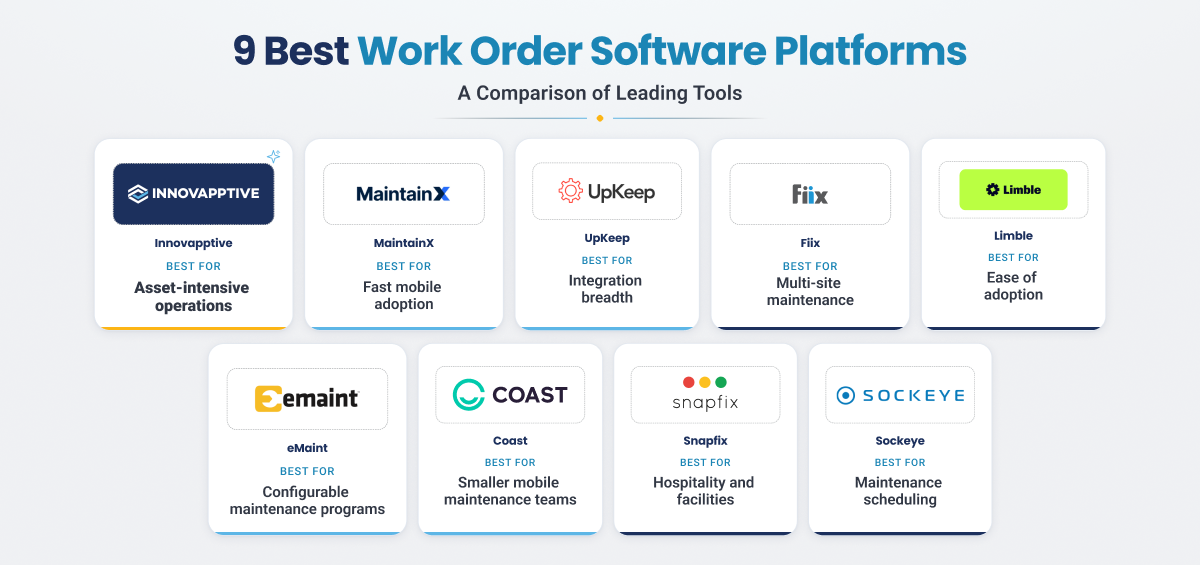
9 Best Work Order Software Platforms Compared
The comparison below lines up all the best work order software platforms against the factors that actually decide fit for an asset-intensive operation: how work orders get executed, how deeply each connects to your ERP, and how well it holds up in real plant conditions. Use it to build a shortlist, then read the detailed reviews that follow.
| Platform | Best For | Core Work Order Capabilities | ERP or CMMS Integration | Mobile and Offline Support | Primary Industries | Pricing |
|---|---|---|---|---|---|---|
| Innovapptive | Asset-intensive industrial operations | Mobile work orders, operator rounds, digital inspections, work instructions, e-permits | Bidirectional SAP and IBM Maximo connectivity; enterprise integrations | Yes, offline-first | Oil and gas, chemical, utilities, mining, manufacturing | Custom enterprise pricing |
| MaintainX | Mobile-first maintenance adoption | Mobile work orders, preventive maintenance, asset history, field documentation | API, integrations, and enterprise connectors | Yes, with offline functionality | Manufacturing, facilities, general maintenance | Free and paid tiers; enterprise pricing |
| UpKeep | Broad integrations and mobile maintenance | Work requests, work orders, assets, parts, PM scheduling | APIs, webhooks, and enterprise integrations | Yes, offline mobile | Facilities, manufacturing, property, maintenance operations | Published per-seat tiers |
| Fiix | Multi-site maintenance and industrial IoT | Work orders, PM, asset management, inventory, reporting, IoT-connected maintenance | Integration Hub, APIs, and enterprise connectors | Yes, offline mobile | Manufacturing, industrial operations | Plan/quote dependent |
| Limble | Ease of adoption | Work orders, prioritization, PM templates, QR-code workflows, asset management | API and integration options | Yes, with offline limitations | Manufacturing, facilities, hospitality, maintenance operations | Published per-seat tiers |
| eMaint | Configurable maintenance programs | Work orders, PM and predictive maintenance, inventory, scheduling | Configurable integrations | Yes, offline mobile | Manufacturing, utilities, facilities, multi-site operations | Plan/quote dependent |
| Coast | Smaller mobile maintenance teams | Work orders, recurring tasks, QR-code asset lookup, messaging | API and integration options; broader capabilities vary by plan | Yes, offline mobile | Hospitality, property, retail, light-commercial, facilities | Free and paid tiers |
| Snapfix | Hospitality and facilities | Photo and voice issue reporting, QR workflows, task tracking | Integrations across hospitality, property, and enterprise systems | Yes, mobile field workflows | Hospitality, property, facilities, education | Custom/plan dependent |
| Sockeye | Maintenance scheduling | Drag-and-drop scheduling, labor balancing, schedule KPIs | Bidirectional ERP, and HR integrations | Mobile/offline execution is not its primary scope | Industrial maintenance | Custom enterprise pricing |
*Pricing and availability change often. Use this table for reference only.
Your ERP Already Knows The Work. The Floor Is Where It Stalls
See how an execution platform turns SAP and Maximo work orders into completed, closed-out jobs.
In-Depth Reviews of the Best Work Order Software
1. Innovapptive: Best for Asset-Intensive Operations
Innovapptive Work Order Software is built for asset-intensive operations in oil and gas, chemical, utilities, mining, and heavy manufacturing. Its focus is the execution gap between a work order created in an enterprise system and the work completed by the frontline. For plants where maintenance depends on SAP or IBM Maximo and technicians may work with limited connectivity, that connection between enterprise planning and field execution is central.
Innovapptive closes that gap by turning a signal into a structured, executed, and closed work order in one flow. WorkSmartAI turns a photo, voice note, or prompt into a structured work order in seconds, RapidSync lets technicians raise, execute, and close the job fully offline, the Maintenance Control Center runs the shift from a live board, and Asset 360 puts failure history and a per-job assistant one scan away. Permits, isolation, parts, and work instructions travel with the order, so technicians mobilize to a job that is confirmed ready. Every closure posts labor, parts, and completion back to the systems the plant already runs, whether SAP, IBM Maximo, or Oracle, so nothing is re-keyed and the record stays clean.
.webp?width=1400&height=800&name=worksmart%20AI%20(1).webp)
|
Pros |
What to consider |
|---|---|
|
|
Proof point:
At Indorama Ventures, connected worker execution helped realize $19M in maintenance savings, a 58 percent cut in maintenance backlog, and a 38 percent reduction in contractor headcount. At W.R. Grace, the same approach made P1 and P2 break-in work 8 times faster and improved planned versus actual maintenance hours by 48 percent, with zero ERP replacements. That execution depth is part of what earned Innovapptive the 2026 Frost and Sullivan Company of the Year award for connected worker platforms.
|
What reviewers say (G2) Reviewers value Innovapptive's offline mode, real-time ERP integration, and fast rollout |
2. MaintainX: For Swift Mobile-First Adoption
MaintainX is a mobile-first work order app for small to mid-sized maintenance teams that want fast deployment and a clean interface. Its strengths include a simple mobile experience, preventive maintenance workflows, asset history, and offline mobile access.
|
Pros |
What to consider |
|---|---|
|
|
|
What reviewers say (G2) Reviewers commonly highlight MaintainX for ease of use and mobile adoption. Feature depth for customization, reporting, and multi-site management varies by plan. |
3. UpKeep: For SMB and Mid-Market Field Teams
UpKeep is a mobile-first maintenance platform for small and mid-market teams that work mostly on the floor rather than at a desk. It pairs a simple work request app with asset and parts tracking, and is often chosen by teams taking their first step into digital maintenance.
| Pros | What to consider |
|---|---|
|
|
|
What reviewers say (G2) Reviewers value UpKeep's ease of use, mobile access, and asset management. The pain point most often raised is limited reporting customization. |
4. Fiix: For Multi-Site Maintenance and Industrial IoT
Fiix, now part of Rockwell Automation, is a cloud CMMS best suited to multi-site manufacturers already invested in the Rockwell ecosystem. It combines maintenance fundamentals such as work orders, preventive maintenance, and parts with the analytics and reporting.
|
Pros |
What to consider |
|---|---|
|
|
|
What reviewers say (G2) Reviewers value Fiix for its ease of use and its multi-site record keeping. The pain point most often raised is custom reporting, data management issues and limited customization. |
5. Limble: For Smaller Teams That Require Quick Adoption
Limble is a CMMS built for small and mid-sized maintenance teams that put ease of use first. It brings preventive maintenance, work orders, and asset records into one place a team can pick up quickly, which is why it appeals to groups leaving spreadsheets, paper, or older tools behind. Its offline mode has functional limitations, so teams should test the mobile workflows they need to perform without connectivity.
| Pros | What to consider |
|---|---|
|
|
|
What reviewers say (G2) Reviewers value Limble's ease of use and quick onboarding. The pain point most often raised is limited reporting and planning depth. |
6. eMaint (by Fluke): For Configurable Maintenance Programs
eMaint, a Fluke company, is a configurable CMMS for mid-enterprise that want to tailor the system to their own processes. It covers work orders, preventive and predictive maintenance, and inventory. Its flexibility can be useful for organizations with detailed processes, but buyers should account for implementation and configuration needs.
| Pros | What to consider |
|---|---|
|
|
|
What reviewers say (G2) Reviewers value eMaint's configurability and support. The pain point most often raised is its complexity and a steep learning curve. |
7. Coast: For Smaller Mobile Maintenance Teams
Coast is a mobile-first work order platform aimed at smaller and mid-market teams that value quick setup and straightforward coordination. Its workflows include work orders, recurring tasks, QR-code asset lookup, messaging, and offline mobile access. It also offers API and integration options.
| Pros | What to consider |
|---|---|
|
|
|
What reviewers say (G2) Reviewers value Coast's ease of use and mobile experience. The pain point most often raised is limited reporting, limited integrations, and offline use in remote conditions. |
8. Snapfix: For Facilities and Hospitality Reporting
Snapfix is a mobile issue-reporting and work management platform with a strong focus on hospitality, property, and facilities operations. A red, yellow, and green traffic-light system tracks status and the app needs almost no training, which suits property, hospitality, and facilities operations.
| Pros | What to consider |
|---|---|
|
|
|
What reviewers say (G2) Reviewers highlight Snapfix for simplicity and quick adoption in facilities and hospitality use cases. The pain point most often raised is limited depth beyond task reporting. |
9. Sockeye: For Maintenance Scheduling
Sockeye is a visual scheduling layer that works with existing CMMS and ERP systems rather than positioning itself as a complete frontline work order platform. It can read work from systems such as SAP, Maximo, and JDE, help planners balance labor availability, and write scheduling information back. Its primary role is maintenance planning and scheduling, so teams looking for a broader execution platform should compare scope carefully.
| Pros | What to consider |
|---|---|
|
|
|
What reviewers say (G2) Reviewers value Sockeye's fast drag-and-drop scheduling and its ERP integration. The pain point most often raised is performance lag on poor connectivity. |
Most Plants Have The Data. Few Can Act On It.
AI is moving from the dashboard to the frontline. See what industrial AI looks like when it runs the work, not just the report.
How We Evaluated These Work Order Software Platforms
We evaluated every platform against the same criteria, weighted for asset-intensive operations rather than small teams. Instead of counting features, we looked at how each one performs where it counts on an industrial site.
- How work orders get executed, from creation and assignment to tracking and closure in the field, not just at a desk
- Depth of ERP and CMMS integration, with SAP and IBM Maximo as the benchmark
- Mobile and true offline performance under real plant conditions
- How tightly work connects to assets, parts, and inventory
- Reporting and KPI visibility for maintenance and reliability leaders
- The ability to scale and standardize across multiple sites
- Fit for regulated or hazardous industry, including compliance and safety workflows such as process safety management requirements
This list is maintained by Innovapptive, and Innovapptive is included in it. Every platform, including our own, was assessed against the same criteria above.
A Note on CMMS vs EAM vs Work Order Software
A CMMS is the system of record for maintenance work: work orders, assets, parts inventory, and reporting. An EAM is broader, covering the full asset lifecycle across the enterprise, from capital planning to retirement, with maintenance as one part of it. Work order software is not a separate category from these; it is a function that lives inside both. For large industrial owners, the practical question is less on CMMS or EAM but more on how work orders from either system actually reach the field. Innovapptive sits above both as the connected worker execution platform that connects SAP or Maximo work orders to frontline mobile execution, so the plan created in the ERP gets completed and recorded on the floor.
Key Features to Look for in Work Order Management Software
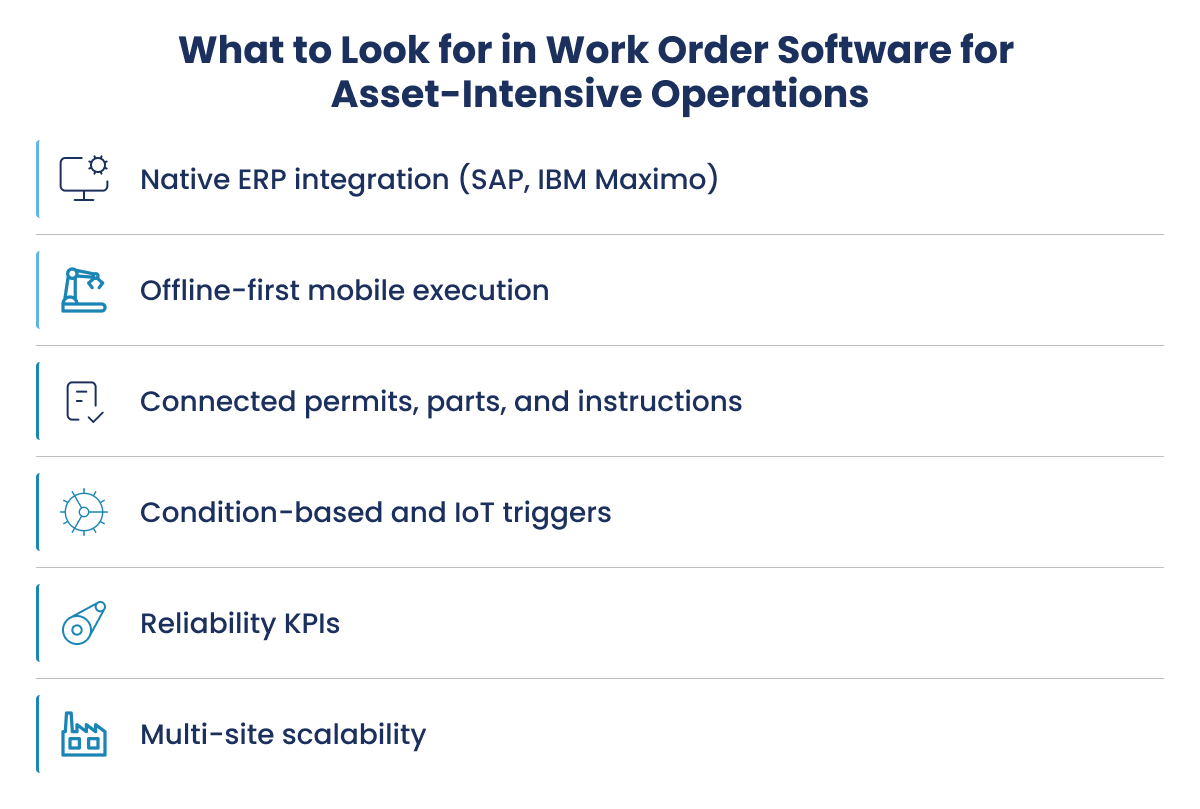
The features that matter most to an asset-intensive operation are not the same ones a small team weighs. A refinery, chemical plant, or mine runs on an ERP, works in hazardous conditions, and cannot afford a work order that stops at the office kiosk. Key features to look for are:
-
Native, two‑way ERP integration: Real bidirectional sync with SAP or IBM Maximo should be the key deciding feature. A work order that does not flow back to the system of record leaves your history incomplete and your reliability data unreliable. Lighter connectors move data but do not keep both systems in step.
-
True offline‑first mobile execution: Field crews in remote plants, tank farms, and underground sites often have no signal. The app should hold the work locally, let the technician complete it, and sync when connectivity returns, rather than simply being mobile‑friendly online.
-
Full frontline coverage in one suite: Work orders rarely travel alone. Operator rounds, digital inspections, digital work instructions, and e‑permits with lockout, tagout, and job hazard analysis should live in the same place so compliance evidence stays attached to the job.
-
Condition‑based and IoT‑triggered work orders: The ability to raise work from sensor thresholds or asset condition, rather than a fixed calendar, is what moves a plant from scheduled to predictive maintenance.
-
Reliability reporting and KPIs: Look for native visibility into backlog, schedule compliance, preventive‑to‑corrective ratio, and mean time to repair.
-
Multi‑site scalability and role‑based control: The platform should standardize workflows across sites while still allowing each plant its own assets, permissions, and reporting.
-
AI that understands industrial work: Planning, troubleshooting, and safety assistance are most useful when built for maintenance rather than repurposed from a general chatbot.
A tool can check a long feature list and still fail the only test that matters for heavy industry: whether it connects the ERP to the field crew and keeps both accurate. Weigh integration depth and offline execution more heavily than surface-level breadth.
A 24-Week Backlog, Down To 10.
Discover how Indorama Ventures rewired maintenance execution.
Benefits of Work Order Software for Asset-Intensive Operations
For a large plant, the biggest benefit of work order software is less unplanned downtime. When a problem is captured, prioritized, and put in front of the right technician quickly, small issues get resolved before they turn into failures that stop production. That single shift, from reacting to failures to acting on them early, is where most of the financial return comes from.
The other benefits build on that same idea of faster, cleaner execution:
- More released capacity: Frontline teams spend less time on paperwork, phone calls, and chasing information, so more of the day goes to actual maintenance work.
- Complete maintenance record: Work is captured at the point of execution, so your system of record in SAP or IBM Maximo holds accurate failure codes, labor, and history rather than gaps, which is what reliability and predictive programs depend on.
- Lower maintenance cost: Better planning and parts visibility reduce reliance on contractors, overtime, and emergency purchases.
- Stronger safety and compliance: Permits, lockout and tagout, and inspections are completed and recorded alongside the work, so the evidence is there when auditors ask.
- Improved decisions: Clear metrics such as maintenance backlog, schedule compliance, and mean time to repair give supervisors and reliability engineers numbers they can act on.
For asset-intensive operations, these benefits only materialize if the work order actually reaches the field and flows back to the ERP. A tool that digitizes the request but leaves execution on paper captures very little of this value.
How to Choose the Right Work Order Software
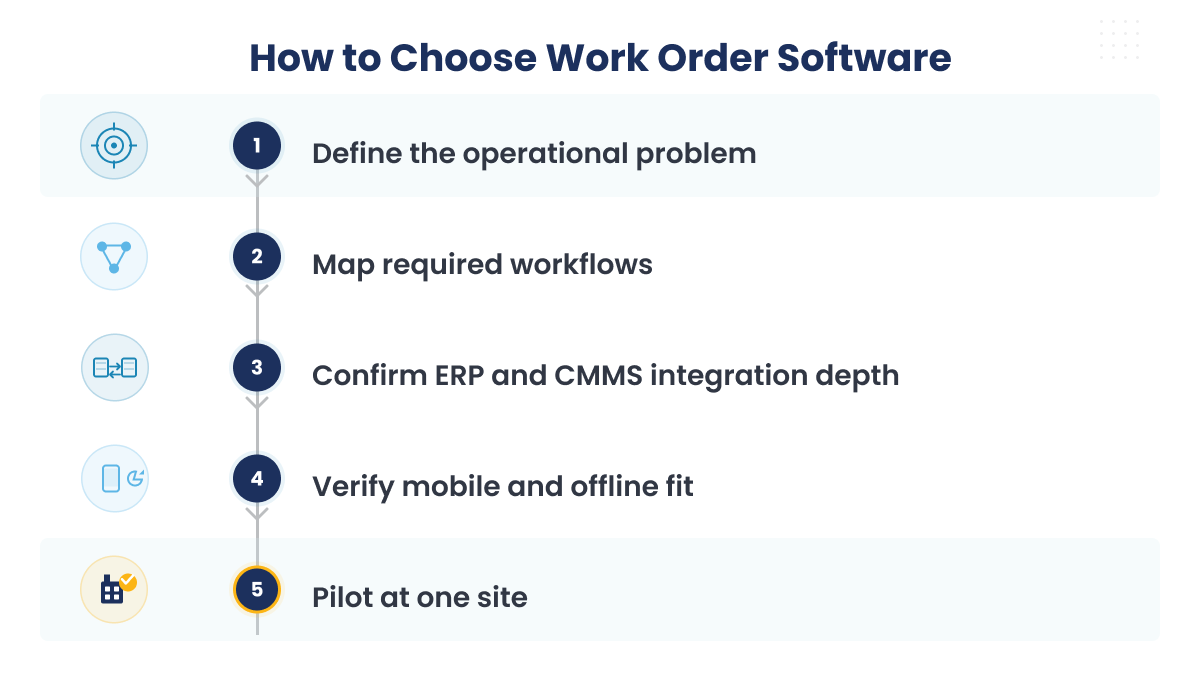
Choosing well comes down to one question: how does the work order get from your ERP into a technician's hands and back again? Use this checklist to pressure-test each option against your own operation.
- Name the problem you are solving, whether it is eliminating paper, tightening compliance, cutting downtime, or connecting your ERP to the field
- Map the work order workflows the platform has to support
- Confirm how deeply it integrates with SAP, IBM Maximo, or your ERP
- Test mobile and offline behavior in real plant conditions, not a demo environment
- Check for IoT or condition-based triggering if predictive maintenance is a goal
- Ask for a demo built on your scenarios, not a generic walkthrough
- Check fit for regulated-industry and compliance
- Speak to reference customers at a similar scale
- Pilot one site before a full rollout
For asset-intensive operations, integration depth is usually the deciding factor, because a work order that never syncs back to SAP or Maximo leaves your system of record incomplete.
What Is Execution Latency Costing Your Plant?
Curious what closing the execution gap is worth at your site? Walk through the margin math with our team.
Why Asset-Intensive Enterprises Choose Innovapptive
Every platform above helps teams manage work orders. Innovapptive takes a different approach. It is an industrial execution platform that connects the work order in SAP, IBM Maximo, or Oracle to the frontline teams responsible for completing it, rather than replacing the enterprise system of record.
The work order stays in the enterprise system. Execution moves to the frontline. This keeps the maintenance plan, field execution, and final work record connected from the moment a problem is identified to the moment the job is closed.
How Innovapptive connects the work order end to end
- Raise: AI-assisted creation turns a photo, voice note, or prompt into a structured, asset-linked work order, giving planners better information to work from.
- Plan: Parts, permits, certifications, and other execution requirements can be checked as part of the workflow, helping teams prepare the job before it reaches the field.
- Execute: Technicians and operators work from mobile digital instructions and operator rounds, online or offline, while capturing readings, parts, and labor as the job progresses.
- Stage parts: Connected warehouse inventory management software helps ensure the required parts are available and staged before the crew mobilizes.
- Close: Required completion information, including failure codes and actual hours, is captured before the work order is closed. Completion data then flows back to the ERP to keep the maintenance record current.
The result is a connected work order process that links planning, preparation, frontline execution, and completion instead of treating them as separate steps.
What that looks like in practice: This connected approach is not just a technology workflow. At Indorama Ventures, a $15.4 billion global chemical enterprise, Innovapptive Connected Worker Platform was deployed at the Port Neches, Texas facility to connect existing SAP and IBM Maximo systems with frontline execution.
The deployment contributed to measurable maintenance and workforce improvements, including:
- $19 million in realized EBITDA savings in 2025
- $50 million estimated cost takeout opportunity
- 58% reduction in maintenance backlog, from 24 weeks to 10 weeks
- 38% reduction in contractor headcount, from 140 to 87
For asset-intensive operations, the value of work order software is not just creating and tracking another record. It is making sure the right work reaches the right people, with the information and resources they need, and that the completed work makes its way back into the enterprise system.
That is the role Innovapptive is designed to play: connecting the enterprise maintenance plan to what actually happens on the plant floor.
Watch The Insight To Action Gap Close In Real Time.
See Innovapptive close the gap between a signal and a completed work order, live on your own scenarios.

Unlock Margins Hidden in Your Maintenance
Watch how leading manufacturers improve OEE, raise PM compliance and cut downtime through connected execution.
Request a Demo
2026 Company of the Year, Global Connected Worker Platforms
See why Frost & Sullivan recognized Innovapptive for closing the frontline execution gap.
Read the Report
- 05-11-2026
Unplanned Maintenance: Definition, Types, Plant Examples
Unplanned maintenance is repair work that has to start as soon as a failure or defect appears. It...

- 30-10-2026
Schedule Compliance: Formula, the 85% Benchmark and Fixes
Schedule compliance measures how much of a committed maintenance schedule gets completed as...

- 27-10-2026
Best Industrial Inspection Software: 11 Platforms Compared
Inspection software encompasses a broad market with its functionality varying widely. Repair shops...