
Best SAP Maintenance Planning and Scheduling Software at a Glance
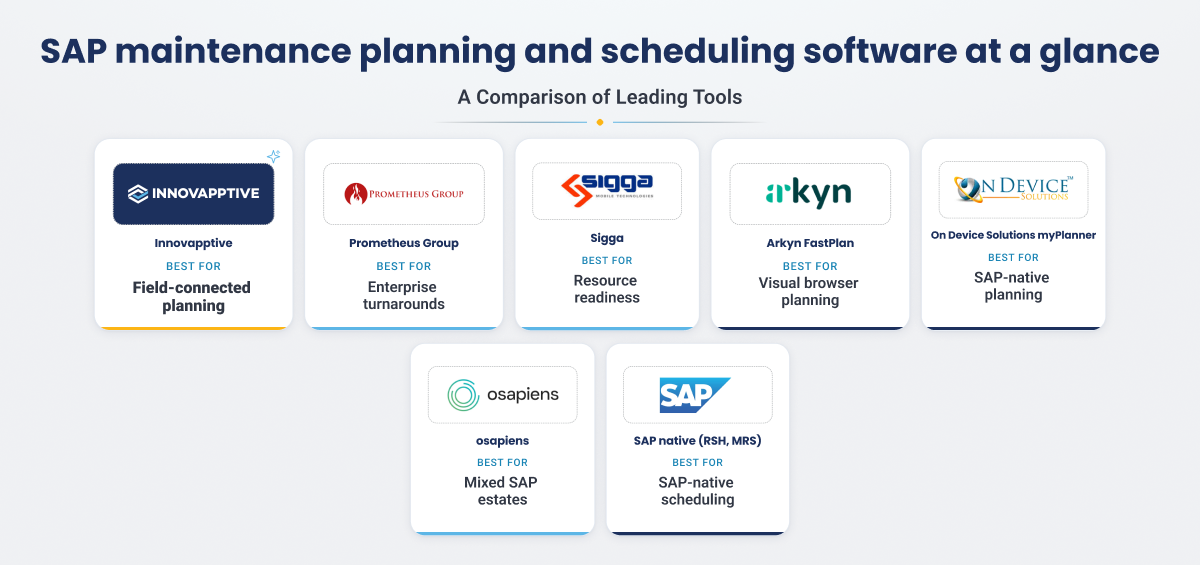
The seven tools below suit different SAP environments and operating models. Innovapptive is built for asset-intensive plants that need planning connected to field execution; Prometheus Group for enterprises consolidating planning with turnaround and permitting; Sigga for SAP teams focused on parts and resource readiness; Arkyn FastPlan for browser-based visual planning on SAP BTP; On Device Solutions myPlanner for SAP-native Gantt planning; osapiens for mixed SAP and non-SAP estates; and SAP native scheduling for teams staying entirely inside SAP.
|
Tool |
Best Fit |
SAP Integration |
Key Consideration |
Starting Price |
|---|---|---|---|---|
|
Innovapptive |
Asset-intensive SAP plants requiring planning connected to field execution |
Deep, bidirectional SAP integration |
AI-assisted planning, readiness, and execution loop |
Custom enterprise pricing |
|
Prometheus Group |
Enterprise planning plus turnaround programs |
Bidirectional SAP integration |
Planning, permitting, and turnaround breadth |
Annual subscription basis |
|
Sigga |
SAP teams focused on material and resource readiness |
SAP-certified integration |
Parts, personnel, and equipment checks |
Custom pricing |
|
Arkyn FastPlan |
Visual SAP PM and CS planning |
SAP BTP |
Browser-based visual planning |
From $250/user/month Minimum: 20 users |
|
On Device Solutions myPlanner |
SAP-native planning |
Runs inside SAP |
Gantt planning and SAP-native experience |
From ~$300/user one-time plus setup |
|
osapiens |
Mixed SAP and non-SAP estates |
SAP-certified connector |
Planning in the platform with SAP synchronization |
Published plans; free tier |
|
SAP native (RSH, MRS) |
Organizations committed to an SAP-native path |
Native SAP |
RSH and MRS scheduling path and roadmap |
Additional license/Add on |
Pricing note: Listed prices are vendor-published starting points from vendor sites or SAP Store partner listings in the source research. Actual terms depend on scope, users, setup, and deployment.
Why SAP PM Plus Spreadsheets Stops Working at Scale
SAP Plant Maintenance has the basics covered. It provides capacity planning and leveling capabilities, including transaction CM25, which is SAP's built-in board for balancing maintenance load across work centers. The harder problem starts when the schedule has to reflect the conditions around the work, not just the work order itself. To manage that, most teams still build the real weekly plan in a spreadsheet, and that is where the problems begin.
A spreadsheet can make a weekly plan easier to see, but it creates a second version of the maintenance plan. Once that copy is exported, changes in SAP and changes in the field cannot be synced in real time. However, the bigger issue is readiness. A job can be technically ready in SAP but still be unable to run because a permit is not ready, an isolation is incomplete, the required craft is unavailable, a part is missing, or a contractor crew changes.
The common failure modes with spreadsheets are ones every planner recognizes:
- Version ambiguity: emailed copies multiply, making it unclear which schedule is current
- Cascade rework: one delayed job can trigger manual changes across dependent work
- Blocked hours: work that finishes early can leave capacity blocked on the next version of the plan
- No audit trail: scheduling decisions are harder to trace because the spreadsheet is separate from the transaction history
- Silent backlog: overdue or newly changed work can stay outside the planner's view until someone checks for it
The structural point is simple: the spreadsheet plan is a copy of SAP data, not a connection to it, so it begins going stale the moment it is exported. That is why a plan built correctly on Friday is wrong by Wednesday, and why schedule compliance slips even when the planning work was done well.
The 3 Models of SAP Maintenance Planning and Scheduling Software
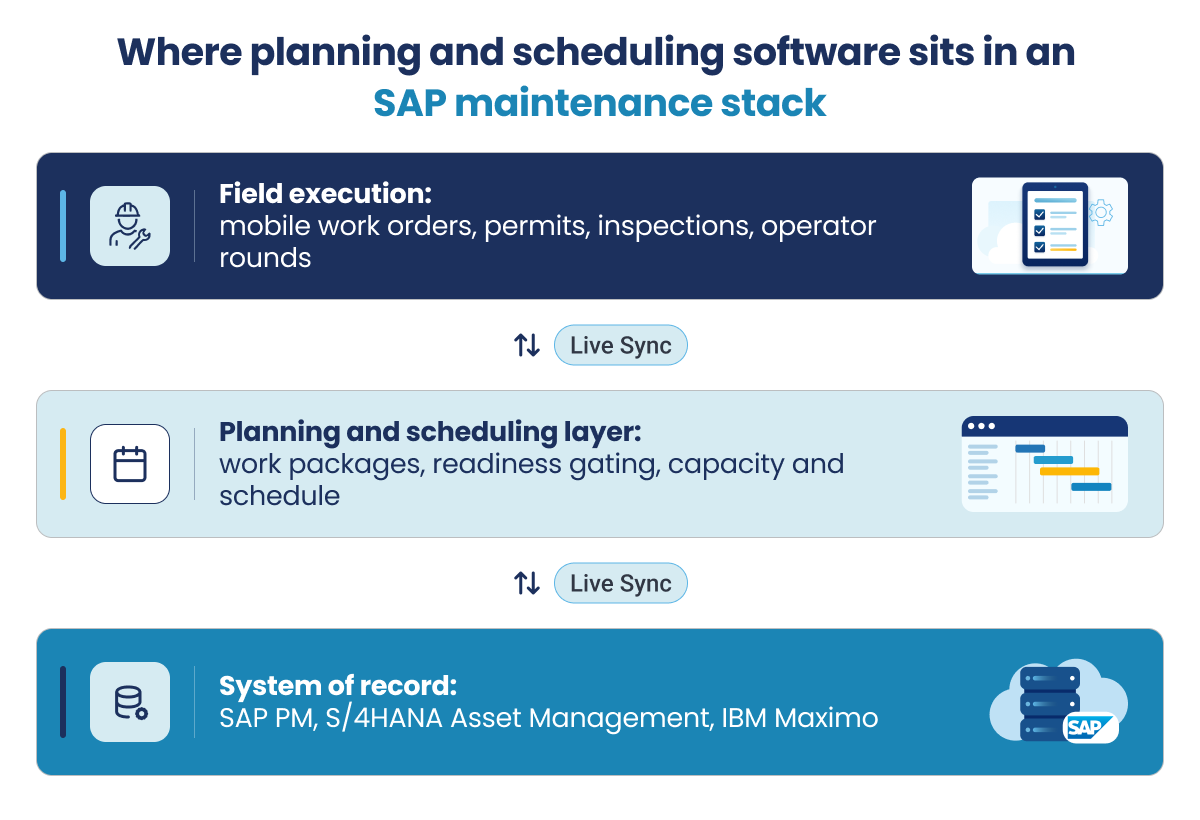
For an SAP maintenance team, the market splits three ways. The question is not which model is best, but where you want planning to happen and whether SAP PM stays your system of record.
| Model | What It Does | Examples | Main Consideration | Who Should Consider It |
|---|---|---|---|---|
| Planning and execution layer | Connects to SAP, provides a planning interface, and can write planning results back to SAP PM. SAP remains the system of record | Innovapptive, Sigga, Arkyn FastPlan, On Device Solutions myPlanner | Adds a planning layer without replacing SAP PM | SAP-centric plants that want planning and execution to stay closely connected |
| SAP-native scheduling | Scheduling capabilities run within SAP products and follow SAP's product architecture and roadmap | SAP RSH, SAP MRS | Native to SAP, with decisions tied to SAP product lifecycle | Organizations committed to an all-SAP scheduling approach |
| CMMS or EAM with an SAP connector | Planning happens in the maintenance platform and SAP data is synchronized through a connector | osapiens; broader CMMS products such as Fiix and MaintainX | Useful for mixed estates, but planning does not stay entirely inside SAP PM | Organizations operating both SAP and non-SAP sites |
CMMS means computerized maintenance management system. EAM means enterprise asset management. Both are broader maintenance management software categories that can act as systems of record. A planning and execution layer is complementary to that system of record. Innovapptive, for example, sits on top of SAP PM, IBM Maximo, or Oracle EAM rather than replacing them.
For an SAP team, the key question is therefore not simply which product has the longest feature list. It is where you want planning to happen, whether SAP PM must remain the system of record, and how closely the planning process needs to connect to what technicians are doing in the field.
Industrial AI Is Moving From the Dashboard to the Frontline
See what AI looks like when it plans the work, checks readiness, and runs the job, not just reports on it.
How These Tools Compare on SAP Integration, Planning, Readiness, and Execution
This comparison focuses on the dimensions that matter when an SAP maintenance team moves beyond basic planning: integration depth, planning approach, readiness, field connectivity, and automation.
| Tool | SAP Connection | Planning | Readiness | Field / Mobile | AI / Automation |
|---|---|---|---|---|---|
| Innovapptive | SAP ECC PM out of the box; S/4HANA Asset Management through SAP BTP; Maximo and Oracle EAM supported | AI-assisted work packaging, planning, scheduling and dispatch | Readiness workflows with explainable confidence scoring | RapidSync offline-first; connected worker integration | Purpose-built planning agents and automation |
| Prometheus Group | Live bidirectional SAP integration; SAP Certified Integration | Planning plus turnaround capability | Parts and downtime visibility | Documented capability | AI-assisted scheduling |
| Sigga | SAP-certified integration for ECC and S/4HANA | 52-week planning horizon, weekly scheduling and simulation | Availability checks across parts, personnel and equipment | Documented capability | Automation and resource readiness |
| Arkyn FastPlan | FastCloud on SAP BTP | Visual browser planning and test runs before write-back | Test before write-back | Browser-based planning | Planning-focused automation |
| On Device Solutions myPlanner | SAP-certified add-on inside SAP ECC and S/4HANA, UI5 on BTP | Gantt planning and personnel assignment | Not documented as a dedicated readiness gate | SAP-native interface | Planning-focused |
| osapiens | SAP-certified connector across PM, SD and MM; standalone, SAP or hybrid | Planning in osapiens with skill-based assignment | Parts availability tied to the plan | Workforce and on-call planning | Platform automation |
| SAP RSH / MRS | Runs within SAP; RSH for S/4HANA, MRS for ECC | SAP-native resource and multiresource scheduling | Not documented as a dedicated gate | SAP-native | SAP product roadmap |
No single tool wins every column. The right choice depends on where your planning breaks down. If the schedule falls apart because the field moves faster than the plan, weigh integration, readiness, and dynamic scheduling most. If you need one vendor across planning, permitting, and turnarounds, breadth matters more. If you mainly want a cleaner scheduling view inside SAP, a lighter native or visual layer may be enough.
The 7 Best SAP Maintenance Planning and Scheduling Software Tools Compared
1. Innovapptive Intelligent Maintenance Planning and Scheduling (iMPS)
Best fit: Asset-intensive SAP plants that want maintenance planning connected to frontline execution.
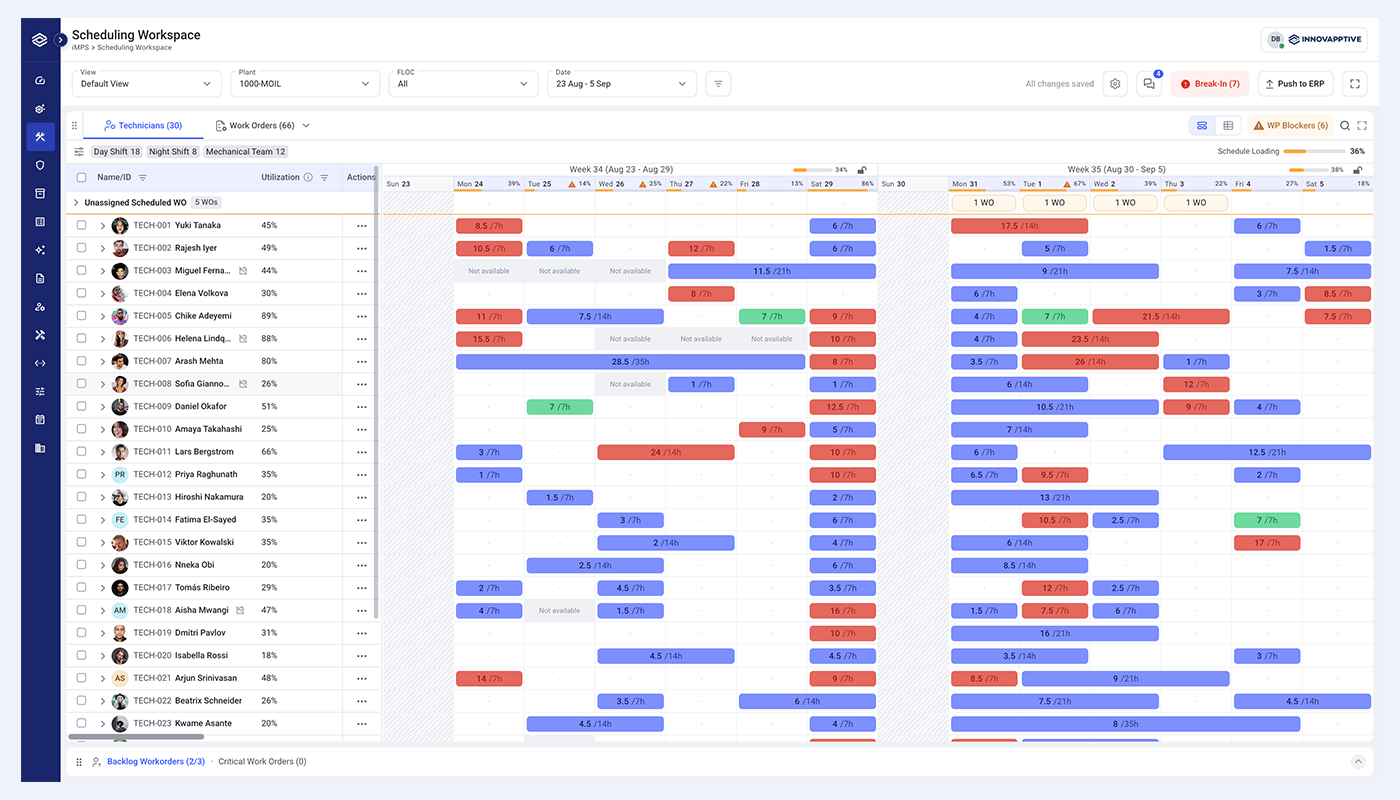
Innovapptive Planning and Scheduling Software is built for asset-intensive organizations that already run SAP and need the maintenance plan to stay connected to what is happening on the plant floor. Rather than positioning planning as a replacement for SAP PM, iMPS adds planning and scheduling and readiness workflows on top of the existing system of record and connects them to frontline execution.
That distinction matters in industrial environments where the schedule can change for reasons that are not visible in a work order alone. A planned job may depend on permit status, isolation readiness, crew availability, materials, or a technician reporting a change from the field. iMPS is designed around bringing those conditions into the planning process rather than treating the Friday schedule as fixed.
Key capabilities:
- AI-assisted work packaging, work-package readiness, scheduling and dispatch
- Readiness checks for the parts, permits, and isolations that can stop work from starting
- Resource and demand planning across crafts and downtime windows
- Offline-first field connectivity through RapidSync
- Explainable recommendations with confidence scoring
- Connected Worker Platform integration so field execution signals feed back into planning
| What stands out | Limitations and considerations |
|---|---|
|
|
Innovapptive's analyst recognition backs this up. It was named a leader in Frost & Sullivan's 2025 Frost Radar for augmented connected worker platforms and the 2026 Frost & Sullivan Company of the Year. On the same Connected Worker Platform that iMPS extends, Indorama Ventures' Port Neches site cut its maintenance backlog from 24 weeks to 10 and lifted its planned-to-corrective ratio from 45 to 80 percent, part of $19M in maintenance savings reported.
|
A 24-Week Backlog, Down to 10 See how Indorama Ventures connected SAP and IBM Maximo to frontline execution and realized $19M in maintenance savings. |
2. Prometheus Group Planning and Scheduling (GWOS-AI)
Best fit: Enterprise environments that want maintenance planning alongside broader turnaround, permitting, and master-data capabilities.
Prometheus Group is a broad enterprise maintenance platform that combines planning and scheduling with adjacent capabilities such as permitting, master data governance, and dedicated turnaround and outage workflows. For large organizations looking to consolidate several maintenance processes under one vendor, that breadth is an important part of the product story.
Key capabilities:
- Graphical drag-and-drop planning and scheduling
- Parts and downtime visibility built into the scheduler
- Dedicated shutdown, turnaround, and outage capability
- Permitting and master-data management in the same platform
- Bidirectional SAP integration as a certified partner
| What stands out | Limitations and considerations |
|---|---|
| The breadth of the maintenance operating model. A plant with substantial turnaround activity, or a broader need to connect planning with permitting and governance, may value having those capabilities in one platform. That is a different approach from a more focused planning and execution layer. |
|
3. Sigga Planning and Scheduling
Best fit: SAP teams that want to strengthen parts and resource readiness through an SAP-certified mobile planning add-on.
Sigga is an SAP-certified add-on focused on mobile maintenance and planning. It automates availability checks across parts, personnel, and equipment, and gives schedulers a resource view with technician availability and skill matching across a rolling horizon.
Key capabilities:
- Availability checks across parts, personnel and equipment
- Long-range planning with a 52-week horizon
- Weekly scheduling, skill matching and schedule simulation
- Mass updates to SAP records
| What stands out | Limitations and considerations |
|---|---|
| Readiness through availability. Sigga is strong at confirming the pieces of a job are in place, which is exactly the check many calendar-driven schedules skip. |
|
4. Arkyn FastPlan
Best fit: SAP PM teams that want a modern visual planner with fast deployment.
Arkyn FastPlan is a browser-based planning option for SAP PM and Customer Service teams that want a visual planning interface with a relatively direct deployment model. It connects through FastCloud on SAP BTP and is designed to avoid changes to the SAP core.
Key capabilities:
- Visual planning in the browser
- SAP BTP deployment with no core modifications
- Test runs before schedule changes are written back
- Fast deployment relative to on-premise suites
| What stands out | Limitations and considerations |
|---|---|
|
|
5. On Device Solutions myPlanner
Best fit: SAP-native planning teams with Clean Core requirements who want a graphical scheduling view close to SAP.
On Device Solutions myPlanner is an SAP-certified planning add-on designed for teams that want planning to remain close to the SAP environment. It runs on SAP UI5 on BTP and carries SAP Clean Core certification.
Key capabilities:
- Drag-and-drop Gantt planning
- Work center and personnel assignment at header and operation level
- Runs within the SAP environment
- Clean Core certification
| What stands out | Limitations and considerations |
|---|---|
| The SAP-native experience. For organizations where keeping planning close to SAP and preserving an SAP-style user experience are priorities, the architecture is straightforward to understand. |
|
6. osapiens
Best fit: Mixed SAP and non-SAP estates that want a standalone or hybrid planning model.
osapiens is a broader operations and compliance platform with a maintenance planning module and an SAP-certified connector. It supports standalone, SAP, or hybrid planning, which suits plants that are not fully on SAP.
Key capabilities:
- SAP-certified connector with a standalone or hybrid model
- Maintenance planning module inside a wider platform
- Parts availability checks
- Published plans and a free tier for smaller evaluations
| What stands out | Limitations and considerations |
|---|---|
| Its flexibility for mixed estates. Where other tools assume SAP is the sole record, osapiens can plan across SAP and non-SAP sites. |
|
7. SAP Native Scheduling: RSH and MRS
Best fit: Organizations committed to an SAP-native path who want no new vendor.
SAP itself offers scheduling products for SAP environments. Resource Scheduling for Maintenance Planners (RSH) is associated with S/4HANA Asset Management, while Multiresource Scheduling (MRS) is the long-standing ECC add-on. SAP is currently consolidating these capabilities into SAP Field Service and Asset Management (FSA).
Key capabilities:
- Native to SAP, so no extra integration to maintain
- Included in the existing SAP investment
- RSH for S/4HANA and MRS for ECC scheduling
- Increasingly data-driven as SAP invests in Asset Management
| What stands out | Limitations and considerations |
|---|---|
| The simplicity of an all-SAP architecture. Organizations that want to minimize the number of planning vendors and keep scheduling inside the SAP ecosystem may prefer this route. |
|
Your SAP Plan Is Only as Good as What Reaches the Field
See how a planning and execution layer turns SAP work orders into ready, scheduled, and closed-out jobs, with parts, permits, and isolations confirmed before the crew mobilizes
How We Evaluated These Tools
We judged every tool on the same criteria, weighted for asset-intensive SAP plants rather than small teams. Instead of counting features, we looked at how each performs where it counts on an industrial site:
- How a work order becomes a committed weekly schedule, from planning through field execution, not just a desk view
- Depth of SAP integration, with bidirectional sync as the benchmark, plus Maximo and Oracle where offered
- Whether the tool checks parts, permit, and isolation readiness before a job is committed
- How much of the planning the AI automates, and whether it can explain its recommendations
- Whether the schedule reacts to live field conditions or only to the last plan
- Fit for regulated, hazardous, asset-intensive sites, including turnaround and shutdown windows
- The ability to standardize across multiple plants
This comparison is maintained by Innovapptive, and Innovapptive is included in it. Every tool, including our own, was held to the same questions above.
Routine Maintenance and Turnaround Require Different Scheduling Logic
Routine maintenance and turnarounds are different scheduling problems, and a tool that is good at one is not automatically good at the other. Routine work is a rolling process that balances maintenance backlog and available capacity. A turnaround works inside a fixed window where the critical path, contractor workforce, permit volume and material availability can determine whether the event finishes on time.
| Dimension | Routine Maintenance | Turnaround |
|---|---|---|
| Planning horizon | Rolling backlog | Fixed event window |
| Primary limiter | Capacity, readiness and changing priorities | Critical path and event completion date |
| Workforce | Recurring maintenance teams | Large internal and contractor workforce |
| Materials | Ready before individual jobs | Often staged before the turnaround begins |
| Typical planning tools | Maintenance planning and scheduling software | Maintenance planning plus project scheduling tools such as Primavera P6 or MS Project |
The implication for software selection is simple: do not assume that strength in weekly maintenance scheduling automatically translates into dedicated turnaround planning. Some plants deliberately use different tools for the two use cases. On tooling, it is worth noting Prometheus has dedicated turnaround, shutdown, and outage capability, and Innovapptive does not have a dedicated turnaround module. That is a difference in scope, not an overall ranking of either platform. Innovapptive's focus is keeping routine scheduling, readiness, and field execution tightly connected, and preparing the readiness a shutdown window depends on.
The Capabilities That Separate a Scheduler From a Planning System
A basic scheduler places jobs on a calendar. A planning system decides whether the work is ready, who should do it, and how the plan should change when conditions do. Four capabilities separate the two, and each is worth testing directly in a demo.
1. Does it verify readiness before a job reaches the schedule?
A scheduler assumes a job can run, while a planning system confirms it. It checks parts, permits, isolations, and craft availability before the work reaches the schedule, so crews do not mobilize to a job that cannot start.
2. Can it level resources automatically, or only show you the overload?
Showing that a crew is overloaded is easy. A planning system helps resolve it, proposing how to level work across crafts, work centers, and downtime windows rather than leaving the planner to fix every clash by hand.
3. If the AI recommends something, can it show you why?
When software recommends a change, the planner needs to see why. An explainable recommendation with a traceable basis and a confidence score can be trusted and challenged; an opaque one cannot.
4. Does the schedule react to the field, or only to the planner?
The plant does not stop when the plan is published. A planning system takes live signals from execution, such as a job finishing early or slipping, and adjusts, rather than reflecting only last week's assumptions.
What Is Planning Latency Costing Your Plant?
Freed-up hours no one reclaims, contractors covering work you could have planned, and a backlog you cannot see. Walk through the margin math with our team on your own numbers.
How to Choose the Right Planning and Scheduling Tool for Your Plant
Use this as a checklist in vendor demos. It focuses on the capabilities that genuinely differ between products, not the ones every tool has, and gives you a specific thing to ask for each.
| Evaluation Area | What Good Looks Like | Question for the Demo |
|---|---|---|
| SAP integration depth | Bidirectional updates between the planning layer and SAP PM, with clear ownership of the system of record | Show what happens when an SAP work order changes after it is scheduled. |
| Work readiness | Checks that the job has the parts, people, permits, isolations and other prerequisites it needs | Show a job that is not ready. What happens to it before it reaches the schedule? |
| Dynamic scheduling | The plan can respond when work finishes early, slips, is reprioritized or loses a resource | Complete or delay a job in the field and show when the schedule reflects the change. |
| Field and offline connectivity | Technicians can execute work in low-connectivity environments and synchronize without a second paper process | Put a technician offline and complete a work order. Show the sync path back to SAP. |
| AI transparency | Recommendations have a traceable basis so planners can understand and challenge them | Ask the system to recommend a change and show the evidence behind it. |
| Resource planning | The platform identifies overloads and helps the planner make practical adjustments | Overload a craft or work center and ask the system to propose an alternative. |
Match the planning model to your SAP environment
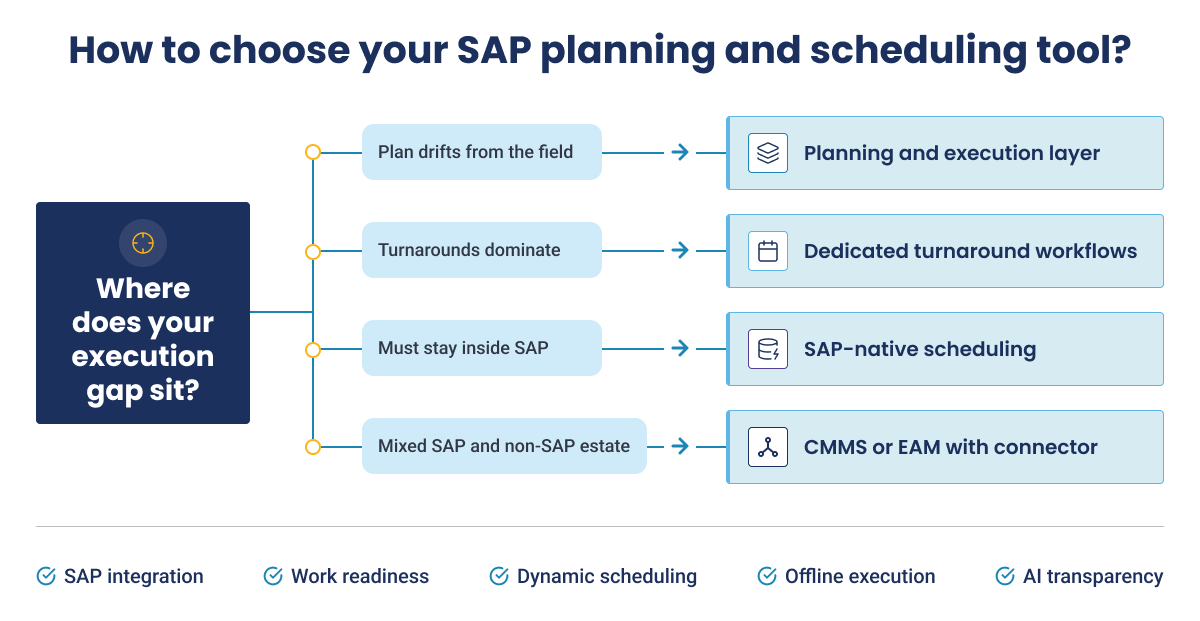
Use your operating model to point toward the architecture worth investigating, rather than starting from a product category:
| Your Operating Model | Architecture to Investigate | Examples in This Comparison |
|---|---|---|
| SAP PM must remain the system of record and field execution is tightly connected to planning | Planning and execution layer | Innovapptive iMPS, Sigga, Arkyn FastPlan, On Device Solutions myPlanner |
| SAP-native scheduling is a strategic requirement | SAP-native scheduling | SAP RSH / MRS and the FSA roadmap |
| Sites use a mix of SAP and non-SAP maintenance systems | CMMS or EAM with SAP connector | osapiens and other connector-based platforms |
| Turnarounds are a major annual planning discipline | Dedicated turnaround workflows | Prometheus Group and other tools with explicit turnaround scope |
This approach keeps the decision grounded in the plant rather than forcing every organization into the same product category. Two companies can both run SAP PM and still need very different planning architectures because their field connectivity, turnaround program, system landscape and planning processes are different.
What to Budget and What to Measure
Two things matter before you buy: what the software will really cost, and how you will prove it worked. On cost, the per-user license is often the smaller part. Setup fees and minimum contract terms usually drive most of the first-year cost, with setup running into six figures and multi-year minimums common, so compare total first-year cost rather than the per-user rate alone. On measurement, track a small, honest set of metrics before and after:
- Schedule compliance: the share of planned work completed as scheduled
- Wrench time and planned maintenance percentage: how much of the day is spent on tools, and how much work is planned rather than reactive
- Maintenance backlog and readiness: whether backlog is shrinking and jobs arrive ready to execute
The Right SAP Planning Tool Depends on Where the Execution Gap Sits
For some SAP teams, the priority is staying entirely inside SAP. For others, it is visual planning, readiness checks, turnaround management, or support for a mixed SAP and non-SAP estate. The important distinction is understanding what the planning layer needs to connect to, not simply counting features.
So start from where your execution gap sits. If the risk is losing sight of the field, prioritize integration depth, readiness, and dynamic scheduling. If it is coordinating large turnarounds, prioritize dedicated turnaround depth. If it is staying inside SAP, weigh the native path and its roadmap. Match the tool to that gap and the shortlist narrows quickly.
For asset-intensive SAP organizations, Innovapptive takes a connected planning and scheduling approach that brings planning and frontline execution together while keeping SAP as the enterprise system of record. That means the weekly plan, the readiness checks behind it, and the work crews actually complete stay linked, so the schedule reflects plant conditions rather than last week's assumptions. For teams whose main gap sits between the plan and the floor, that connection is the part worth evaluating first.
Close the Gap Between Your SAP Plan and the Plant Floor
See Innovapptive turn an SAP work order into a ready, scheduled, and closed-out job, live on your own scenarios, so the weekly plan reflects what is actually happening in the field.

Unlock Margins Hidden in your Maintenance
Watch how leading manufacturers improve OEE, increase PM compliance, and reduce downtime through connected execution.

- 12-10-2026
Manufacturing Skills Gap: What It Costs and How to Close It
A plant can have every role filled and still experience a manufacturing skills gap. Very often,...

- 05-10-2026
10 Best Shift Handover Software Platforms for Plant and Process Operations
Shift handover software can mean different things depending on the operating environment. Some...

- 29-09-2026
Best SAP Maintenance Planning & Scheduling Software 2026
Your maintenance work orders live in SAP Plant Maintenance (PM), while the working schedule lives...