
What Is Maintenance Planning and Scheduling?
Maintenance planning and scheduling is the process of fully preparing each maintenance job before anyone is assigned to it, confirming it is ready, and then committing it to a specific week, crew and equipment window. The two functions run in a fixed sequence, and keeping that order is what makes the schedule hold.
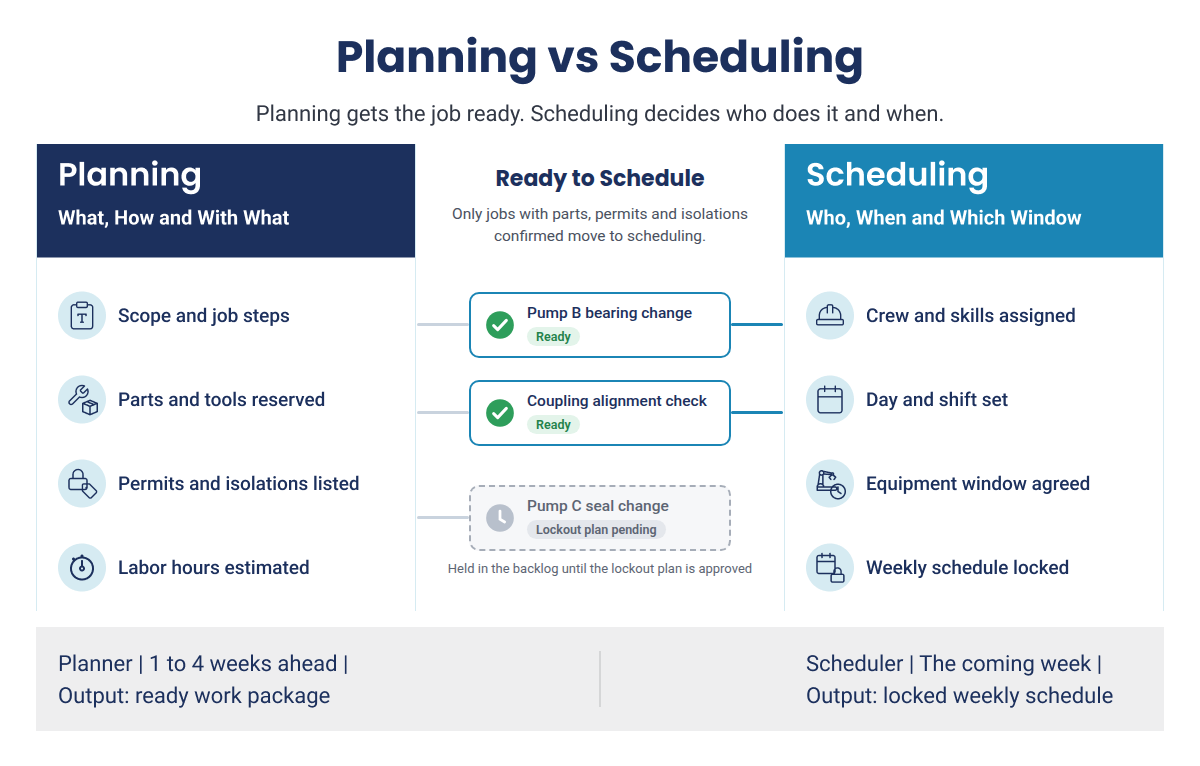
Maintenance planning defines the work before a crew is assigned. The planner sets the scope and job steps, estimates the labor hours, and confirms the parts, tools, permits, isolations and access the job needs. Once all of these are confirmed, the job is marked as ready to schedule.
Maintenance scheduling is the work of assigning ready jobs to a specific week, technicians and equipment window, based on the labor hours available and the operating plan.
It also helps to be clear about what the process is not:
- It is not the due date on an ERP work order. A date shows when someone wants the job done, but it says nothing about whether the job can actually run on that day.
- It is not a list of tasks. A list with no labor estimate and no readiness check behind it tells the crew what to do, but not whether they will be able to do it.
Maintenance Planning vs Scheduling: What Each One Decides
Planning decides what the job is, how it will be done and what it needs. Scheduling decides who will do it, when, and in which equipment window. While planning removes delays during a job, such as a technician stopping to find a missing part, scheduling removes delays between jobs, such as a crew finishing early with nothing ready to start next.
The table below compares the two, using the feedwater pump bearing job as an example.
| Maintenance planning | Maintenance scheduling | |
|---|---|---|
| Question answered | What is the job, how will it be done and what does it need? | Who will do it, on which day and in which equipment window? |
| Owner | Maintenance planner | Maintenance scheduler, with the crew supervisor running the daily plan |
| Typical horizon | Often one to four weeks before the intended work date, with longer preparation for complex jobs | The coming week, followed by a daily assignment plan |
| Main inputs | Work requests, equipment history, saved job plans, parts stock, permit and isolation needs | Ready jobs, available labor hours by trade, equipment windows agreed with operations |
| Output | A complete job package with requirements identified and readiness status clear | A published schedule that fits the capacity and equipment windows available |
| Success measure | Estimate accuracy and weeks of ready backlog | Schedule compliance |
| Common failure | The crew has to stop to locate parts, tools, instructions or approvals | Jobs are placed in the week before they are ready, or more hours are loaded than the crew can cover |
| Feedwater pump example | The planner reserves the bearing set, estimates two mechanics for six hours and lists the isolation points | The scheduler assigns the job to Wednesday day shift, when operations runs the standby pump |
The handoff between the two functions is where most plants get into trouble. Scheduling should only draw from work that planning has marked as ready, which makes the ready backlog the scheduler's only legitimate source of work. When a scheduler pulls in a job that is still waiting on a part or a permit, the job stops, and the rest of the week has to be rearranged.
Keeping to this rule also reduces downtime, because equipment comes out of service only when the crew can finish the job.
Why Combining the Planner and Scheduler Roles Breaks Both
When one person owns both planning and scheduling, today's urgent work almost always wins over next week's preparation. A planner who is pulled into chasing parts for a running breakdown stops building packages, and two weeks later the scheduler has very little ready work to load. The problem sits in the role design, so the answer is to set clear ownership:
- Keep the planner on future work: The planner prepares next week's jobs, not today's breakdowns.
- Separate weekly scheduling from daily supervision: The scheduler builds the weekly schedule from the planner's ready backlog, and the crew supervisor owns the daily schedule.
- Protect planning time in small teams: If one person holds both roles, block fixed planning days.
Are Unready Jobs Still Reaching Your Weekly Schedule?
Learn how leading plants separate planning from scheduling, check parts, permits and isolations before the week is locked, and keep their schedules on track when urgent work comes in.
The Maintenance Planning and Scheduling Process in 7 Steps
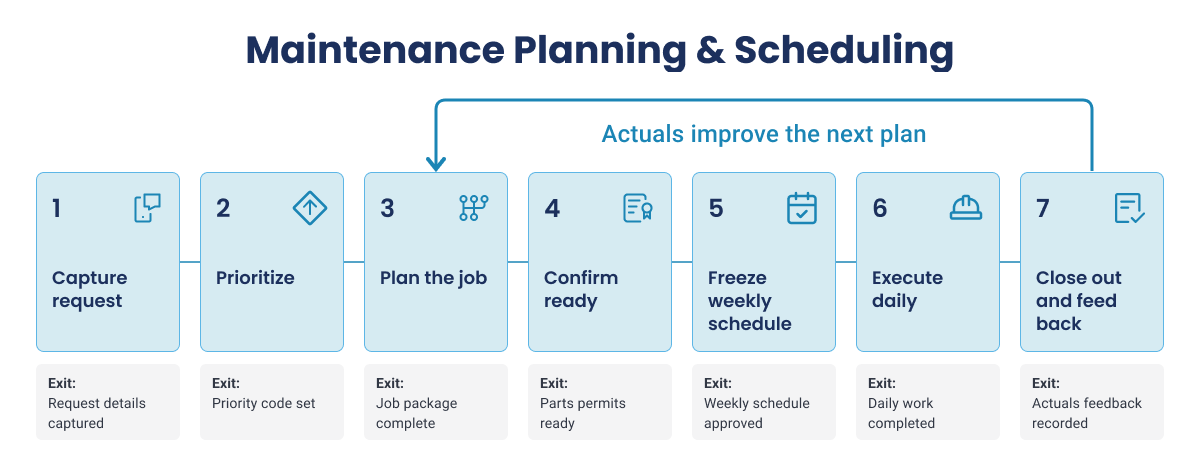
The maintenance planning and scheduling process steps often vary in number based on whether intake and prioritization are considered separate, readiness is considered as a step, or whether closeout is part of the process. However plants should note that a list of steps is not enough if work can move forward before the previous step is finished. Each step needs a clear owner and a check that must be met before the job moves on. This guide uses seven steps because each one ends in a decision someone signs off on, with an exit condition that must be true before the work moves on.
| Step | Owner | Exit Condition |
|---|---|---|
| 1. Capture and screen the work request | Planner or coordinator | The request is confirmed and duplicates are removed |
| 2. Prioritize by asset criticality and risk | Planner, with operations | A priority and required-by date are set |
| 3. Plan the job and build the work package | Planner | The package is complete and parts are reserved |
| 4. Confirm the job is ready to schedule | Planner, with storeroom and operations | Every readiness check is confirmed |
| 5. Build and lock the weekly schedule | Scheduler, with operations | The schedule is published and locked |
| 6. Execute and manage the daily schedule | Crew supervisor | Work is done and urgent jobs are logged |
| 7. Close out the work order | Technician and planner | Actual hours and notes are recorded |
The steps described below follow the bearing job on feedwater pump B, which has an installed spare pump A.
Step 1: Capture and Screen the Work Request
Every request should be logged in one place, whether it comes from operator rounds, inspections, preventive maintenance triggers, condition alerts or production. Each request should be screened for the following before any planning time is spent on it:
- Check for duplicates: An open inspection request for the same pump B bearing is merged with the new one.
- Confirm the scope is clear and the correct asset or functional location is named.
- Stop bypassed requests: Informal requests leave no record, so the schedule loses hours nobody can see.
Exit condition: Request validated, asset identified and duplicates checked
Step 2: Prioritize by Asset Criticality and Risk
Priority should always be set before planning starts. Most plants use a priority matrix that weighs equipment criticality against the safety, environmental, production and cost impact of a failure. RIME (Ranking Index for Maintenance Expenditures), which multiplies a criticality score by a work type score, is one example; use the method your site has approved.
| Priority code | Response window | Example job |
|---|---|---|
| P1 Emergency | Start immediately, even if it displaces scheduled work | Loss of containment on a process line |
| P2 Urgent | Include in next week's schedule | Rising bearing temperature on pump B, with spare pump A available |
| P3 Routine | Plan within two to four weeks | Corroded handrail on a non-process walkway |
Exit condition: Priority code and required-by date set.
Step 3: Plan the Job and Build the Work Package
The planner turns the request into a work package a qualified technician can follow without stopping to ask questions. A complete package contains:
- Scope and step-by-step job instructions
- A labor estimate by craft
- A parts list, with stock checked and parts reserved
- Special tools, lifting gear and access equipment such as scaffolding
- Safety requirements, including permits and isolation points
- Drawings, manuals and the equipment's own past work orders
- Notes from the last time the same job was done
For repeat jobs, the planner starts from the saved job plan and the hours actually recorded last time. For example, the last bearing change on pump B sets the estimate at two mechanics for six hours.
Exit condition: Work package complete, estimate set and parts reserved.
Step 4: Confirm the Job Is Ready to Schedule
Once parts, permits, isolations, access, tools and the equipment release are confirmed, the job is marked as ready. It then joins the ready backlog, which is the pool of fully planned jobs the scheduler can choose from. For example, the bearings for pump B arrive Monday, the electrical and valve isolations are listed, and operations agree the pump can be released midweek, so the job is marked as ready.
Exit condition: Job marked ready and counted in the ready backlog.
Step 5: Build and Lock the Weekly Schedule
The scheduler selects ready jobs by priority and due date and matches them to next week's labor hours by trade. Operations agree to the equipment windows in a weekly scheduling meeting, usually midweek, and the schedule is published and locked a few days before the week starts so the storeroom can stage parts. After that, only emergencies can change it. For example, the pump B bearing job is grouped with an alignment check and a lubrication task on the same pump in one Wednesday window, so one isolation covers three jobs.
Exit condition: Schedule published and frozen, with operations sign-off recorded.
Step 6: Execute and Manage the Daily Schedule
The crew supervisor turns the weekly schedule into daily assignments. Urgent work that was not on the schedule, often called break-in work, can displace a scheduled job only if it meets the following criteria:
- Only work above a set priority, usually P1, can displace scheduled work.
- Every break-in is logged with a reason code.
- Technicians record time, findings and parts used as they work, ideally on a mobile device, instead of from memory at the end of the shift.
For example, when a cooling water leak breaks in on Tuesday, the supervisor logs the reason and moves a P3 job to the following week. Pump B stays on Wednesday.
Exit condition: Work executed, with break-ins logged against reason codes.
Step 7: Close Out the Work Order and Record What Happened
Closeout is where the next plan improves. A work order closed with only the word complete teaches the planner nothing, so closeout should capture:
- Actual hours against the estimate, and the parts actually used
- The as-found and as-left condition of the equipment
- Failure codes that record what failed and why
- Technician notes on anything the plan missed
In the future, the planner updates the job plan library from these notes. For example, the pump B job ran two hours over because of a seized coupling hub, so the planner added a hydraulic puller and two hours to the plan for next time.
Exit condition: Work order closed in the system of record, with actuals and feedback attached.
AI That Does the Prep Work While Your Planners Stay in Charge
Discover how Innovapptive’s planning and scheduling agents draft work packages, size job durations and recommend assignments, while planners and schedulers approve or change every decision.
Work Readiness: Proving Parts, Permits and Isolations Before Scheduling
A job is ready when the requirements that could stop the work or make it unsafe are confirmed. Materials, permits, isolations, access, skills and equipment release all affect whether the crew can finish in the planned window. Use this checklist before any job goes on the schedule.
| Readiness Check | What must be confirmed | Who confirms it | What happens if it is assumed |
|---|---|---|---|
| Parts and materials | Kitted, staged and tagged to the work order | Planner and storeroom | The job stops for a missing part |
| Scope and job instructions | Work scope, sequence, drawings and relevant asset history are attached or accessible | Planner with a qualified technician or engineer | The crew has to clarify the method or discover missing work in the field |
| Permits | Permit type known, gas tests booked, issuer available | Planner, operations and safety | The crew waits for the permit |
| Isolations | Applicable energy sources and isolation points are identified under the site procedure, with the required isolation and verification handled by authorized personnel | Planner and operations, with authorized personnel | Work cannot begin safely or the job scope must be reassessed |
| Access and special equipment | Scaffold, lifting gear, crane, confined-space arrangements or other special access needs are planned and available | Planner and access contractor | The crew cannot reach or remove the component as planned |
| Equipment release | Operations has agreed on the release window, operating constraints and return-to-service expectations | Scheduler and operations | The unit is still running when the crew arrives |
| Labor and skills | Required trades, certifications and supervision are available for the intended shift | Scheduler and supervisor | The crew is short of a required skill or qualification |
| Tools and documents | Special tools, lifting or access equipment, contractor support and required qualifications are available | Planner, scheduler and support teams | Work pauses because a required resource is missing |
Parts and permits are the checks most often assumed rather than proven. When parts are picked and staged before the week starts, the storeroom has confirmed they physically exist, which a stock figure cannot do, and good kitting exposes wrong or missing items days early. An electronic permit to work lets the planner see permit status next to the work package instead of chasing it by phone.
Isolations are also a safety requirement. For work covered by the OSHA lockout/tagout standard, employers must have written energy control procedures setting out the steps for shutting down, isolating, blocking and securing equipment. Isolation points should therefore be confirmed during planning.
Many planning teams aim to keep two to four weeks of ready work, so the scheduler has options when a window opens or a job slips.
Planning Horizons: From the Annual Plan to the Weekly Schedule
A planning horizon is how far ahead a decision looks. Annual planning sets major outage and budget commitments; multi-week planning prepares jobs with lead-time requirements; weekly scheduling commits ready jobs; and daily supervision manages progress and exceptions. Each horizon should feed the next.
| Horizon | Main decisions | Typical inputs | Primary owner |
|---|---|---|---|
| Annual and multi-year | Major outages, inspection cycles, budget assumptions, contract strategy and long-lead needs | Asset strategy, inspection requirements, capital projects and production plan | Maintenance manager with operations and reliability |
| Quarterly to monthly | Turnaround scope, contractor needs, long-lead materials and balancing of planned maintenance demand | Outage scope, PM forecast, supplier lead times and work volume | Maintenance manager and senior planner |
| Several weeks ahead | Job packages, estimates, parts, permits, access and readiness status | Approved requests, asset history, job plans and procurement status | Planner |
| Next week | The committed schedule by work order, trade, crew and equipment window | Ready backlog, available hours, skills, priority and agreed release windows | Scheduler with operations and supervisors |
| Today and this shift | Crew assignments, progress, break-in work and handover of unfinished jobs | Attendance, new failures, safety conditions and live equipment status | Maintenance supervisor |
In chemical, refining and oil and gas plants, some long-range inputs are set by regulation. The OSHA process safety management standard requires inspection and test frequencies on covered process equipment to follow manufacturers' recommendations and good engineering practice. Those dates go into the annual plan first, so an inspection due next year can decide which outage window gets booked today.
Shutdowns, Turnarounds and Outages
Shutdown, turnaround and outage work follows the same plan-then-schedule sequence, but every step happens earlier and at a much larger scale. Scope usually freezes months ahead, readiness has to cover contractor crews, scaffolding and hundreds of permits, and every job that is not ready when the unit comes down adds hours to the outage itself. In a refinery or chemical plant, where each outage day means lost production, an unready job on the critical path costs far more than the same job in a normal week.
- Routine work is usually planned two to four weeks ahead, while turnaround work needs a planning lead time measured in months.
- Late scope additions should go through formal approval, because each one competes for readiness effort that the existing scope still needs.
- Readiness reviews in the final weeks before shutdown should focus on long-lead parts, contractor mobilization and permit volume.
How Maintenance Scheduling Works: Schedule Types, Loading and Break-Ins
Maintenance scheduling turns the ready backlog into a committed week, and it only works when every job it places has already passed the readiness checks. Three questions decide whether a schedule holds up: where the work comes from, how many hours you schedule and how you handle urgent jobs.
Time-Based, Usage-Based and Condition-Based Schedules
| Trigger | What sets it off | Plant example | Predictability | Notice |
|---|---|---|---|---|
| Time-based | A calendar interval | Quarterly thermography on motor control centers | High, known months ahead | Weeks to months |
| Usage-based | Run hours, cycles or throughput | Air compressor service at 4,000 run hours | Good once run hours are tracked | Two to six weeks |
| Condition-based | An inspection or monitoring reading outside its limit | Rising vibration on an induced draft fan bearing | Lower, depends on how fast the condition worsens | Days to weeks |
Repairs found during these jobs and breakdowns compete for the same labor hours, and predictive alerts still need planning and a readiness check like any other job.
How Many Hours Should You Schedule Each Week?
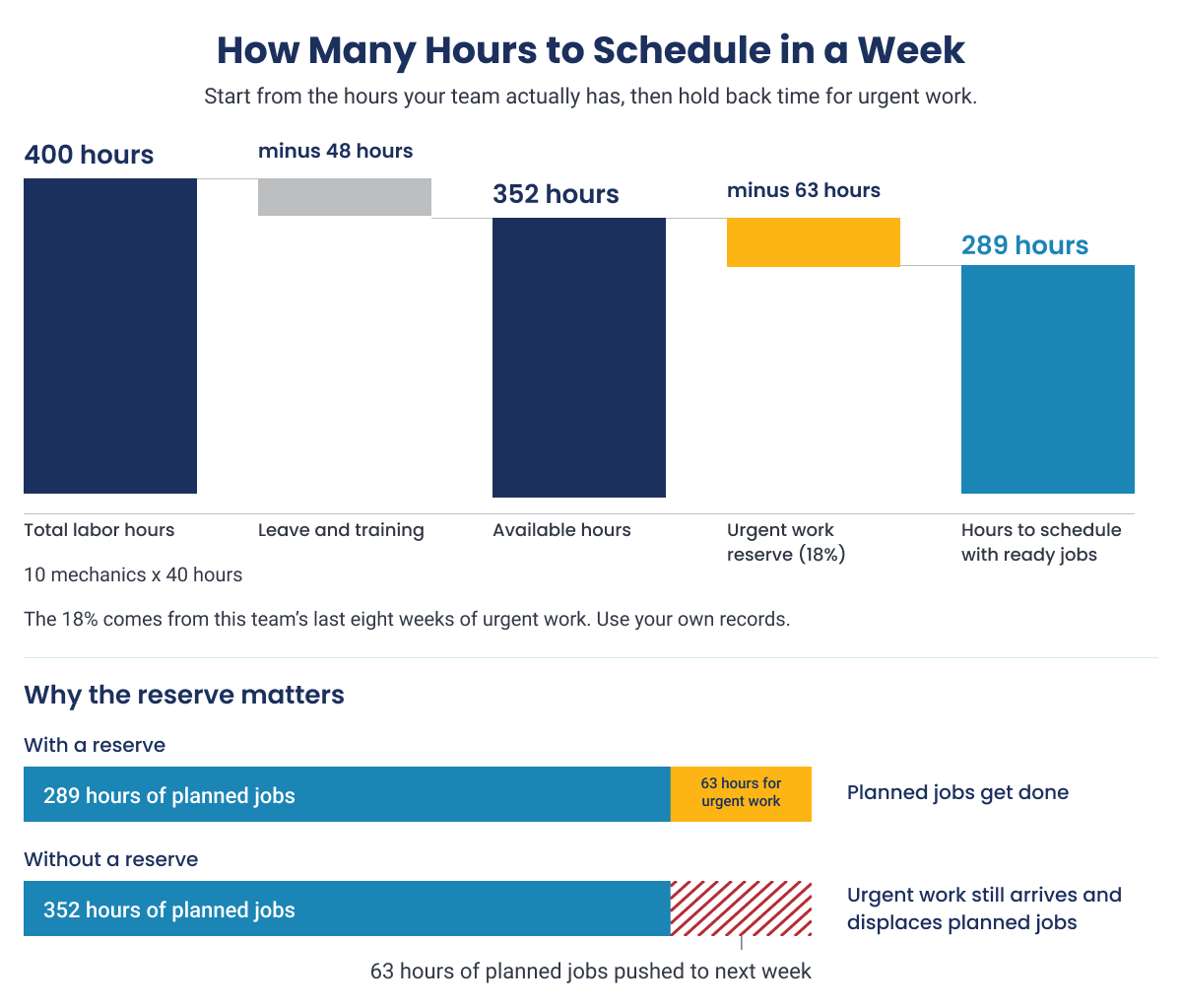
Start with the hours your team will actually be on site, not the headcount. Subtract known absences from the total labor hours by trade, then hold back a reserve for urgent work based on your site's recent history. Fill what remains with ready jobs.
| Step | Hours | How it is worked out |
|---|---|---|
| Total labor hours | 400 | Ten mechanics working 40 hours each |
| Less known absences | 48 | One week of leave and one day of training |
| Available hours | 352 | Hours the team will be on site |
| Less urgent work reserve | 63 | 18% of available hours, based on the last eight weeks |
| Hours to schedule | 289 | Filled with jobs from the ready backlog |
The 18% is an example, not an industry target, and the reserve matters in both directions. Schedule the full 352 hours and every urgent job pushes a planned job off the schedule, compliance falls, carried-over jobs pile into the next week and technicians stop trusting the plan. Make the reserve too large and the team finishes early with nothing ready to start. Check your actual share of urgent work each month and adjust the reserve.
Handling Urgent Work After the Schedule Is Locked
Break-in work is urgent work that was not on the schedule but has to be done during the week. It cannot be avoided, but it can be controlled:
- Set a priority threshold, so only work at or above it, usually emergencies, can break into the frozen schedule.
- When a break-in arrives, postpone a job that has not started instead of interrupting one already in progress.
- Record every break-in with a reason code.
- Review the reason codes in the weekly scheduling meeting. These reviews often show that some emergencies were routine jobs raised late, which points to an intake problem rather than an equipment problem.
- Set next week's break-in allowance from the measured rate.
Over time, this routine also raises your planned maintenance percentage, because fewer jobs reach the crew as unplanned work.
Maintenance Planning and Scheduling Best Practices and Common Mistakes
Most planning and scheduling programs struggle with the same small set of principles, and each one produces a clear symptom on the plant floor when it is ignored. The planning rows follow the principles in Doc Palmer's Maintenance Planning and Scheduling Handbook, and the last two are additions for industrial plants.
| Practice | What it looks like | What you see when it is missing |
|---|---|---|
| Planning | ||
| Keep planners on future work | Planners prepare next week's jobs, not today's breakdowns | Packages for next week are late or incomplete |
| Plan jobs before release | No job reaches a crew without a work package | Technicians start jobs, then look for parts |
| Estimate from equipment history | Estimates start from hours recorded on past jobs | Most jobs overrun their estimate |
| Write for a qualified technician | Key steps and specifications, not a manual | Plans ignored because they are too long or too thin |
| Act on feedback | Technician notes and actual hours improve the plans | The same problems repeat on every visit |
| Scheduling | ||
| Schedule only ready jobs | Jobs come only from the ready backlog | Jobs stop midweek for parts or permits |
| Set priorities before the week starts | Priorities agreed in the scheduling meeting | The schedule changes every morning |
| Schedule against real availability | The schedule matches who is on site and certified | Jobs assigned to people on leave |
| Use all available hours | Hours filled after the urgent work reserve | Technicians finish early with nothing ready |
| Review schedule compliance weekly | Completed scheduled work is checked every week | The same jobs carry over week after week |
| Plant-specific additions | ||
| Log every request in one place | All work starts as a screened request | Hours spent on work with no work order |
| Close out every work order fully | Actual hours, findings and failure codes recorded | Job plans never improve |
If your plant is mostly reactive, start with three: log every request in one place, keep planners on future work and schedule only ready jobs. Together they make the real workload visible, give planners time to prepare it and make the weekly schedule hold.
Where Weekly Maintenance Schedules Commonly Break Down
Even when the process is well designed, these problems come up again and again in plants that are trying to make it work.
Operations will not release the equipment: A schedule is credible only when production agrees to release the equipment. Resolve constraints in the weekly meeting and keep ready jobs available for unexpected windows.
Estimates are based on guesswork: Planners without a hands-on background often struggle most with job durations. Group past work orders by job type, average the recorded hours and walk the job with an experienced technician. Most overruns come from what nobody planned for, such as a seized bolt.
Job packages are too detailed for the work or too vague to guide it: Keep repeatable steps concise, with the drawings, hazards and asset-specific instructions needed in the field. Ask technicians whether the package answers their practical questions.
Accountability lands on the planner: The planner prepares work, the supervisor manages execution, operations confirms equipment availability, and stores and safety own their commitments. Clear ownership helps explain a missed job.
How to Measure Planning and Scheduling Performance
A planning and scheduling process can look busy and still fail to deliver. Metrics show whether the committed week happened, whether plans can be trusted and whether there is enough ready work ahead.
The most important is schedule compliance: how much of the work on the weekly schedule was completed as scheduled. It only stays high when jobs were ready, hours were realistic and urgent work was controlled.
| Metric | Formula | What it tells you | How it can mislead |
|---|---|---|---|
| Schedule compliance (hours) | (Hours worked on scheduled jobs ÷ Total labor hours available to schedule) × 100 | Whether the committed week happened | Looks good if only easy jobs are scheduled |
| Actual hours to planned estimate | (Actual labor hours ÷ Planned labor hours) × 100 | Estimate quality: 100% means the job matched the plan, above 100% means it took longer | Looks good if estimates are set high to avoid overruns |
| Ready backlog (weeks) | Hours of ready work ÷ Weekly labor hours available | Weeks of ready work to choose from | Jobs marked ready before checks are done |
| Total backlog (weeks) | Hours of all approved work ÷ Weekly labor hours available | The full maintenance backlog waiting to be done, in weeks | Old work orders never cleaned up |
| Planned maintenance percentage | (Planned maintenance hours ÷ Total maintenance hours) × 100 | Share of hours spent on planned work | Overstated if urgent jobs are logged as planned |
| Break-in rate | (Hours of urgent unscheduled work ÷ Available labor hours) × 100 | How much of the week went to urgent work | Understated if urgent jobs are not recorded |
| Wrench time | (Observations of hands-on work ÷ Total observations) × 100, from work sampling | Share of technician time spent on hands-on work | Skewed by one-off studies on a good day |
These definitions follow SMRP Best Practices, Metrics and Guidelines, which also offers a version based on work order counts. Whichever you choose, apply it consistently.
Review the metrics together, because one number can mislead. If compliance rises while jobs keep finishing well under estimate, estimates may be set too high. If compliance looks healthy but the ready backlog is shrinking, next month's schedule will be hard to fill.
What Is Low Schedule Compliance Costing Your Plant?
Our Margin Walkthrough connects your maintenance metrics to labor, contractor and downtime costs, so you can see the value of a schedule that holds.
What Poor Planning and Scheduling Costs a Plant
When work reaches the field before it is ready, the plant pays for it in four ways: idle labor, outside contractors, extra inventory and longer outages.
- Labor and overtime: Technicians waiting for parts, permits or instructions are still paid for. The unfinished work due to lack of readiness often moves to overtime which impacts wrench time negatively. Ricky Smith and R. Keith Mobley put wrench time at 25 to 35% in plants without a structured planning and scheduling program, against 55 to 65% at world-class sites.
- Contractor spend: When nobody can see how much internal capacity is free, work goes out to contractors by default, often at a higher hourly rate for the same job.
- Spare parts inventory: Shortages found on the day of work mean expedited freight and extra stock that ties up working capital.
- Lost production: On a bottleneck asset, every hour a repair waits for a part or an isolation is lost output.
The table below prices the labor cost alone, using example numbers. Replace the assumptions with your own figures.
| Item | Value | How it is calculated |
|---|---|---|
| Technicians affected | 25 | Assumption |
| Waiting time per shift | 75 minutes | Assumption |
| Shifts per year | 240 | 5 shifts a week × 48 weeks |
| Waiting hours per year | 7,500 | 25 technicians × 1.25 hours × 240 shifts |
| Loaded labor rate | $85 per hour | Assumption |
| Paid waiting time per year | $637,500 | 7,500 hours × $85 |
| Equivalent full-time technicians | About 4 | 7,500 hours ÷ about 1,900 hours per technician per year |
| Illustrative replacement-capacity scenario | $937,500 | 7,500 hours × an assumed contractor rate of $125 per hour |
The $637,500 is paid time that produced no work. The $937,500 is a separate scenario for replacing that capacity with contractors. Both are modeled examples, not measured results.
This is why planning and scheduling is one of the most direct ways to reduce maintenance costs: it recovers hours the plant is already paying for.
How Indorama Ventures Cut Contractor Headcount by 38%
At its Port Neches, Texas site, Indorama Ventures already ran SAP PM and IBM Maximo, but frontline execution was largely paper-based and the maintenance backlog had reached 24 weeks. The site deployed Innovapptive's Connected Worker Platform to connect notifications, permits, parts and technicians in real time.
Contractor headcount fell from 140 to 87, a 38% reduction, and overtime was cut in half. The backlog dropped 58% to 10 weeks, the site realized $19M in EBITDA savings in 2025, and the program identified a $50M cost reduction opportunity across the enterprise.
See How Indorama Ventures Reduced Its Reliance on Contractors
Discover how Indorama connected notifications, permits, parts and technicians in real time, and what changed in their backlog, overtime and contractor spend within a year.
Spreadsheet, CMMS or ERP: Where Planning and Scheduling Data Belongs
Every plant needs one official record of its maintenance work. For most asset-intensive plants, that is an ERP or EAM such as SAP PM, IBM Maximo or Oracle, holding the work order, costs, materials and equipment history. What it does not do on its own is tell the scheduler whether this week's jobs can actually run. Those answers sit with the storeroom, operations, safety and technicians, and usually travel by phone, email and spreadsheet.
| Option | What it does well | Where it falls short |
|---|---|---|
| Spreadsheet or whiteboard | Quick to set up and easy for one planner to manage | Not connected to work orders, parts or permits, and depends on one person |
| CMMS | Manages work orders, preventive maintenance and equipment history at a single site | Readiness checks and workload balancing are often manual |
| ERP or EAM | Holds the official work order, cost and asset record across the enterprise, and an EAM also covers the full asset lifecycle | Built to record and control work, so readiness, grouping and weekly balancing usually happen outside it |
| Execution layer on top of the ERP or EAM | Connects readiness, crew availability, downtime windows and field updates to the work order | Depends on clean integration with the system of record and on adoption by field teams |
This is why many plants add an execution layer on top of their ERP or EAM instead of replacing it. The work order stays in the system of record, while the execution layer checks readiness against live data, shows available crews and equipment windows, and sends field results back. AI makes that layer faster by drafting work packages, sizing durations from similar past jobs and flagging readiness gaps, while planners and schedulers keep the final decision.
Close the Gap Between Insight and Frontline Action
Plants have more data than ever, yet issues still take too long to resolve. Learn how AI agents built into maintenance, safety and reliability workflows reduce the time from detection to resolution.
How Innovapptive Helps Plants Schedule Only Work That Is Ready
A usable schedule depends on reliable job history, material status, readiness, available hours and field feedback. When those details are split across spreadsheets, messages and paper forms, context can be lost between the system of record and the crew.
Innovapptive’s Maintenance Planning and Scheduling Software connects these decisions around work orders in the ERP or EAM the plant already uses. That application remains the system of record; iMPS adds guided workflows to prepare work, check dependencies and coordinate execution. It is not a replacement CMMS or a condition-monitoring system; it helps teams prepare and execute work that enters the maintenance process.
| Stage of the process | Where the gap appears | How iMPS closes it |
|---|---|---|
| Requests and priorities | Findings arrive incomplete and capacity is unknown | Mobile findings arrive as complete requests, and the Demand Forecasting Agent checks upcoming work against capacity |
| Planning the job | Packages rebuilt from scratch, estimates guessed | The Work Packaging Agent drafts a package from the equipment's own history, with a confidence score the planner reviews |
| Confirming readiness | Missing parts, permits or isolations surface on the day of work | The Schedule Readiness Agent checks material, permit and isolation status, raises purchase requisitions and keeps unready jobs off the schedule |
| Building the week | Schedules ignore leave, skills and downtime windows | Bundling, duration and dispatch agents group jobs, size durations from real history and recommend assignments, which schedulers approve or override |
| Doing the work | Status updates arrive late or on paper | Technicians update work on mobile, so the schedule reflects the field |
| Closing out | Actual hours never reach the next plan | Execution history improves future packages, durations and PM intervals, and the locked schedule syncs to the ERP with an audit trail |
This focus on connecting planning to frontline execution is part of why Frost & Sullivan named Innovapptive its 2026 Global Company of the Year for augmented connected worker, end-to-end platforms.
See How Plants Get to 90%+ Schedule Compliance
Discover how Innovapptive’s iMPS drafts work packages, checks parts, permits and isolations, and recommends a weekly schedule your team approves, all on top of the SAP PM, Maximo or Oracle system you already run.

Unlock Margins Hidden in your Maintenance
Watch how leading manufacturers improve OEE, increase PM compliance, and reduce downtime through connected execution.

- 23-10-2026
Maintenance Planning and Scheduling: The Ultimate Guide
A mechanical crew reaches a boiler feed water pump at 7 a.m. to change a bearing, then waits three...

- 21-10-2026
10 Best Work Instructions Software: Compared and Reviewed
Choosing work instructions software is about more than turning a PDF into guided steps on a tablet....

- 15-10-2026
Maintenance Digitalization: A Digital Transformation Guide
Maintenance digitalization is the shift from paper, spreadsheets and disconnected tools to...