
What Is Kitting in Inventory Management?
Kitting in inventory management means gathering all the components required for a specific task or order, checking them against an approved list, and preparing them together into one labeled set, called a kit. In plant storerooms, the kitting trigger is commonly a released maintenance work order; in manufacturing, it is a production order; in fulfillment, it is a customer order or forecast. The kit then moves through storage, picking and delivery as one item with one ID.
A kit bill of materials lists the components and quantities each kit contains, and each component keeps its own part number in the inventory record. The kit itself moves through storage, picking and delivery as one item with one ID. Kits for a repair or a production run usually carry the number of the work order or production order they support, while kits sold to customers get their own stock keeping unit (SKU).
Inventory kitting is the system side of the same practice: keeping the inventory record in step with the physical kit. Parts are reserved against the order in the enterprise resource planning (ERP) system, and the record shows when they are picked, staged and issued, as well as any unused parts that come back. Put simply, kitting moves the work of finding parts away from the moment the job starts and into a planned step that happens earlier.
|
Setting |
What goes in the kit |
Trigger event |
Kit identifier |
Who uses it |
|---|---|---|---|---|
|
Maintenance, repair and operations (MRO) storerooms |
The spares and consumables for a planned repair, such as a pump seal, bearings, gaskets and fasteners |
A released maintenance work order |
Work order number |
The maintenance technician or contractor |
|
Manufacturing and assembly |
Components for one assembly step or one unit, such as a control-panel harness, connectors and fasteners |
Production schedule or production order |
Production order or kit number |
The assembly operator |
|
Warehouse and order fulfillment |
A sellable set, such as a coffee maker with filters and descaling solution |
A customer order or a sales forecast |
Kit SKU |
Customer or fulfillment team |
The principle stays the same in all three settings. What differs is the trigger event that creates demand for the kit and the stakeholder whose work depends on it arriving complete.
How Does the Inventory Kitting Process Work?
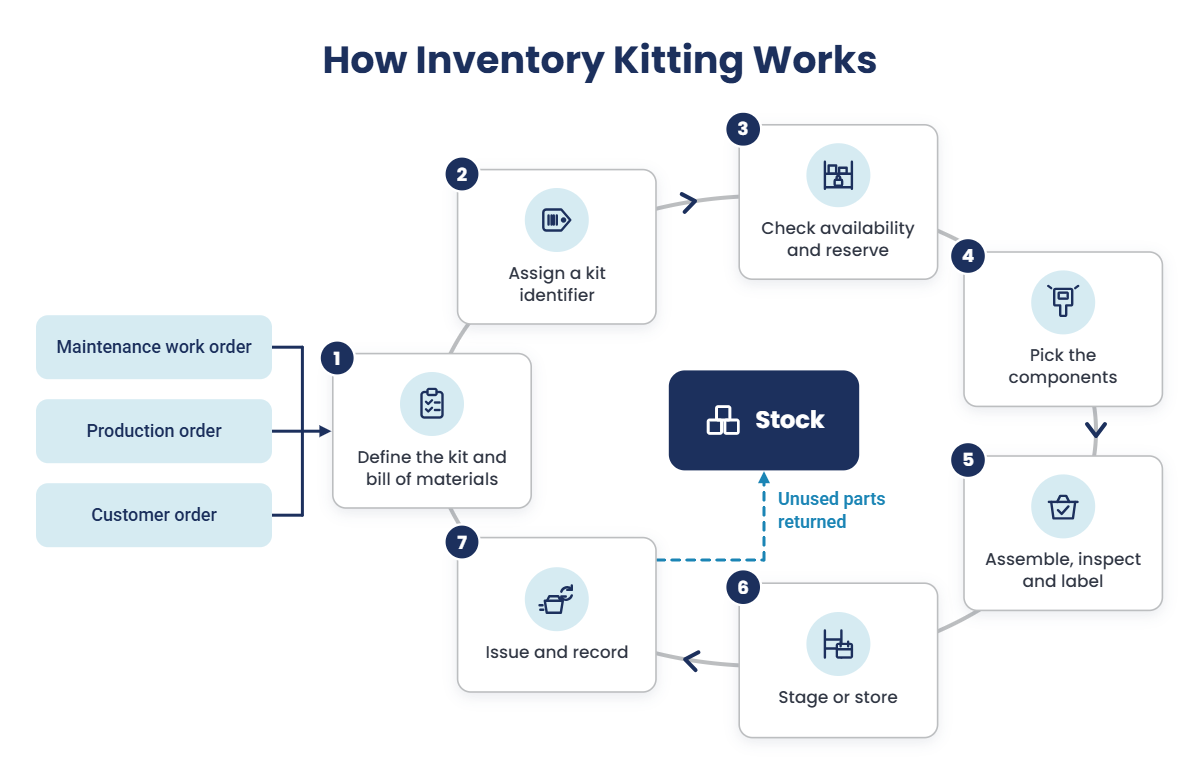
The kitting process has seven steps. They apply to a pump overhaul kit in a chemical plant storeroom just as much as to a build kit on an assembly line or a product set in a fulfillment center. Only the trigger event and the kit ID change from one setting to the next. The steps are:
Step 1: Define the Kit and Its Bill of Materials
List every component the kit needs, with its part number, quantity, unit of measure and current revision. Small consumables such as O-rings, thread sealant and fasteners are the items most often left off. Make one person responsible for the list, and route design changes or job plan revisions to that person before another kit is put together. For maintenance kits, the job plan attached to the work order is usually the starting point.
Step 2: Assign a Kit Identifier
Use an identifier that links the prepared set to the demand it serves. A sellable kit generally uses a kit SKU. A plant storeroom can use the work order number, while an assembly operation may use the production order or a kit number. Put the identifier on a label, preferably with a barcode, so the kit can be traced as it moves through picking, staging and issue.
Step 3: Check Availability and Reserve Every Component
Confirm that the recorded quantity is available and that the parts can be located before reserving them against the order or work order. A reservation prevents the same stock from being allocated to a different job, but it cannot correct an inaccurate stock record.
APQC, the American Productivity & Quality Center, publishes a cross-industry benchmark that puts median inventory accuracy at 95% across 8,660 organizations. In other words, even a typical operation carries some gap between what the system shows and what is on the shelf. Any kit line reserved against that gap turns into a surprise at the bench.
A shortage found at this step can still be bought at a normal lead time. A shortage found at the bench or at the equipment becomes an expedited order or a stalled job. This is why checking kit readiness before the weekly schedule is locked is a core discipline of good maintenance planning and scheduling.
Step 4: Pick the Components
Build the pick list around bin locations so the picker can follow an efficient route instead of crossing the warehouse repeatedly. When several work orders need overlapping parts, consider batch picking: collect the shared components during one route, then separate and verify each kit at the preparation point. A scan at the bin helps catch the wrong part or location before it reaches the kit.
Batch picking is not automatically the right choice for every operation. It works best when orders share components and the team can keep each job's materials clearly separated. For a single urgent repair with unique parts, a dedicated pick may be easier to control.
Step 5: Assemble, Inspect and Label the Kit
As each item goes into the kit bin or bag, tick it off against the kit list. Where a mistake would be costly or unsafe, a second storeroom attendant or a barcode scan should confirm the count before release. Before the kit is closed, answer five questions:
- Do the part numbers and revisions match the kit list?
- Is the quantity of each component correct?
- Is everything undamaged, with seals and packaging intact?
- Are shelf-life dates still valid for items such as sealants and elastomers?
- Has anything gone into the kit that is not on the list?
Finish by attaching a label that shows the kit ID, destination, equipment or order, and need-by date. Add a contents list so the person receiving it can confirm what is inside without rebuilding the pick list from memory.
Step 6: Stage or Store the Finished Kit
A kit built ahead of demand goes to a kit storage location. A kit built for a specific job should wait in a marked staging location grouped by destination or need-by time. For maintenance, that may be a storeroom collection point or a designated area near the unit where the work will take place.
Decide how long a kit may wait in staging before someone checks it again. Staging without an owner or time limit creates a risk: parts may be taken to cover another job, the work order may change, or shelf-life limits may pass while the kit waits. Set a review point for kits that miss their planned date, and recheck the contents before release if the schedule or job scope changes.
Step 7: Issue the Kit and Record the Movement
When the kit is handed to the crew or shipped to the customer, record the issue at that point rather than waiting until the end of the shift. In a maintenance operation, post the goods issue against the work order so the inventory balance and job cost reflect the material used. When unused parts come back, inspect them and record the return to the correct stock location. A return that stays on paper is not available inventory.
Recording each movement where and when it happens is what keeps inventory accuracy high in any operation that kits.
Is Your Stock Record Good Enough to Kit Against?
Most storerooms compare book and physical counts and assume the rest. Use the Inventory Trust Ladder in this guide to check whether your parts are usable, findable and truly ready for the work order.
What Are the Main Types of Kitting?
Kits are easiest to classify along two lines:
- Purpose: Who the kit serves, whether a maintenance crew, a production line or a customer.
- Timing: Whether the kit is built before demand arrives, or only after a work order or customer order is released.
|
Type |
What it contains |
Trigger event |
Who usually builds it |
|---|---|---|---|
|
Maintenance or work order kitting |
All the spares and consumables for one maintenance task |
A released work order |
The storeroom team |
|
Assembly or material kitting |
The parts for one build step or one complete unit |
The production schedule |
Production logistics or the warehouse |
|
Sequenced or just-in-time kitting |
Kits sent to the line in build order, timed close to use |
The build sequence |
Production logistics |
|
Product or fulfillment kitting |
A finished, sellable set under a kit SKU |
A customer order or a forecast |
The warehouse team or a third-party logistics provider |
|
Full kitting (a release standard) |
Any of the kits above, held back until nothing is missing |
Applies to every kit type |
Whoever approves kit release |
1. Pre-Kitting vs. On-Demand Kitting
Pre-kitting, also called kit to stock, builds kits before demand arrives. On-demand kitting, also called kit to order, waits for a released work order or customer order.
|
Factor |
Pre-kitting (kit to stock) |
On-demand kitting (kit to order) |
|---|---|---|
|
When it happens |
Before a specific order is received, based on a stable kit definition or expected demand. |
After an order, production order or work order confirms the need. |
|
Availability at demand |
The prepared set can be issued quickly if the kit is current and complete. |
The team must pick and verify the parts after demand is confirmed. |
|
Inventory impact |
Components are committed to the prepared combination and may remain tied up until use. |
Components remain available for other demand until they are reserved or picked. |
|
Main risk |
A design or job-plan change can make stored kits outdated; parts may be taken from them for other work. |
Preparation takes longer after demand arrives, and shortages may surface later if stock is not checked early. |
|
Best fit |
Stable, high-volume combinations, such as a standard monthly preventive maintenance kit or a recurring shutdown package. |
Variable or one-off work, such as a corrective repair whose parts depend on the confirmed scope. |
Demand peaks call for a hybrid approach. In a fulfillment warehouse, the peak is the holiday rush, so the best-selling kits are pre-built a few weeks ahead. In a plant storeroom, the peak is a planned shutdown or turnaround. Build the kits for the turnaround work packages well in advance, and keep day-to-day corrective work on demand.
2. Virtual Kits vs. Physical Kits
A virtual kit exists only in the system, with its parts kept in normal storage until an order calls for them. A physical kit is put together ahead of time and shelved as one unit. To find how many virtual kits you can promise, divide the on-hand quantity of each component by the quantity one kit needs, then take the lowest result. With 40 filters at 2 per kit and 15 gasket sets at 1 per kit, you can promise 15 kits, not 20.
In short, virtual kits keep parts available for other jobs, but each kit has to be picked quickly and accurately when it is needed. Physical kits are ready to go sooner, but the parts inside them cannot be used for anything else.
How Is Kitting Different From Bundling, Assembly and Staging?
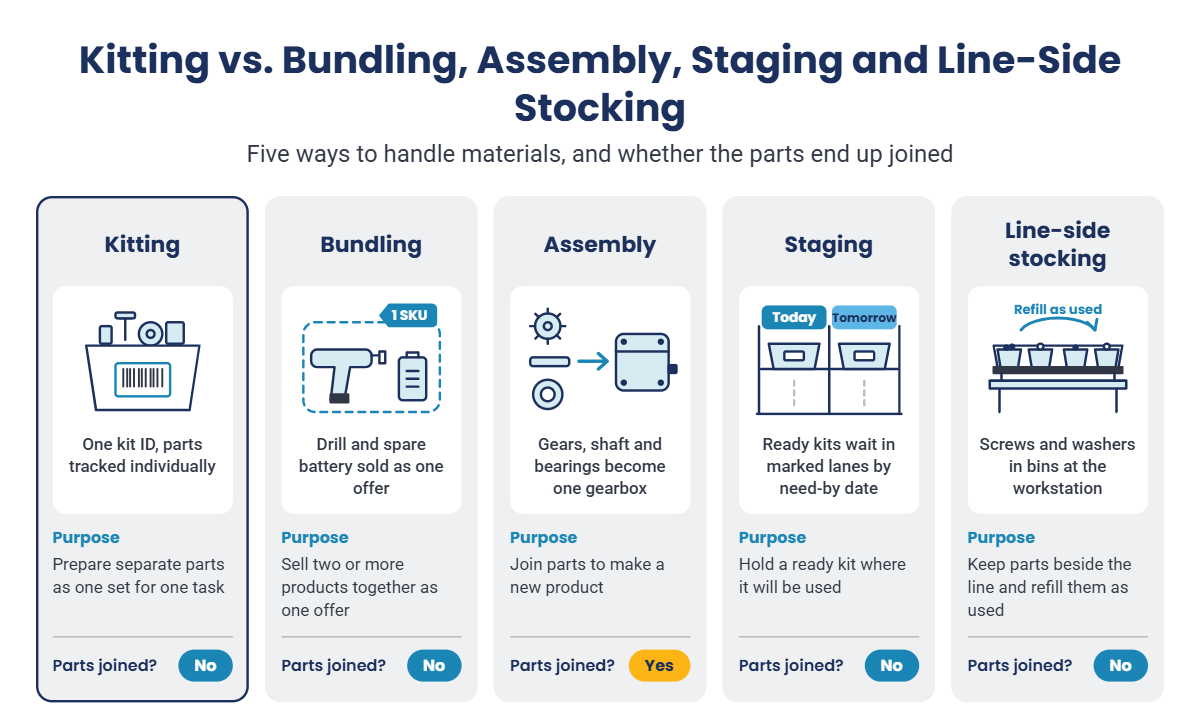
The terms describe different parts of material handling. Kitting prepares a defined set for one task or order. Bundling is a commercial way to sell products together. Assembly changes the parts into a new product, while staging places prepared materials where they will be used.
|
Practice |
Purpose |
Are parts physically joined? |
What the system tracks |
Example |
|---|---|---|---|---|
|
Kitting |
Prepare a set of separate components for one task, order or build. |
No. The parts are grouped but remain identifiable. |
A kit identifier linked to component records and the demand it supports. |
A pump repair kit reserved to a maintenance work order. |
|
Bundling |
Offer two or more products together as one commercial offer. |
No. Products are sold together, but may remain separate items. |
A bundle SKU or the individual sales-order lines, depending on the system. |
A cordless drill sold with a spare battery. |
|
Assembly |
Join or process components to create a new or partly finished product. |
Yes. Components are physically combined. |
A new finished or semi-finished item and its production record. |
A gearbox assembled from shafts, gears and bearings. |
|
Staging |
Hold picked materials in a designated location until they are needed. |
No. It is a location or status step. |
The kit or material location, readiness status and destination. |
A completed pump kit held in a lane for the next shift. |
|
Line-side stocking |
Keep frequently used parts beside a workstation and replenish them as they are consumed. |
No. Parts remain in separate bins. |
The quantity at each workstation and replenishment activity. |
Screws and washers replenished in assembly-line bins. |
The clearest way to separate kitting from assembly is to ask whether the parts end up joined together. A pump overhaul kit is still a kit when it reaches the technician, because the bearings and seals inside it remain separate parts until the repair is done. Once they are fitted into the pump, the work has become assembly.
When manufacturers decide how to feed an assembly line, the real choice is usually between kitting and line-side stocking. Kits suit parts that are numerous, varied or bulky, while line-side stocking suits small, low-cost parts used on every unit. Cross-docking is a separate practice: goods that arrive are sent out again almost immediately, with no storage and no regrouping into sets, so it rarely competes with kitting.
Kitting Examples in Warehouses, Manufacturing and Maintenance
The components in a kit depend on the task. The most useful examples show what triggers the kit and who needs the materials at the point of use.
|
Setting |
Kit |
Typical contents |
Trigger event |
|---|---|---|---|
|
Chemical plant maintenance |
Centrifugal pump overhaul kit |
Bearings, mechanical seal, flange gaskets, O-rings, grease, printed job card |
Released work order |
|
Refinery turnaround |
Heat exchanger reassembly kit |
Gasket sets, stud bolts, nuts, anti-seize compound, tags |
Turnaround work package |
|
Electronics assembly |
LED light fixture build kit |
Driver board, LED strips, wiring harness, heat sink, screws |
Production order |
|
Auto parts distribution |
Timing belt replacement kit |
Belt, tensioner, idler pulley, water pump, gaskets |
Customer or dealer order |
|
Subscription ecommerce |
Monthly pet supply box |
Rotating treats and toys, insert card, branded carton |
Billing date |
|
Commercial construction |
Sprinkler pipe hanger kit |
Hangers, threaded rod, beam clamps, anchors, nuts |
Daily work plan |
Kitting in Maintenance and MRO Storerooms
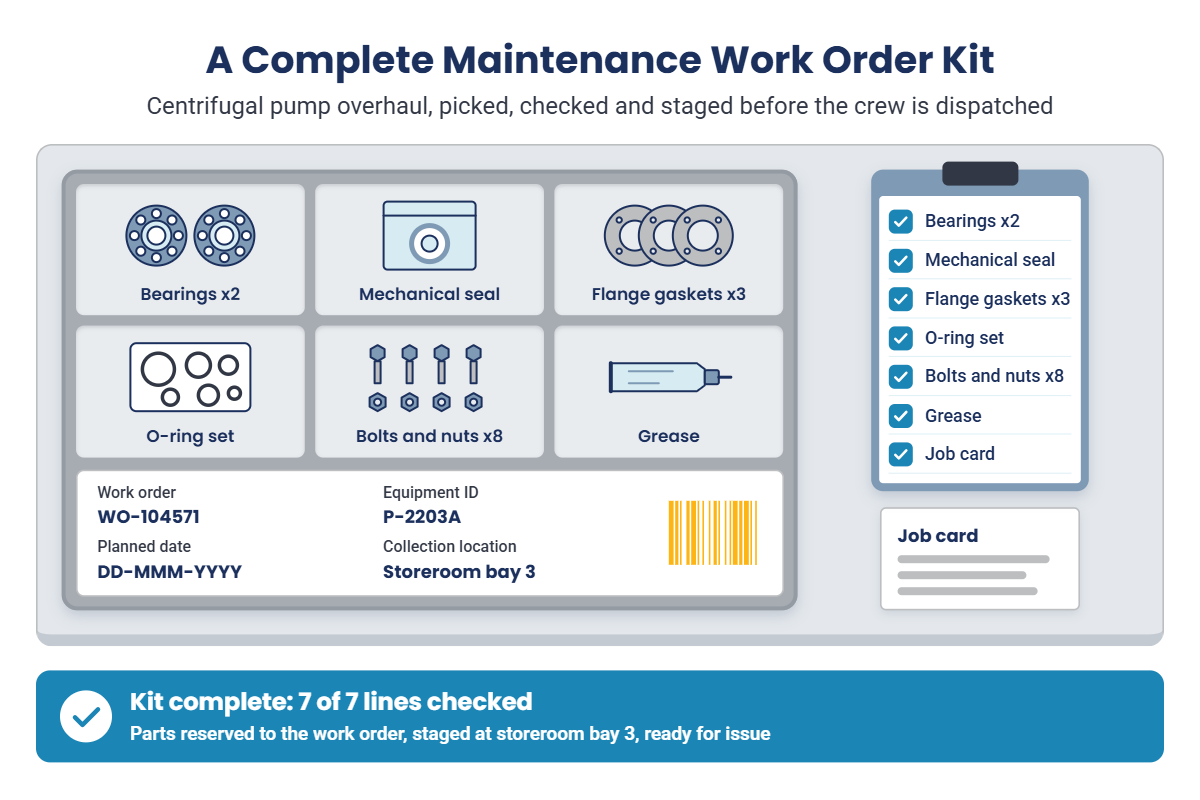
In a plant storeroom, the trigger for a kit is a released maintenance work order. The storeroom uses the job plan to identify the required spares and consumables, checks availability, and prepares the materials before the crew is dispatched. A label that includes the work order, equipment ID, planned date and collection location helps the technician confirm that the kit belongs to the right job.
Every trip back for a forgotten gasket comes straight out of wrench time, so storerooms usually kit scheduled jobs, routine preventive tasks and turnaround work first. Kitting is less useful for an emergency breakdown, when the failure has not yet been diagnosed and the parts requirement is unknown. The aim is to remove the storeroom trip from work that can be prepared in advance, not to pre-build a kit for every possible failure.
Kitting in Manufacturing and Assembly
On an assembly line, carts or bins bring each workstation exactly what the next unit needs, often lined up in build sequence. Operators spend their time assembling instead of walking to racks, and the line needs less floor space, because workstations no longer have to store a full supply of every part. This makes kitting a natural fit for lean and just-in-time production.
In electronics assembly, many parts look almost identical. A kit that keeps each part in its own labeled slot helps operators avoid mixing them up. Some lines build many product variants. There, the kit can also hold the parts for each unit's specific option, such as a color or feature, so the operator does not have to check it separately.
Kitting in Warehouse Management and Ecommerce Fulfillment
In a fulfillment warehouse, kitting can turn an order with several component lines into one pick of a predefined kit SKU. A warehouse team or third-party logistics (3PL) provider may prepare frequently ordered combinations ahead of demand, while less predictable combinations are picked after the customer order arrives. For subscription boxes and gift sets, the prepared kit also supports a consistent packing and unboxing experience.
Kitting in Construction and Field Work
Construction crews can receive task-specific job boxes with the anchors, fittings, fasteners and consumables needed for an installation. Materials prepared off site reduce repeated trips to a central store once work is underway. A 2021 study in the Journal of Construction Engineering and Management compared four renovation projects with and without kitting and found that kitting stabilized assembly work and raised on-site labor productivity. The lesson carries over to maintenance crews: when materials arrive ready for the task, people spend more of their shift doing the work.
From Released Work Order to Ready Kit
See how storeroom teams reserve, pick, check and stage spare parts against SAP, Maximo or Oracle work orders, with kit readiness visible before the job is scheduled.
Benefits of Kitting and When Not to Kit
Picking is the most expensive job in most warehouses and storerooms. A 2025 study in Applied Sciences estimates that order picking makes up between half and three quarters of warehouse operating costs, and nearly 55% of labor time. Most of that cost is labor: walking between storage locations, searching for each item and handling parts one at a time. Kitting goes after that cost directly by replacing many separate picks with one.
- More predictable job starts: Parts are checked before the work order reaches the technician, reducing the chance that a missing component is discovered at the equipment.
- Fewer picking and issue errors: A defined kit list gives the picker a single reference for part number, revision and quantity, with a final check before release.
- Less searching and repeated travel: Shared components can be collected in one planned route, while operators and technicians spend less time returning to stores.
- Earlier shortage visibility: A reservation or stock check tied to planned demand exposes shortages early enough for normal purchasing or transfers.
- Better control of inventory commitment: Planners can see which parts are allocated to upcoming work and avoid relying on undocumented side stores.
- Traceability at the point of use: Lot, serial and issue details can be associated with the work order or customer order when the material moves.
How Does Kitting Free Up Working Capital in a Plant Storeroom?
The working-capital benefit is not that kitting automatically reduces inventory. Instead, reserving and kitting parts for scheduled jobs well ahead of time shows the storeroom exactly what will be needed, weeks in advance. Shortages can then go through normal purchasing instead of rush freight. This matches what APQC research finds more broadly: higher inventory accuracy goes hand in hand with fewer expedited orders and lower inventory carrying costs.
When technicians trust that kits will be complete, they have less reason to keep private stashes or informal side stores. Planners can then test whether some just-in-case buffers in MRO inventory can be reduced without increasing the number of jobs that start short.
Track kit completeness alongside planned-job stockouts and inventory value before changing safety-stock levels. If stock value falls while kits remain complete and planned work continues to start with the required materials, the change may be sustainable. If completeness slips, the inventory reduction may simply have moved the shortage from the shelf to the job site.
|
How Much Cash Is Sitting in Your Just-in-Case Stock? In a short walkthrough, we map how parts readiness, emergency purchases and excess MRO inventory affect your plant's margin, using your own baseline. |
When Is Kitting the Wrong Choice?
Kitting takes extra effort up front, because someone has to build, check and store each kit before it is used. It is most useful when the same component combinations recur often enough to justify building and checking a set. It is less useful when contents change frequently, demand is unpredictable or prepared kits would sit untouched for long periods.
|
Kitting is a good fit when |
Kitting may not pay off when |
|---|---|
|
The same components are needed together repeatedly. |
The kit list changes often because the design, equipment or repair scope varies. |
|
The task needs many small, similar or easy-to-miss parts. |
The order or job needs only one or two common items. |
|
Wrong or missing components are already causing delays. |
Demand is one-off or unknown until diagnosis, as with many emergency breakdowns. |
|
A defined space and owner are available for kit preparation and staging. |
Prepared kits would occupy scarce space or remain staged for days without a confirmed need. |
|
The team can verify contents and record issue and returns. |
No one owns the kit list, release check or follow-up on unused parts. |
Watch the hidden costs too: pre-built kits tie up components, get broken open for other jobs, add SKUs, and can go out of date after a design change. Check recent orders or work orders before launching a kitting program. If the same parts appear together repeatedly and the preparation can be completed before the need-by date, that combination is a stronger candidate than a one-off kit.
How Indorama Ventures Raised Parts Availability From 55% to 95%
Indorama Ventures, a global chemical manufacturer, shows what changes when parts are confirmed before work is scheduled. Its Port Neches, Texas site already ran SAP PM and IBM Maximo, but most frontline maintenance and storeroom work still happened on paper. Inventory accuracy stood at 89.5%, below APQC's 95% median, and parts availability at scheduling was only 55%.
After moving work orders, inventory transactions and operator rounds onto mobile devices connected to those systems, the site raised inventory accuracy to 99.5% and parts availability at scheduling to 95%. The maintenance backlog fell from 24 weeks to 10, and the site realized $19M in EBITDA savings.
From 55% to 95% Parts Availability at Scheduling
Discover how one chemical site moved storeroom and maintenance work off paper and onto connected mobile workflows on top of SAP and Maximo.
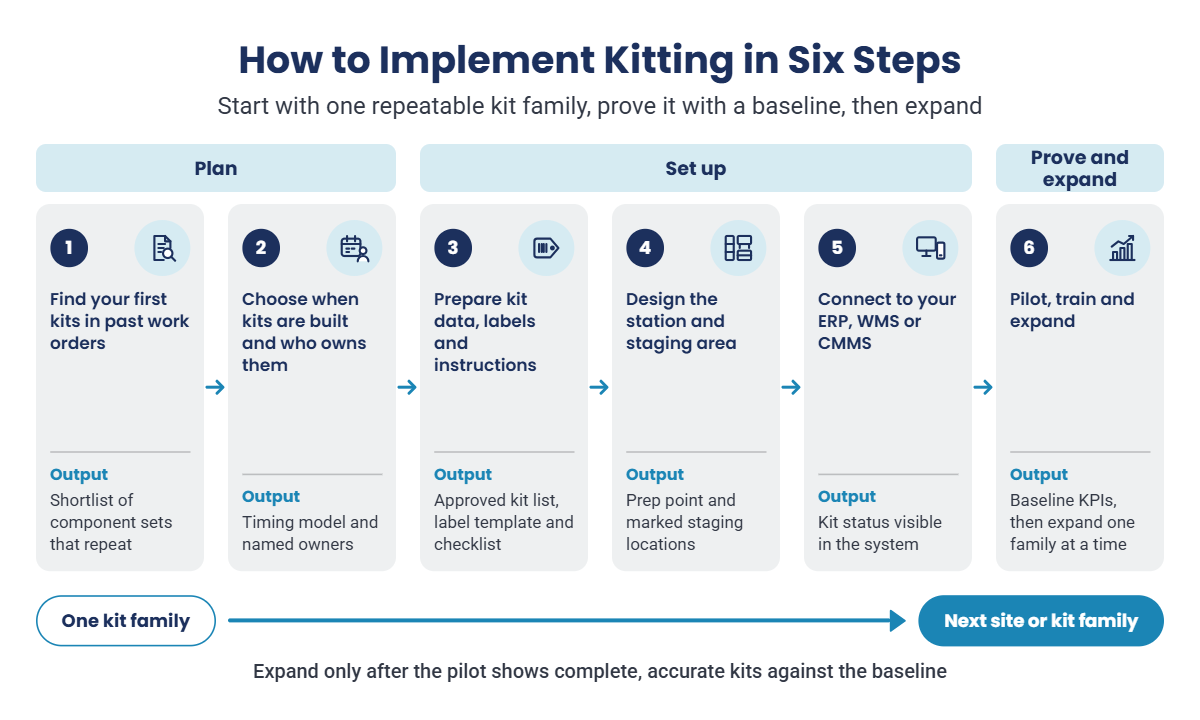
How Do You Implement Kitting in Six Steps?
Start with one repeatable kit family, establish a baseline and test whether the process improves readiness. Expanding to every product, line or storeroom before the first kit is stable makes it harder to identify what is working and where errors are entering the process.
Step 1: Find Your First Kits in Past Work Orders
Pull six to twelve months of work orders or customer orders and look for component sets that appear together again and again. Rank them by how often they repeat, how many lines they involve, and how often they have caused errors or shortages. For maintenance teams, routine preventive maintenance tasks and turnaround work packages are the easiest starting point, because their parts lists rarely change.
Step 2: Choose When the Kit Will Be Built and Who Owns It
Select pre-kitting for stable, predictable combinations and on-demand preparation for variable work. Then assign responsibility for the kit list, picking, verification, staging and returns. One team may perform several of these roles, but the handoffs should be clear. For customer fulfillment, the owner may be the warehouse or a third-party logistics provider; in a plant, it is usually the storeroom or materials team working with maintenance planning.
Step 3: Prepare Kit Data, Labels and Instructions
Before the first kit is prepared, make sure the information used by the picker and the person receiving the kit is consistent. Agree on the kit identifier and the fields that must appear on every kit record:
- Approved kit bill of materials, including part number, quantity, unit of measure and revision.
- Source of demand, such as customer order, production order or maintenance work order.
- Storage bin, destination, need-by date and kit status.
- Barcode label and a short work instruction or verification checklist.
- A rule for recording substitutions, non-stock purchases, returns and cancelled kits.
Agree with finance how kit costs will be assigned, especially when labor or packaging is added to a sellable kit. For maintenance, the material issue should remain traceable to the work order that consumes it.
Step 4: Design the Kitting Station and Staging Area
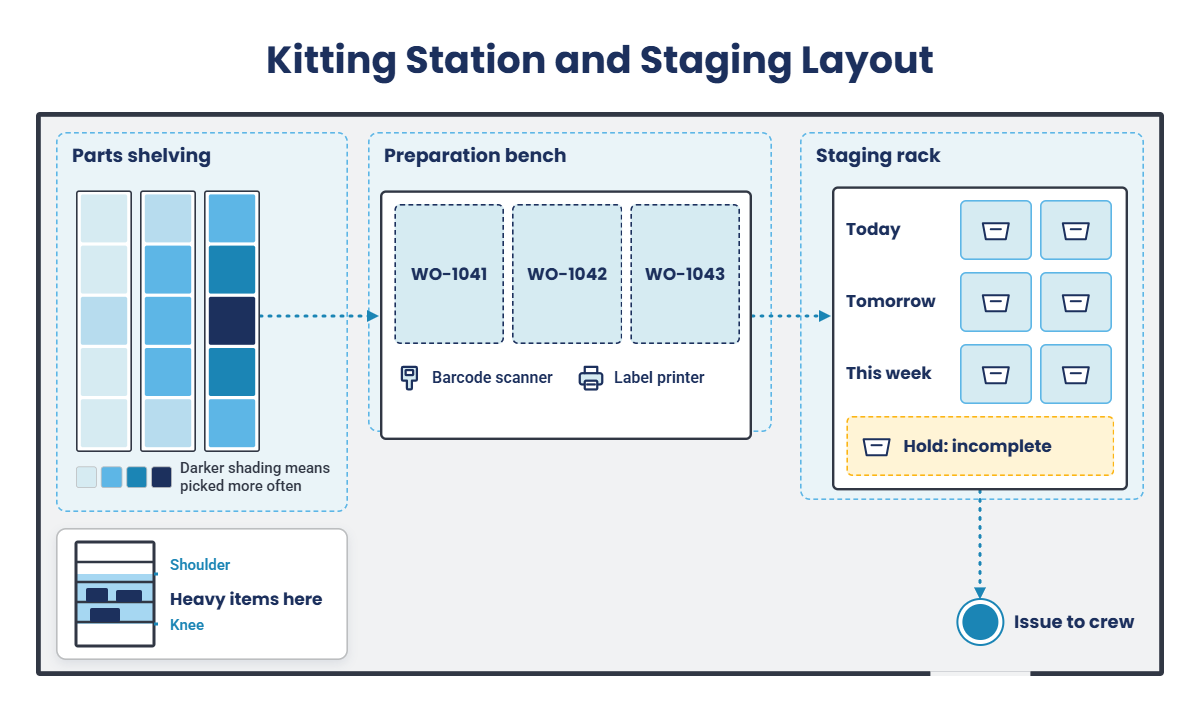
Choose a preparation point close to the components picked most often, with enough space to keep several jobs separated. Use bins or containers sized for the kit, a scanner and a label printer where needed, and clearly marked staging locations. Keep heavy materials at a practical lifting height, because the Occupational Safety and Health Administration's warehousing guidance lists lifting and lowering injuries among the most common in warehouse work.
Make the route between storage, preparation and staging easy to follow. Arrange staging by need-by date, and make each kit's status obvious at a glance. The goal is a controlled flow, not a large dedicated kitting cell from day one.
Step 5: Connect Kitting to Your ERP, WMS or CMMS
Kitting stays reliable only when the system knows what each kit holds and where it is. Many operations are not there yet: in the 2026 Warehouse/DC Operations Survey by Peerless Research Group, 55% of respondents used paper-based picking, up from 40% a year earlier. Check that your ERP, warehouse management system (WMS) or computerized maintenance management system (CMMS), or the mobile layer on top of it, can:
- Store kit lists and kit IDs, with stock checks and reservations line by line.
- Produce bin-sorted pick lists with a barcode check at the shelf.
- Show planners a live status for each kit, from picked to issued or returned.
- Handle non-stock items inside the same kit as stocked parts.
- Pick several work orders in one walk, and work offline where coverage is weak.
- Record returned parts and report completeness, accuracy and cycle time automatically.
Plant storerooms on SAP MM and PM or IBM Maximo usually build each kit from the reservations already on the work order. Distribution warehouses run kitting in their WMS, and SAP EWM covers kit to order, kit to stock and reverse kitting.
Start with barcode scanners and mobile apps, because they cost far less than automation, roll out in weeks, and fix the two most common errors: wrong parts and unrecorded movements. In APQC's benchmark on picking automation, only 15% of picking work at the median organization is aided by robots, voice picking or pick-to-light.
Step 6: Pilot, Train and Expand
Run the pilot on one kit family or crew long enough to cover its usual job types, such as routine preventive maintenance, planned repairs and urgent requests. Track the key performance indicators (KPIs) given below for several weeks beforehand, so you have a baseline. Train people on what a correct kit looks like, not just where the bins are, and name one process owner on the floor.
Avoid the usual mistakes: no baseline, kit lists without an owner, no staging time limit, and going plant-wide too early. Once the pilot works, roll out to the next site or kit family using the procedure, labels and measures that worked the first time. While it might look slower on a project plan, it is much faster than fixing a plant-wide rollout that never settled.
Kitting Best Practices for Complete, Accurate Kits
A kitting process needs day-to-day controls after the pilot ends. These practices help maintain kit accuracy and avoid turning staging locations into another unmanaged store of inventory.
- Release only complete kits: One missing gasket halts a job as completely as a missing kit. If a part is missing, keep the kit status as incomplete and make the shortage visible to the planner or order owner.
- Scan at pick and at close: Scan each part as it leaves the bin, then scan the kit again before it is sealed.
- Keep kit lists under revision control: Assign an owner and update the list when an engineering change, product variant or maintenance job plan changes.
- Stage by destination and need-by date: Make the work order or order reference, destination and expected use time visible on the label and staging location.
- Shelve parts by how often they are kitted: High-use parts nearest the bench shorten every pick.
- Label inside and out: The outside label shows where and when, and the packing list inside lets the technician check.
- Issue dated stock by expiry: For sealants, adhesives and elastomers, issue stock by earliest expiry date rather than relying only on receipt date.
- Set a staging time limit: If a job moves or a kit waits beyond the agreed period, recheck the contents, expiry dates and work-order status before release.
- Keep non-stock items in the same control process: Track externally purchased or direct-delivery parts against the kit so they do not disappear between procurement and the job.
- Record returns the same day: Inspect returned parts and post them back to the right stock location before the next shift or agreed close of day.
- Retire kits that no longer fit: Break down kits when the job is cancelled or the contents become outdated, and record each component back into inventory.
- Use feedback from completed kits: Capture missing parts, substitutions, damaged items and components that consistently return unused, then revise the list with its owner.
Best Practices for Kitting and Staging in MRO Warehouses
A practical guide for storeroom and maintenance leaders who want kits that stay complete, accurate and on time.
How Do You Measure Kitting Performance? 6 KPIs to Track
Kitting succeeds or fails at one moment: when the technician opens the kit at the equipment. These six KPIs show how often kits pass that test, how quickly they are built and what they cost.
| KPI | Formula | What it tells you |
|---|---|---|
| Kit completeness (kit fill rate) | (Kits complete at the due point / kits required) x 100 | Whether kits are ready when needed. In maintenance, the due point is when the weekly schedule is locked. |
| Kit accuracy | (Kits found error-free / kits inspected) x 100 | Whether the correct parts and quantities were picked. |
| Kitting cycle time | Time the kit is staged minus time the pick list is released | Time to turn confirmed demand into a ready kit. |
| On-time kit rate | (Kits staged by the required time / kits due) x 100 | Whether kits arrive in time to protect the schedule. |
| Delays caused by kit errors | Jobs held up, or minutes lost, because of a missing or wrong item | The real cost of kit failures. |
| Cost per kit | (Kitting labor hours x loaded labor rate + labels and packaging) / kits built | The labor and material cost of preparing each kit. |
Illustrative example: A storeroom builds 60 kits in one week. By the time the schedule is locked, 48 are complete. An inspection of 20 kits finds one holding the wrong bearing. Kitting took 15 labor hours at a loaded rate of $50 per hour, plus $60 for labels and containers.
|
KPI |
Calculation |
Result |
|---|---|---|
|
Kit completeness |
48 complete kits / 60 kits required x 100 |
80% |
|
Kit accuracy |
19 error-free kits / 20 kits inspected x 100 |
95% |
|
Cost per kit |
(15 hours x $50 + $60) / 60 kits |
$13.50 |
Completeness is the first fix here, because 12 planned jobs would have started without every part. Most warehouses already track the stock side, with 83% of Peerless Research Group survey respondents measuring inventory accuracy. Kit completeness and kit accuracy apply the same discipline to the kit, and belong next to the other MRO inventory metrics that storeroom leaders review each month.
How Innovapptive Helps Plant Storerooms Kit Every Work Order
The Indorama Ventures results point to a gap that most asset-intensive plants share. SAP, IBM Maximo or Oracle already hold the work order, the parts list and the stock record. The physical work of picking, checking, staging and issuing kits, however, often still runs on paper. As a result, planners cannot see whether a kit is actually ready before they commit a job to the schedule.
Innovapptive is built to close that gap. It works as the mobile execution layer on top of those systems. Storeroom attendants, planners and supervisors get one connected view of every kit, from the released work order to the goods issue. Here is how it supports each stage of the kitting process:
- Kitting tasks created from the work order: In Innovapptive's spare parts management software, releasing a work order or reservation automatically creates a kitting task on a picker's mobile device. The Spare Parts Control Center tracks every kit on a live board, including non-stocked parts that never sit in a regular bin.
- Batch picking across work orders: Pickers kit several work orders in a single route sequenced by bin location. Each part is confirmed with a barcode scan and the material photo from the SAP material master, using Innovapptive's warehouse barcode software.
- Kit readiness before dispatch: Supervisors and planners can see which kits are complete, which are staged and which are still waiting on parts, so they know a job is ready before it goes on the schedule.
- Real-time posting to the ERP: The goods issue posts to SAP, Maximo or Oracle the moment the kit leaves the storeroom, with a digital signature. The native app keeps working offline in dead zones and remote stores, then syncs when the connection returns.
- Full storeroom coverage in one app: Receiving, putaway, cycle counting and goods issue run in the same app through Innovapptive's warehouse inventory management software, which includes more than 90 prebuilt SAP warehouse and inventory transactions.
This combination of spare parts management, barcoding and inventory tracking is also what Frost & Sullivan highlighted when it named Innovapptive its 2026 Company of the Year for global connected worker platforms.
Make Parts Readiness Part of the Schedule
Find out how Innovapptive turns released work orders into checked, staged kits on top of SAP, Maximo or Oracle, with real-time goods issue.

Unlock the Margin Hidden in Your Storeroom
Watch how plants cut rush buys, excess buffer stock and parts delays with connected, real-time inventory execution.
Watch Product Tour
2026 Company of the Year, Global Connected Worker Platforms
See why Frost & Sullivan recognized Innovapptive for closing the frontline execution gap.
Read the Report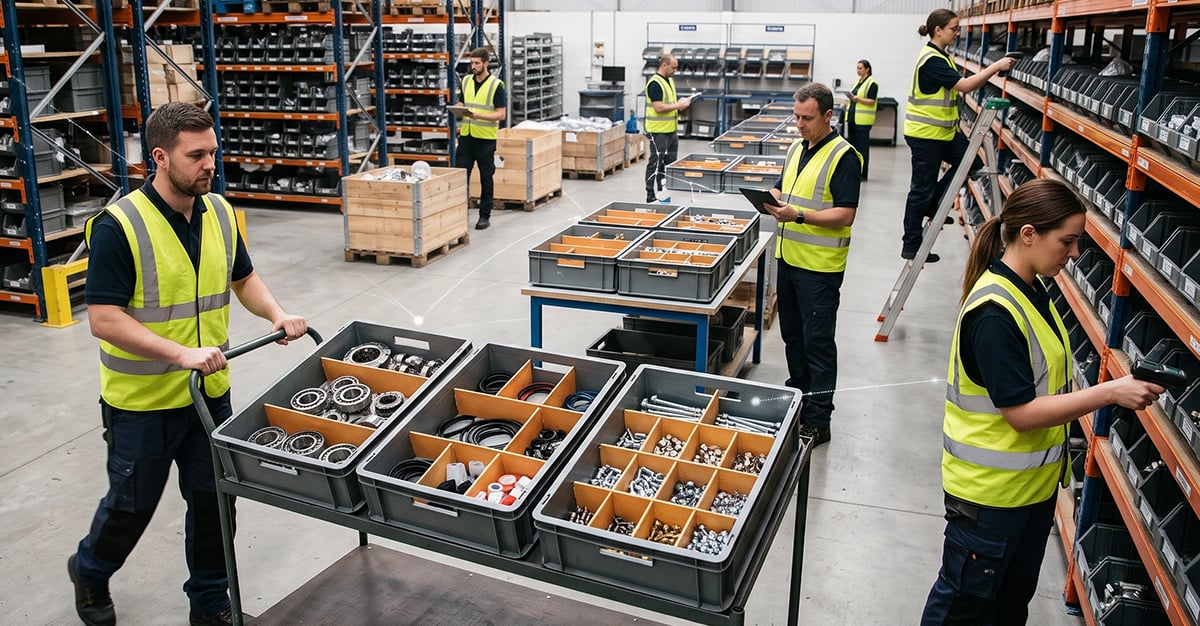
- 27-11-2026
What Is Kitting? Complete Guide to the Inventory Kitting Process, Best Practices and Implementation
Kitting is the process of collecting and checking the parts and consumables needed for a planned...

- 25-11-2026
Maintenance Planning and Scheduling KPIs: 9 Metrics Every Planner and Scheduler Should Track
A maintenance crew can meet most of its schedule compliance target and still face delays and...
- 24-11-2026
What Is SLOB Inventory? How to Find, Measure and Reduce It
Slow-moving and obsolete inventory, usually shortened to SLOB inventory, builds up gradually in...